
AI Formatter vs Never Drop
Side-by-side comparison to help you choose the right product.
AI Formatter
AI Formatter instantly transforms raw text into professional documents with customizable templates for resumes and.
Last updated: March 1, 2026

Never Drop
NeverDrop instantly captures contacts and drafts personalized follow-ups, ensuring you never lose a lead at events.
Last updated: February 28, 2026
Visual Comparison
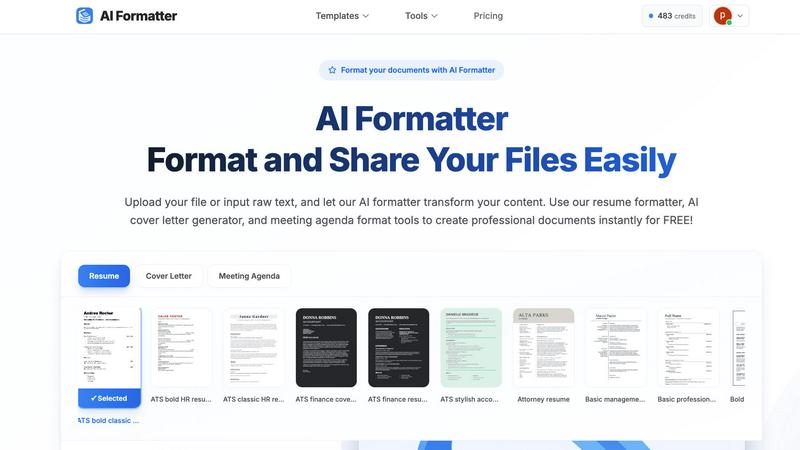
AI Formatter
Never Drop

Feature Comparison
AI Formatter
Extensive Template Library
AI Formatter provides users with access to a diverse collection of over 162 professional templates, optimized for ATS compatibility. This extensive library includes resumes, cover letters, meeting agendas, and invoices, all designed to meet various professional needs and standards.
Real-Time Customization
Users can customize their documents in real-time using AI Formatter. The platform allows adjustments to fonts, colors, and layouts, enabling individuals to create documents that align with their personal or corporate branding, enhancing the overall presentation.
Multi-Format Support
AI Formatter supports multiple file types, including PDF, DOC, DOCX, and TXT formats, facilitating easy uploads of existing documents or input of raw text. This feature ensures users can format their content seamlessly, regardless of the original file type.
User-Friendly Interface
The platform's user-friendly interface simplifies the document formatting process. Users can easily drag and drop files, input text, and navigate through the formatting options, making it accessible for individuals of all technical backgrounds.
Never Drop
Instant Business Card Scanning
Never Drop allows users to scan any business card in seconds. The app utilizes AI-powered Optical Character Recognition (OCR) technology to extract essential contact details such as name, company, title, phone number, and email instantly. This feature eliminates the need for manual entry, reducing errors and saving valuable time.
Automatic Email Enrichment
One of the standout features of Never Drop is its ability to automatically enrich captured contact profiles with verified work emails. This is particularly useful as business cards may sometimes contain generic or outdated email addresses. By searching for verified emails based on the contact's name and company, Never Drop ensures that users have accurate and reliable information for follow-ups.
Personalized AI-Generated Follow-Ups
Never Drop takes follow-up efficiency to the next level by generating personalized emails based on users' voice notes and conversation context. This ensures that follow-ups are not generic templates but rather tailored messages that reflect the nuances of the conversation. Users can review, tweak, and send these emails in less than two minutes, allowing for rapid engagement.
Team Collaboration and Organization
Never Drop is designed for sales teams, providing a centralized workspace where users can organize leads by event, reassign contacts among team members, and monitor overall team activity through an intuitive dashboard. This feature fosters collaboration and ensures that no lead is overlooked, improving overall sales effectiveness.
Use Cases
AI Formatter
Job Seekers
AI Formatter is particularly beneficial for job seekers who want to create polished resumes and cover letters. The tool's high ATS pass rate ensures that their documents will be viewed favorably by hiring managers and automated screening systems.
Professionals
For working professionals, AI Formatter offers an efficient way to produce meeting agendas and professional reports. The ability to format documents quickly and effectively saves valuable time, allowing users to focus on other important tasks.
Academics
Researchers and students can utilize AI Formatter to prepare academic papers, thesis submissions, and presentations. The extensive template options and formatting capabilities help maintain professionalism in academic documentation.
Small Businesses
Small business owners can leverage AI Formatter to create invoices and other business documents with ease. The platform provides them with the tools needed to present their services professionally, facilitating better client relationships and transactions.
Never Drop
Trade Shows
Sales teams attending trade shows can leverage Never Drop to capture leads on the spot. By scanning business cards and adding contextual notes, teams can ensure they remember key details about potential clients, facilitating more meaningful follow-ups.
Conferences
At conferences, networking opportunities abound. With Never Drop, users can quickly gather contact information from fellow attendees and generate personalized follow-up emails, enhancing the chances of converting connections into clients.
Networking Events
Networking events often involve numerous interactions within a short timeframe. Never Drop simplifies the process by allowing users to scan business cards and send tailored follow-ups immediately, ensuring timely engagement with new contacts.
Business Dinners
During business dinners, the informal setting can lead to valuable connections. Never Drop enables users to capture important details and follow up with personalized emails, helping to solidify relationships developed in more casual environments.
Overview
About AI Formatter
AI Formatter, developed by Sun Sky LLC, is a cutting-edge cloud-based document formatting platform tailored to optimize the creation of professional documents. By harnessing advanced AI technology, users can effortlessly transform raw text or uploaded files—including Word, PDF, and TXT formats—into impeccably formatted documents within seconds. This platform stands out with a stellar ATS (Applicant Tracking System) pass rate exceeding 95%, making it an invaluable tool for job seekers aiming to enhance their resumes and cover letters. AI Formatter boasts an extensive library of over 100 professional templates crafted for diverse needs, such as resumes, cover letters, meeting agendas, and invoices. Users can personalize these templates in real-time, modifying fonts, colors, and layouts to reflect their unique branding. The intuitive interface allows for seamless file uploads and content entry, while versatile export options and secure sharing capabilities further enhance user experience. With an introductory offer of 10 free credits, AI Formatter caters to a wide audience, including job seekers, professionals, businesses, and academics, significantly reducing the time and effort required for document preparation.
About Never Drop
Never Drop is a cutting-edge lead-capture app meticulously crafted for sales teams navigating high-pressure environments such as trade shows, conferences, and networking events. This innovative tool revolutionizes the way leads are collected and managed by enabling users to effortlessly scan business cards using their smartphones. Upon scanning, users can enhance the captured information with voice notes or text, providing crucial context about their interactions. This feature ensures that sales professionals retain vital details that could influence future conversations. Furthermore, Never Drop harnesses advanced AI technology to generate personalized follow-up emails within just two minutes, significantly reducing the chances of leads falling through the cracks. With seamless integration into popular Customer Relationship Management (CRM) systems like HubSpot, Never Drop guarantees that your sales pipeline remains organized and primed for action. Say farewell to lost leads and embrace a streamlined follow-up process that transforms potential connections into closed deals.
Frequently Asked Questions
AI Formatter FAQ
How does AI Formatter ensure my documents are ATS-friendly?
AI Formatter utilizes ATS-optimized templates specifically designed to meet the standards of automated screening systems. This increases the likelihood that your resume will be noticed by recruiters.
Can I customize my templates after formatting?
Yes, once your document is formatted, you can make adjustments in real-time. You can change fonts, colors, and layouts to ensure that the final product meets your personal or corporate branding needs.
What file formats does AI Formatter support?
AI Formatter supports a variety of file formats, including PDF, DOC, DOCX, and TXT. This flexibility allows users to upload existing documents or enter raw text for formatting.
Is there a cost associated with using AI Formatter?
AI Formatter offers an introductory package of 10 free credits for document formatting. Additional pricing information may vary based on usage and specific features required.
Never Drop FAQ
What is Never Drop?
Never Drop is a lead-capture app designed for sales teams at events. It enables users to scan business cards, add contextual notes, and automatically generates personalized follow-up emails in under two minutes, enriching contacts with verified emails and syncing with CRM systems.
How does business card scanning work?
Users can take a photo of any business card using the Never Drop mobile app. The app's AI-powered OCR technology extracts contact details—such as name, company, title, phone number, and email—within seconds, streamlining the lead capture process.
What types of events is Never Drop for?
Never Drop is ideal for various events, including trade shows, conferences, networking gatherings, meetups, and business dinners. The app allows users to organize scans by event, making it easy to manage leads from multiple occasions.
Do I need the mobile app?
Yes, the Never Drop mobile app is essential for scanning business cards, recording voice context, and triggering follow-ups on-the-go. Users can also access a web dashboard for managing teams, reviewing scans, and handling settings, but both platforms work together seamlessly for optimal functionality.
Alternatives
AI Formatter Alternatives
AI Formatter is a cloud-based document formatting platform developed by Sun Sky LLC, designed to streamline the creation of professional documents. Utilizing advanced AI technology, it transforms raw text into polished formats suitable for various applications, such as resumes and cover letters. Users often seek alternatives to AI Formatter for a variety of reasons, including pricing concerns, specific feature requirements, or compatibility with different platforms and operating systems. When choosing an alternative, it is essential to consider factors such as template variety, customization options, document security, and overall user experience to ensure the selected tool meets individual or organizational needs.
Never Drop Alternatives
Never Drop is an innovative lead-capture application designed for sales teams operating in dynamic environments such as trade shows and networking events. It falls under the category of productivity and management tools, specifically focusing on enhancing lead generation and follow-up processes. Users often seek alternatives to Never Drop for various reasons, including pricing, additional features, or specific platform compatibility that better suits their needs. When searching for an alternative, it is essential to consider factors such as ease of use, integration capabilities with existing systems, and the effectiveness of lead management features. In any search for alternatives, users should prioritize tools that offer seamless data capture and management, robust personalization options for follow-ups, and efficient integration with CRM platforms. The ability to enrich lead data with contextual notes or AI-generated follow-ups is also crucial for ensuring that no potential deal is overlooked. Ultimately, the right alternative should streamline the lead capture process while enhancing overall sales productivity.