
Agent to Agent Testing Platform vs claude ide
Side-by-side comparison to help you choose the right product.

Agent to Agent Testing Platform
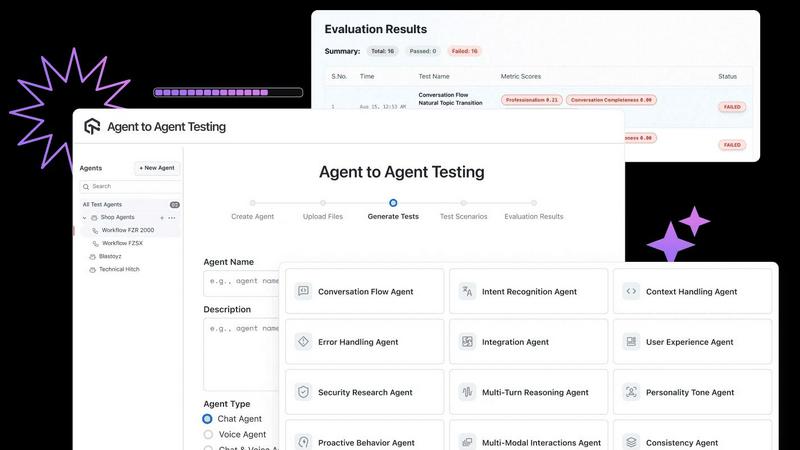
Validate AI agent performance and compliance across chat, voice, and phone interactions with dynamic testing scenarios.
Last updated: February 27, 2026

claude ide
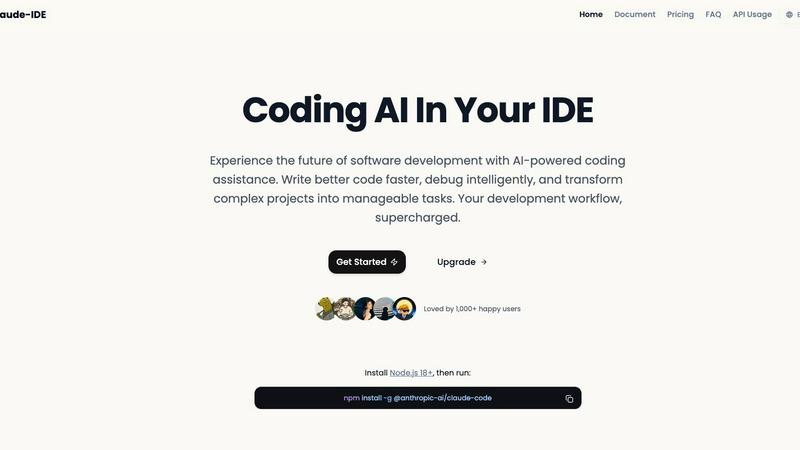
Claude IDE embeds powerful AI coding assistance directly in your terminal and VS Code for streamlined development.
Last updated: February 28, 2026
Visual Comparison
Agent to Agent Testing Platform
claude ide
Feature Comparison
Agent to Agent Testing Platform
Automated Scenario Generation
The platform features automated scenario generation that creates a wide range of diverse test cases for AI agents, simulating interactions across chat, voice, and phone calls. This capability ensures that the agents can handle varied scenarios, enhancing their robustness and reliability.
True Multi-Modal Understanding
Agent to Agent Testing allows for multi-modal input analysis, enabling users to define detailed requirements or upload product requirements documents (PRDs) that include images, audio, and videos. This feature ensures that AI agents are evaluated under conditions that closely mirror real-world usage.
Autonomous Test Scenario Generation
Users can access a library of hundreds of pre-defined test scenarios or create custom scenarios tailored to specific needs. This includes testing personality tones, data privacy protocols, and intent recognition, allowing for a comprehensive assessment of the agent's capabilities.
Regression Testing with Risk Scoring
The platform facilitates end-to-end regression testing, providing insights into risk scoring that highlights potential areas of concern. This feature allows teams to prioritize critical issues and optimize their testing efforts, ensuring that the AI agents remain effective over time.
claude ide
Intelligent Whole-Codebase Understanding
Claude IDE's most significant feature is its ability to comprehend an entire project's architecture, dependencies, and inter-file relationships. Unlike basic code completion tools that analyze single files, Claude IDE ingests the full context of a codebase. This allows it to make accurate, coordinated suggestions and execute edits across multiple files while maintaining consistency and functionality. This deep understanding is powered by Anthropic's Claude Opus model, enabling the assistant to grasp project purpose and structure without manual context file selection, as demonstrated in its ability to analyze and explain complex projects like Excalidraw within seconds.
Seamless Terminal and IDE Integration
The tool is designed for zero friction, operating directly within a developer's primary environments. It can be installed globally via npm (npm install -g @anthropic-ai/claude-code) and invoked from the command line, and it offers deep plugins for VS Code and JetBrains IDEs. This integration philosophy eliminates the disruptive need to switch between a coding window and a separate AI chat interface, keeping the developer in a state of flow. All interactions, from code generation to executing complex edits, happen within the terminal or IDE sidebar, enhancing productivity.
End-to-End Development Workflow Management
Claude IDE extends beyond simple code generation to manage complete software development tasks. It integrates with version control platforms like GitHub and GitLab, enabling a streamlined workflow from issue reading to code submission. Developers can instruct Claude IDE to read an issue, write the corresponding code, execute tests, and even prepare and submit a Pull Request (PR), all through conversational commands in the terminal. This turns the AI into a proactive partner in the development cycle.
Powerful Multi-File Editing Capability
Leveraging its whole-codebase understanding, Claude IDE can execute sophisticated refactoring and feature implementation tasks that span numerous files. It ensures that changes made in one part of the codebase are correctly reflected in all dependent modules, maintaining architectural integrity. This capability is crucial for large-scale code modifications, dependency updates, or implementing new features that touch multiple components, reducing the risk of human error and saving considerable manual effort.
Use Cases
Agent to Agent Testing Platform
Quality Assurance for AI Chatbots
Enterprises can leverage the platform to conduct thorough quality assurance testing for AI chatbots, ensuring that they perform accurately and consistently across various customer interactions.
Voice Assistant Performance Evaluation
Organizations can utilize the platform to evaluate the performance of voice assistants, assessing their ability to understand commands, respond appropriately, and maintain a natural conversational flow.
Multi-Persona Testing
The platform enables testing scenarios that simulate interactions with diverse personas, ensuring that AI agents can cater to different user needs and behaviors—crucial for applications in customer service and support.
Compliance and Risk Management
Using the risk scoring feature, companies can conduct compliance testing to ensure that AI agents adhere to relevant regulations and internal policies, significantly reducing the risk associated with AI deployment.
claude ide
Rapid Codebase Familiarization and Onboarding
For developers joining a new project or reviewing unfamiliar code, Claude IDE can instantly analyze and provide a comprehensive overview of the codebase. As shown in the provided example, it can explain the project's purpose, architecture, key components, and technology stack in seconds. This dramatically reduces the learning curve and onboarding time, allowing developers to become productive contributors much faster than through manual code exploration.
From Issue Triage to Pull Request Creation
Claude IDE can manage the entire lifecycle of a feature or bug fix. A developer can present a GitHub issue to Claude IDE within the terminal. The AI can read the issue requirements, plan the implementation, write the necessary code across relevant files, run associated tests to verify functionality, and finally, craft and submit a well-documented Pull Request. This creates a highly efficient, single-threaded workflow for task completion.
Complex Refactoring and Code Maintenance
When a project requires significant architectural changes, dependency upgrades, or widespread code style updates, Claude IDE is an invaluable tool. Developers can describe the refactoring goal (e.g., "Replace all uses of library X with library Y" or "Restructure the data layer into a repository pattern"), and Claude IDE will intelligently execute the changes across all affected files, ensuring the code remains functional and consistent.
Intelligent Debugging and Problem-Solving
When encountering a bug or unexpected behavior, developers can ask Claude IDE to analyze the relevant code sections, error logs, and stack traces. Using its deep context, it can hypothesize the root cause, suggest specific fixes, and even implement the corrective code. This transforms debugging from a time-consuming, solitary task into an interactive, assisted process.
Overview
About Agent to Agent Testing Platform
The Agent to Agent Testing Platform is a pioneering AI-native framework tailored for validating the behaviors of AI agents in real-world scenarios. As AI systems grow increasingly autonomous and their operations become less predictable, traditional quality assurance (QA) methods—designed for static software—become inadequate. This platform transcends basic prompt-level evaluations, enabling comprehensive assessments of multi-turn conversations across various mediums, such as chat, voice, and multimodal interactions. It is especially beneficial for enterprises seeking to ensure their AI agents perform reliably before they are deployed in production environments. By employing a specialized assurance layer, the platform utilizes over 17 unique AI agents to identify long-tail failures, edge cases, and interaction patterns often overlooked by manual testing. Autonomous synthetic user testing allows for the simulation of thousands of production-like interactions, ensuring that key compliance and performance metrics are met, including bias, toxicity, and hallucination detection.
About claude ide
Claude IDE is a sophisticated AI-powered coding assistant designed to integrate directly into a developer's existing workflow, fundamentally enhancing the software development lifecycle. It is not a standalone Integrated Development Environment (IDE) but rather an intelligent agent that embeds itself within popular development environments like the terminal, Visual Studio Code, and JetBrains IDEs. Its core value proposition lies in leveraging Anthropic's Claude Opus model to provide deep, context-aware assistance by analyzing entire codebases, as opposed to operating on isolated code snippets. This holistic understanding enables developers to perform complex, multi-file refactoring, debug intricate issues, and rapidly familiarize themselves with new projects. According to its documentation, Claude IDE is engineered for a broad spectrum of users, from solo developers and students to professional teams, offering a cost-effective alternative to expensive proprietary tools. By minimizing context switching and operating within familiar tools, it significantly boosts productivity, allowing developers to focus on building higher-quality software with intelligent support for tasks ranging from code explanation to full feature implementation and pull request management.
Frequently Asked Questions
Agent to Agent Testing Platform FAQ
What types of AI agents can be tested using this platform?
The Agent to Agent Testing Platform supports a variety of AI agents, including chatbots, voice assistants, and phone caller agents, allowing for comprehensive testing across different modalities.
How does the platform ensure the accuracy of AI agents?
The platform employs advanced automated scenario generation and multi-agent testing to simulate a wide range of interactions, ensuring that AI agents are evaluated for accuracy and reliability under real-world conditions.
Can I create custom test scenarios?
Yes, users can create custom test scenarios tailored to specific requirements, in addition to accessing a library of pre-defined scenarios. This flexibility allows for targeted testing according to unique business needs.
What metrics can be evaluated using the platform?
The platform evaluates a variety of metrics, including bias, toxicity, hallucination, effectiveness, accuracy, empathy, and professionalism, providing a comprehensive assessment of AI agent performance.
claude ide FAQ
What is Claude IDE and how is it different from GitHub Copilot?
Claude IDE is an AI coding assistant that integrates into terminals and IDEs, powered by Anthropic's Claude Opus model. Its key differentiator is its focus on whole-codebase understanding and end-to-end task management. While Copilot primarily offers inline code completions, Claude IDE operates conversationally and can execute complex, multi-file edits and manage full workflows from issue to PR, acting more as an autonomous coding partner than just a suggestion tool.
How do I install and start using Claude IDE?
Installation is straightforward for users with Node.js 18 or above installed. You simply run the command npm install -g @anthropic-ai/claude-code in your terminal. This installs the CLI tool globally. After installation, you can invoke it directly from your terminal or integrate it into your VS Code or JetBrains IDE using the provided extensions. Authentication with an Anthropic API key is required to begin using its features.
Does Claude IDE work with private repositories and code?
Yes, Claude IDE is designed to work with private codebases. According to Anthropic's policies, data sent via the API is not used for training their models without explicit permission. The tool operates locally within your development environment and communicates with the API to process your code context, allowing it to be used securely on proprietary and private projects.
What are the system requirements and supported platforms?
The primary requirement is having Node.js version 18 or higher installed on your system. Claude IDE itself runs as a global Node.js package. It is platform-agnostic and works on Windows, macOS, and Linux. For IDE integration, it supports Visual Studio Code and the suite of JetBrains IDEs (like IntelliJ IDEA, WebStorm, PyCharm), in addition to its core terminal/CLI interface.
Alternatives
Agent to Agent Testing Platform Alternatives
The Agent to Agent Testing Platform is an innovative AI-native quality assurance framework that specializes in validating the behavior of AI agents across various communication modalities, including chat, voice, and phone. As enterprises increasingly adopt AI solutions, ensuring these agents behave as intended in real-world environments has become critical. However, the complexities and nuances of agent interactions often lead users to seek alternatives that better match their specific needs, whether due to pricing constraints, feature sets, or compatibility with existing platforms. When searching for alternatives to the Agent to Agent Testing Platform, users should consider the scalability of the testing solution, the comprehensiveness of its testing capabilities, and the level of support offered. It's crucial to evaluate how well an alternative can simulate authentic user behavior and detect potential compliance or security risks, ensuring it effectively addresses the unique challenges posed by autonomous AI systems.
claude ide Alternatives
Claude IDE is an advanced AI coding assistant that falls into the category of AI-powered development tools. It integrates directly into a developer's terminal and popular integrated development environments (IDEs) like VS Code and JetBrains, providing intelligent code understanding and multi-file editing capabilities to streamline the software development process. Users often explore alternatives to such tools for a variety of reasons. Common factors include budget constraints and pricing models, the need for specific features not offered, compatibility with different operating systems or development stacks, and preferences for a different user interface or workflow integration. The rapidly evolving landscape of AI development tools also prompts developers to regularly assess the market for the most effective solution. When evaluating an alternative, key considerations should include the depth of the tool's codebase analysis, the quality and context-awareness of its suggestions, and the seamlessness of its integration into your existing development environment. It is also prudent to assess the tool's security posture, its support for your primary programming languages, and the overall value proposition relative to its cost.