
Admanage AI vs Master Metrics
Side-by-side comparison to help you choose the right product.

AdManage AI accelerates ad launches across major platforms, enabling users to create and manage campaigns 10x faster.
Last updated: February 27, 2026

Master Metrics provides AI-powered dashboards and alerts to unify marketing data for smarter, data-driven decisions.
Last updated: February 28, 2026
Visual Comparison
Admanage AI
Master Metrics
Feature Comparison
Admanage AI
Fast Ad Launching
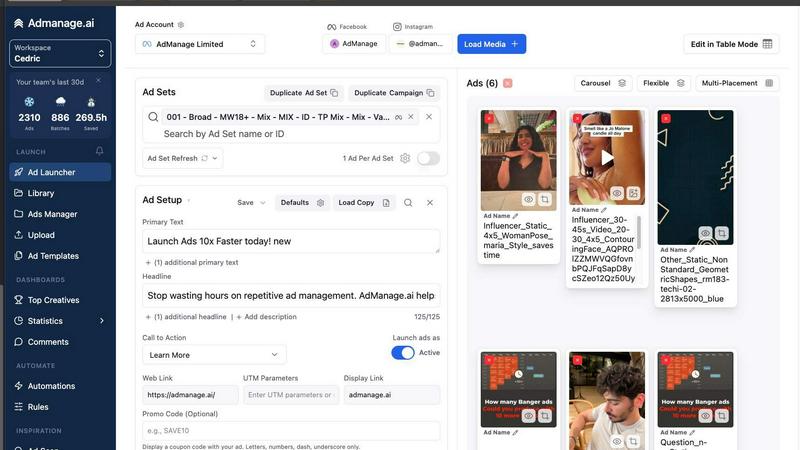
Admanage AI allows users to launch ads up to 10 times faster compared to traditional methods. The platform's user-friendly interface streamlines the ad creation process, enabling marketers to focus on high-level strategy rather than getting bogged down by tedious tasks.
One-Click Templates
The platform offers one-click ad templates derived from the best-performing creatives. This feature simplifies the ad creation process, reducing the time spent on setup and ensuring consistency across campaigns.
Automated Multi-Format Grouping
Admanage AI automatically groups ads into various formats such as 9:16, 4:5, and 1:1, eliminating the need for manual adjustments. This feature is particularly beneficial for marketers who need to adapt their creatives for different platforms and audiences.
Google Sheets Integration
The free Google Sheets plugin allows users to bulk upload ads directly from their spreadsheets. This integration facilitates a more efficient workflow, making it easier to manage large campaigns and variations without the risk of manual errors.
Master Metrics
Unified Overview Control Panel
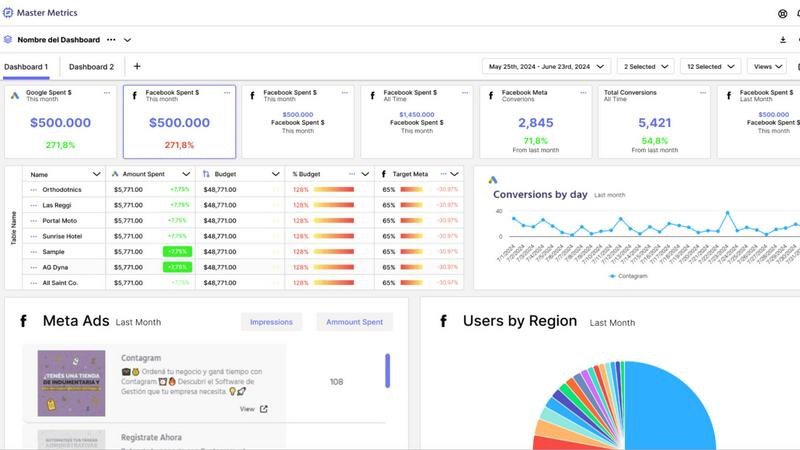
The Overview Control Panel acts as a mission-critical command center, allowing users to manage all client or campaign accounts from a single interface. Its customizable Overview Table enables teams to see key performance indicators (KPIs) across all data sources at a glance, identifying trends, outliers, and areas requiring immediate attention. Users can merge data using custom formulas and even add proprietary data directly into the table, creating a truly bespoke and comprehensive business intelligence snapshot that drives efficient daily operations and strategic reviews.
AI-Powered Reporting & Google Slides Generation
This feature revolutionizes client reporting by automating the creation of professional, editable Google Slides presentations. Users simply select their data sources, key metrics, goals, and a preferred design template. Master Metrics' AI then synthesizes the data and generates a complete presentation in just a few clicks. This not only saves countless hours of manual report building but also ensures consistency, accuracy, and a polished, data-driven narrative for client communications, directly translating complex analytics into understandable insights.
Proactive Custom Alerts & Budget Control
Master Metrics moves beyond passive dashboards with a powerful alert system that monitors business health in real-time. Users can set conditional alerts for any metric, such as campaign underperformance, declining sales, or CRM close rate drops. Crucially, the platform offers sophisticated budget pacing alerts, notifying teams when daily spend deviates from the trajectory needed to hit monthly targets. These alerts can be delivered via email, WhatsApp, or Slack, enabling proactive campaign management and preventing budget overruns or missed opportunities before they impact results.
Seamless Data Integration & Live Connectors
The platform eliminates manual data exports and spreadsheet headaches by offering live, automated connectors to popular data destinations. Users can seamlessly extract, transform, and merge data from all connected marketing sources directly into Google Sheets or Looker Studio (formerly Google Data Studio). This ensures reports and dashboards always reflect the most current data without manual intervention, fostering trust in data accuracy and freeing up analyst time for higher-value tasks like interpretation and strategy.
Use Cases
Admanage AI
High-Volume Creative Testing
Marketers can leverage Admanage AI to conduct extensive A/B testing of creatives at scale. The platform's ability to launch hundreds of ads quickly enables teams to gather performance data and optimize their strategies in real time.
Streamlined Media Management
By integrating with cloud storage solutions, Admanage AI allows users to load media directly from platforms like Google Drive and Dropbox. This feature accelerates the ad creation process, ensuring that teams have immediate access to the latest assets.
Efficient Campaign Management
Admanage AI simplifies campaign management by automating tasks such as ad set creation and naming conventions. This efficiency helps marketers maintain organization and consistency across multiple campaigns.
Enhanced Visibility and Control
With features that reduce errors and streamline workflows, Admanage AI provides teams with greater visibility into their ad performance. This clarity allows marketers to make informed decisions and adjustments as needed, ultimately improving campaign outcomes.
Master Metrics
Digital Marketing Agency Client Reporting
Agencies can leverage Master Metrics to automate the entire client reporting lifecycle. By connecting all client ad accounts and social platforms, the platform aggregates data into unified dashboards and can generate AI-created Google Slides presentations for monthly reviews. This use case saves dozens of hours per client, improves report consistency and quality, and allows account managers to shift their focus from data compilation to strategic consultation and relationship management.
E-commerce Marketing Performance Monitoring
E-commerce teams use Master Metrics to gain a unified view of marketing performance across channels like Meta Ads, Google Ads, and TikTok, alongside sales data from platforms like Shopify. Custom alerts can monitor for sudden drops in conversion rate or ROAS, while budget control alerts ensure daily ad spend aligns with monthly targets. The Overview Table provides a daily snapshot of key metrics like customer acquisition cost (CAC) and lifetime value (LTV), enabling rapid, data-driven optimizations.
Multi-Account Portfolio Management for Franchises or Enterprises
Businesses managing multiple locations or brand accounts (e.g., franchise networks, multi-brand companies) utilize the Overview Control Panel to monitor the performance of all entities simultaneously. Executives can quickly compare performance across regions, identify top and bottom performers, and spot operational trends. Custom formulas allow for the calculation of region-specific KPIs, providing scalable oversight and ensuring local marketing efforts align with corporate goals.
Sales & Marketing Alignment via CRM Integration
By integrating CRM data with marketing performance metrics, sales and marketing leaders can use Master Metrics to track the full funnel. Teams can create dashboards that connect lead source cost from ads to opportunity value and close rate in the CRM. Alerts can be set for declining lead quality or changes in sales cycle length. This use case breaks down data silos, providing a shared source of truth that aligns both departments on metrics that truly impact revenue.
Overview
About Admanage AI
Admanage AI is an innovative ad management platform designed specifically for performance marketers who require rapid and efficient creative testing. It addresses the common pain points associated with traditional ad management tools, such as slow ad launches, cumbersome workflows, and manual uploads that can lead to errors. With Admanage AI, users can launch hundreds of ads in mere seconds, significantly enhancing their productivity. The platform integrates seamlessly with cloud services like Google Drive and Dropbox, enabling users to manage media and creatives effortlessly. Built by media buyers for media buyers, Admanage AI prioritizes speed, accuracy, and scalability, allowing marketing teams to focus on strategy rather than repetitive tasks. The solution caters to high-velocity advertisers across various industries, making it a reliable choice for those looking to optimize their advertising efforts.
About Master Metrics
Master Metrics is a sophisticated, agency-focused analytics and reporting platform engineered to solve the core data challenges faced by modern marketing teams. Built by digital marketing veterans with firsthand agency experience, the platform is designed to consolidate, analyze, and visualize data from a vast array of sources, transforming fragmented metrics into actionable business intelligence. Its primary value proposition lies in dramatically enhancing productivity and decision-making speed by automating the most time-consuming aspects of data management: collection, unification, and report generation. By aggregating data from various ad networks, social platforms, and CRM systems into a centralized Overview Table, Master Metrics provides an immediate, holistic view of campaign and business performance. This empowers agencies and in-house marketing teams to move from reactive data gathering to proactive strategy, maximizing marketing ROI and sales outcomes. The platform's emphasis on seamless integration with ubiquitous tools like Google Sheets, Google Slides, and Looker Studio ensures it fits effortlessly into existing workflows, making advanced analytics accessible without a steep technical learning curve.
Frequently Asked Questions
Admanage AI FAQ
How does Admanage AI improve ad launch speed?
Admanage AI enhances ad launch speed by providing a purpose-built interface that allows users to launch ads in seconds, as opposed to the hours typically required by traditional ad managers.
Can I integrate Admanage AI with other tools?
Yes, Admanage AI integrates with various cloud platforms such as Google Drive, Dropbox, Frame.io, and others, facilitating seamless media management and workflow efficiency.
Is there a free trial available for Admanage AI?
While specific trial details may vary, Admanage AI often provides options for potential users to test the platform through demos or trial periods to evaluate its features and capabilities.
What types of advertisers benefit from Admanage AI?
Admanage AI is particularly beneficial for performance marketers who run high-velocity creative tests across different platforms, including those in industries like e-commerce, digital media, and technology.
Master Metrics FAQ
What data sources does Master Metrics connect to?
Master Metrics is built to connect with a wide array of essential marketing and business platforms. This includes major ad networks like Google Ads and Meta Ads, social media platforms, analytics tools, and e-commerce systems. The platform also offers powerful connectors to Google Sheets and Looker Studio for further data manipulation and visualization. Specific source integrations are continually updated, and users should consult the official "Data Sources" page for the most current list of available connections.
How does the AI Google Slides presentation feature work?
The AI presentation feature is designed for efficiency. Users select the client or campaign, choose the specific data sources and metrics to include, and pick a visual design template. Master Metrics' AI engine then processes the selected data, identifies key trends and insights, and automatically populates a fully formatted Google Slides deck with charts, graphs, and summary narratives. The resulting presentation is editable, allowing for final customization before sharing with clients or stakeholders, streamlining a process that typically takes hours into minutes.
Can I control my advertising budget with Master Metrics?
Yes, proactive budget control is a core functionality. Master Metrics allows you to set a monthly budget for any campaign or account. The platform's alert system then calculates the required daily spend to meet that budget and monitors performance in real-time. You will receive notifications via your chosen channel (email, Slack, etc.) if the daily spend is significantly over or under the target percentage you define, enabling immediate adjustments to ensure optimal budget pacing and prevent overspending.
What is the difference between the Overview Table and a Dashboard?
The Overview Table is a centralized, customizable spreadsheet-like view within the Control Panel designed for at-a-glance monitoring and management of all accounts and key metrics. It's ideal for quick health checks and identifying outliers. Dashboards, conversely, are more comprehensive, visual data stories built for deeper analysis and reporting, often created in connected tools like Looker Studio using Master Metrics data. The Overview is for operational control, while dashboards are for analysis and presentation.
Alternatives
Admanage AI Alternatives
AdManage.ai is a cutting-edge advertising management platform that enables marketers to launch ads across multiple channels like Meta, TikTok, Pinterest, Google, YouTube, Snapchat, and Axon with remarkable speed and efficiency. It is designed for performance marketers who require a streamlined and effective workflow for high-volume creative testing. Despite its strengths, users often seek alternatives due to factors such as pricing, specific feature sets that better align with their needs, or platform compatibility issues. When considering alternatives to AdManage.ai, it is essential to evaluate the platform's capabilities in relation to your unique requirements. Look for features that facilitate rapid ad deployment, support for multiple ad formats, and integrations with your existing tools. Additionally, consider the pricing structure, user experience, and customer support to ensure the alternative meets your expectations for performance and reliability.
Master Metrics Alternatives
Master Metrics is an AI-powered marketing analytics and reporting platform designed to help agencies and marketing teams streamline data management and decision-making. It falls into the category of marketing performance management and business intelligence tools, aggregating data from multiple ad networks into a centralized dashboard. Users often explore alternatives to Master Metrics for several common reasons. These can include budget constraints and pricing models, the need for different or more specialized feature sets, specific integration requirements with existing tech stacks, or a preference for a platform tailored to a different business size or industry vertical. The search for the right tool is a natural part of the software evaluation process. When evaluating an alternative, key considerations should include the platform's core data integration capabilities, the depth and customizability of its reporting and alerting features, its ease of use for team members, and the overall value relative to its cost. The goal is to find a solution that not only consolidates data but also translates it into actionable insights that align with your team's specific workflows and strategic objectives.