SureThing.io vs TinyFast
Side-by-side comparison to help you choose the right product.

SureThing.io
SureThing.io is your autonomous business manager, remembering your goals and preferences to optimize productivity while you sleep.
Last updated: March 19, 2026

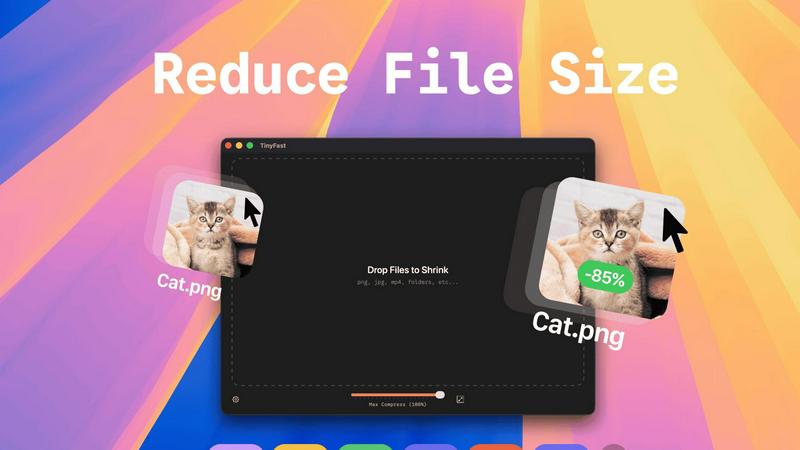
TinyFast is a Mac app that privately compresses files locally for faster, secure workflows.
Last updated: February 28, 2026
Visual Comparison
SureThing.io

TinyFast
Feature Comparison
SureThing.io
Autonomous Operations
SureThing is not just reactive; it actively manages your tasks by monitoring your inbox and scheduling, significantly reducing your workload and allowing you to concentrate on more critical aspects of your work.
Persistent Memory
With its state-of-the-art memory, SureThing retains your preferences and communication style across sessions. The longer you use the platform, the better it understands you, minimizing the need for repetitive instructions.
Project Tracking
SureThing efficiently tracks ongoing projects and their progress, ensuring that you stay informed about deadlines and milestones. It provides updates and reminders, enabling you to manage your time effectively.
Cross-Application Integration
This AI agent connects seamlessly with various applications, allowing it to execute tasks across different platforms. Whether it's scheduling meetings or sending emails, SureThing ensures all your tools work harmoniously together.
TinyFast
100% Local & Private Processing
TinyFast operates on a fundamental principle of data sovereignty: your files never leave your Mac. This architecture eliminates the risks associated with uploading sensitive or proprietary assets to third-party cloud servers. As noted in data protection frameworks like the GDPR, maintaining data on the user's device is a primary method for ensuring privacy. This makes TinyFast indispensable for professionals bound by Non-Disclosure Agreements (NDAs) or those handling confidential client material, providing total privacy by design without compromising functionality.
Blazing-Fast Native Compression
Leveraging optimized native engines built specifically for macOS, TinyFast performs compression at remarkable speeds. By processing files directly on the local hardware, it removes the latency of internet uploads and downloads, which are the primary bottlenecks of online tools. This native approach allows users to shrink large files in seconds, a critical efficiency gain that saves professionals hours each week, as highlighted by its core value proposition of speed and workflow integration.
Batch & Drag-and-Drop Simplicity
The application is designed for maximum user efficiency with an intuitive batch processing workflow. Users can drag and drop entire folders filled with various file types onto the app and receive optimized output in seconds. This eliminates the tedious, time-consuming process of compressing files individually or navigating complex software settings, aligning with usability heuristics that prioritize user control and freedom while reducing cognitive load and task completion time.
Universal File Type Support
TinyFast supports a comprehensive range of common file formats across multiple digital asset categories. This includes images (PNG, JPG, TIFF, HEIC, WEBP, GIF, BMP, SVG), videos (MP4, MOV, M4V), documents (PDF, DOCX), code (JS, CSS, JSON), and audio (MP3). This universality consolidates a user's compression needs into a single, reliable tool, eliminating the need to seek out and trust multiple specialized online services for different file types, thereby streamlining the entire digital asset optimization pipeline.
Use Cases
SureThing.io
Efficient Email Management
For busy professionals inundated with emails, SureThing autonomously manages inboxes by prioritizing messages, drafting replies, and ensuring that important communications are addressed promptly.
Startup Launch Support
Solo entrepreneurs can leverage SureThing to handle the myriad tasks involved in launching a startup. From managing schedules to tracking project timelines, it acts as a reliable partner in executing a go-to-market strategy.
Personalized Communication
SureThing enhances communication by drafting responses that reflect your tone and style. This feature is particularly beneficial for maintaining consistency across client interactions and internal correspondence.
Continuous Productivity Enhancement
By learning from your interactions, SureThing continuously refines its operations. This results in improved task management, fewer errors, and an overall increase in productivity, allowing you to focus on strategic decision-making.
TinyFast
Securing Confidential Client Work
For legal professionals, consultants, and agencies handling sensitive client documents, prototypes, or media, TinyFast provides a secure method to optimize files for sharing or storage. By compressing PDFs, images, and videos locally, it ensures that confidential information governed by NDAs or data protection laws never traverses the internet to an external server, mitigating the risk of data breaches and maintaining client trust and contractual compliance.
Optimizing Web and Application Assets
Developers and web designers frequently need to compress images (PNG, JPEG, WebP, SVG), code files (JS, CSS), and videos to improve website and application load times, a key factor in user experience and SEO rankings. TinyFast allows them to batch-process these assets quickly and locally as part of their build pipeline, ensuring faster page speeds without exposing proprietary code or design elements to third-party online services.
Preparing Multimedia for Distribution
Content creators, marketers, and videographers often need to reduce the file size of high-resolution videos (MP4, MOV) and images for email, social media, or digital portfolios. TinyFast's fast local compression and optional resolution resizing enable them to prepare media rapidly while retaining quality, all without the upload delays, queue waits, or file size limits imposed by many web-based compression tools.
Managing Local Storage and Archives
Individuals and businesses looking to free up valuable disk space on their Macs can use TinyFast to compress old projects, documentation, and media libraries. By compressing folders of documents, images, and audio files locally, users can create efficient, space-saving archives while maintaining immediate access to their files and ensuring the original data remains securely under their physical control.
Overview
About SureThing.io
SureThing.io is an advanced autonomous AI agent designed to operate seamlessly on your behalf, working tirelessly around the clock. Unlike conventional AI chatbots that await specific instructions, SureThing takes a proactive approach to managing your tasks. It intelligently monitors your email inbox, drafts responses in your unique voice, organizes your schedule, tracks your ongoing projects, and performs actions across connected applications, all while you focus on other priorities. With its state-of-the-art persistent memory, SureThing remembers your preferences, communication style, and objectives, ensuring it continuously adapts to your workflow. This capability not only reduces the need for repetitive explanations but also enhances your productivity by minimizing errors. Built with enterprise-level security in mind, SureThing is SOC 2 certified and Google CASA Tier 2 compliant, making it a reliable choice for professionals seeking an AI agent they can trust. Early adopters, including a technical director from OpenClaw, have praised SureThing as "the Mac of AI agents," highlighting its effectiveness in managing complex tasks, especially for solo founders launching comprehensive go-to-market strategies.
About TinyFast
TinyFast is a native macOS application engineered to address the critical need for secure, high-speed file compression directly on a user's local machine. It enables professionals to reduce the size of a wide array of digital assets—including images (PNG, JPEG, WebP, SVG), videos (MP4, MOV), documents (PDF), audio (MP3), and code files (JS, CSS)—without any data ever leaving the device. This local processing model directly tackles the security and efficiency compromises inherent in cloud-based online tools, which often involve uploading sensitive files to unknown servers. The core value proposition, as validated by its adoption by over 500 Mac users, is a powerful trifecta: unparalleled speed through optimized native processing, absolute privacy by design, and exceptional ease-of-use via a simple drag-and-drop interface. Developed by a fellow developer frustrated with existing solutions, TinyFast is purpose-built for developers, designers, content creators, and businesses that prioritize data sovereignty, workflow efficiency, and maintaining file integrity. By ensuring all processing occurs locally, it aligns with stringent data protection principles and is an essential tool for anyone working under NDAs or handling confidential client work, effectively bringing enterprise-grade data control to the individual professional's desktop.
Frequently Asked Questions
SureThing.io FAQ
How does SureThing remember my preferences?
SureThing utilizes an advanced memory system that records your preferences, patterns, and goals. This persistent memory allows it to adapt to your work style over time, minimizing the need to re-explain your needs.
Is SureThing secure for enterprise use?
Yes, SureThing is SOC 2 certified and compliant with Google CASA Tier 2 standards, ensuring that it meets high security and privacy requirements suitable for enterprise-level use.
Can SureThing integrate with other applications?
Absolutely. SureThing is designed to work across various applications, allowing it to execute tasks efficiently and streamline your workflow without requiring constant input.
Who can benefit from using SureThing?
SureThing is ideal for busy professionals, entrepreneurs, and technical directors who require a reliable assistant to manage tasks, enhance productivity, and maintain effective communication within their operations.
TinyFast FAQ
Is my data truly private with TinyFast?
Yes, absolutely. TinyFast is engineered with a privacy-by-design architecture. All compression processes are executed entirely on your local Mac hardware. No file data is ever uploaded to the internet, cloud servers, or external databases. This local-only approach is the most secure method possible, ensuring compliance with strict data protection standards and making it safe for use with highly sensitive or confidential information.
What file types does TinyFast support?
TinyFast supports a wide and versatile range of common file formats. This includes images (PNG, JPG, TIFF, HEIC, WEBP, GIF, BMP, SVG), videos (MP4, MOV, M4V), documents (PDF, DOCX), code files (JS, CSS, JSON), and audio (MP3). This comprehensive support is designed to cover the majority of compression needs for professionals across development, design, and content creation fields within a single application.
How does the speed compare to online tools?
TinyFast is typically significantly faster than online compression tools for most users. Online tools are constrained by your internet upload and download speeds, server queues, and processing delays. TinyFast eliminates all these variables by using your Mac's native processing power. Files are read, compressed, and saved directly on your SSD, resulting in compression times that are often a matter of seconds, especially for batch operations, with no dependency on your network connection.
Can I compress multiple files at once?
Yes, TinyFast features robust batch processing capabilities. You can drag and drop an entire folder containing multiple files and supported formats into the application. It will automatically process all compatible files in sequence, outputting the compressed versions efficiently. This batch functionality is a core feature designed to save substantial time compared to handling files individually, whether you're optimizing a website's asset folder or preparing a client delivery.
Alternatives
SureThing.io Alternatives
SureThing.io is an autonomous AI agent designed for business management, operating in the productivity and management category. It functions continuously and proactively, monitoring tasks, managing schedules, and communicating on behalf of users to enhance efficiency and effectiveness across various applications. As businesses seek tools that align with their specific needs, users commonly explore alternatives to find solutions that offer better pricing, additional features, or compatibility with their existing platforms. When choosing an alternative, it is crucial to consider factors such as the software's adaptability to your work style, its reliability in handling tasks, and the level of security it provides. Additionally, evaluating user reviews and case studies can offer insights into how well the alternative performs in real-world scenarios, ultimately ensuring that the tool selected will meet your operational demands.
TinyFast Alternatives
TinyFast is a native macOS application in the local file compression category. It distinguishes itself by processing images, videos, and documents entirely on a user's Mac, ensuring no data is uploaded to the cloud. This focus on privacy and speed makes it a compelling choice for professionals handling sensitive materials. Users may seek alternatives for various reasons. Common motivations include budget constraints, the need for cross-platform compatibility with Windows or Linux, or a requirement for more specialized compression features not covered by a generalist tool. Some may also prefer open-source software for transparency or seek solutions integrated into broader asset management platforms. When evaluating an alternative, key considerations should align with your primary needs. Prioritize the tool's processing location (cloud vs. local) for privacy, its supported file formats, and its speed for batch operations. Assess the balance between compression efficiency and output quality, and ensure the user experience fits seamlessly into your existing workflow without unnecessary complexity.