AIPhotoTalk vs SubtitlesFast
Side-by-side comparison to help you choose the right product.

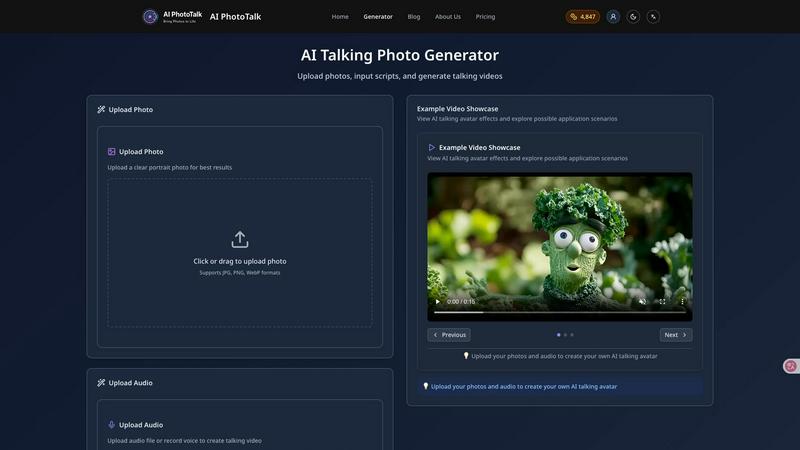
AI PhotoTalk transforms photos into realistic talking videos with perfect lip sync, multi-language support, and 4K quality in just 30 seconds.
Last updated: March 11, 2026

SubtitlesFast
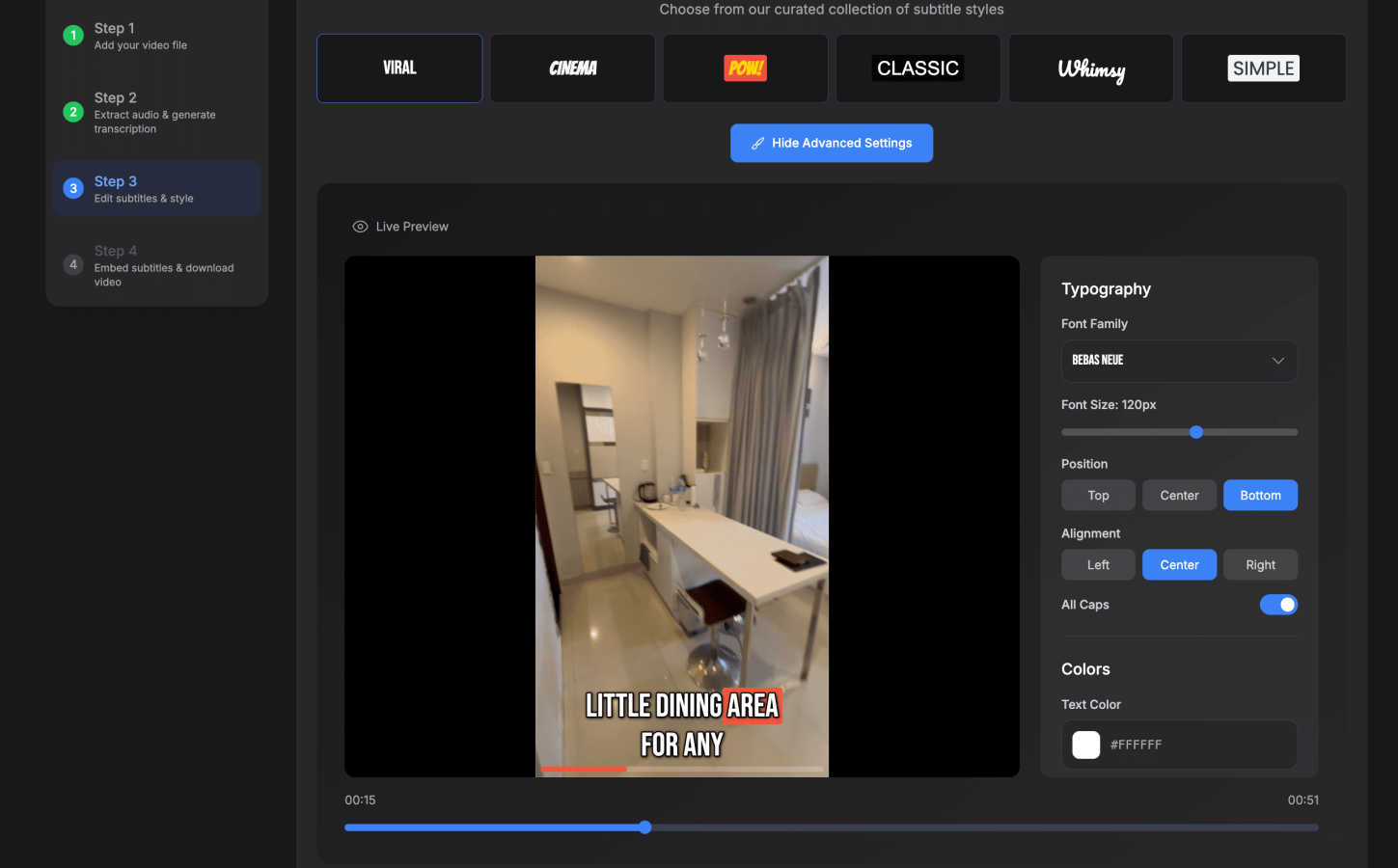
SubtitlesFast is the fastest way to add animated, engaging subtitles to your videos directly from your browser.
Last updated: March 1, 2026
Visual Comparison
AIPhotoTalk
SubtitlesFast
Feature Comparison
AIPhotoTalk
Professional Lip Sync Technology
AIPhotoTalk utilizes advanced algorithms powered by deep learning to ensure perfect lip synchronization. This feature allows for the creation of realistic photo animations that mimic natural facial expressions, making the final video appear lifelike and engaging.
Multi-language Voice Synthesis
The platform supports voice synthesis in over 30 languages, catering to a global audience. This feature enables users to create content that resonates with diverse demographics, making AIPhotoTalk an invaluable tool for international marketing and education.
4K Professional Video Output
AIPhotoTalk guarantees high-quality video production with its advanced rendering technology that produces professional-grade 4K videos. This feature is particularly beneficial for businesses and educators seeking to deliver polished presentations and marketing materials.
30-Second Generation Speed
The AI processing capabilities of AIPhotoTalk allow it to generate talking videos in under 30 seconds. This rapid production time is optimized for professional workflows, enabling users to create and share content quickly without sacrificing quality.
SubtitlesFast
AI-Powered Auto-Transcription
SubtitlesFast utilizes sophisticated automatic speech recognition (ASR) technology to generate accurate transcriptions from uploaded video audio. The system supports over 50 languages, facilitating global content creation. This AI handles the heavy lifting of converting speech to text in real-time, forming the precise foundation for your subtitles. The accuracy and speed of this feature eliminate the manual, time-consuming task of transcription, which research from Stanford University indicates can take up to four times the length of the original media when done manually.
Advanced Subtitle Styling & Animation
Beyond basic text, SubtitlesFast offers creators extensive control over the visual presentation of their captions. The platform provides access to more than 30 animated subtitle styles, allowing for dynamic text that captures viewer attention. Features like word-level highlighting, which emphasizes words in sync with the spoken audio, enhance readability and viewer retention. This level of stylistic customization, typically found in premium desktop software, is made accessible in a simple, web-based interface, enabling creators to produce visually polished content that stands out in crowded social feeds.
Integrated, No-Fuss Video Editor
The platform includes a streamlined, timeline-based video editor designed specifically for the subtitle workflow. This editor allows users to perform essential tasks such as trimming clips, adding background music, and inserting text or images without the complexity of professional suites. Its design philosophy follows the Pareto principle, offering the 20% of features used 80% of the time for quick social video editing. This integrated approach means creators can complete all post-production steps—editing, subtitling, and styling—in a single, cohesive environment.
One-Click Export with No Watermark
A critical feature for professional creators is the ability to export final videos without any platform branding. SubtitlesFast offers a one-click export function that renders the video with subtitles permanently "burned in" to the visual track. This ensures compatibility across all social platforms (X, TikTok, YouTube, Instagram) without reliance on external caption files. Notably, even its free trial allows for exports without watermarks, a practice that builds trust and provides genuine value upfront, unlike many competitors who restrict this capability to paid tiers.
Use Cases
AIPhotoTalk
Talking Social Media Videos
AIPhotoTalk is perfect for creating engaging social media content. Users can transform their personal photos into captivating talking videos that attract attention and drive engagement on platforms like TikTok and Instagram.
AI Spokesperson Clips
Businesses can utilize AIPhotoTalk to create AI-generated spokesperson videos that deliver messages effectively. This use case is particularly useful for marketing campaigns where a human-like presence can enhance brand communication.
Educational Explainer Videos
Educators can leverage AIPhotoTalk to create dynamic explainer videos. By animating historical figures or educational content, teachers can make learning more interactive and appealing to students.
Animated Historical Characters
AIPhotoTalk allows for the creation of animated historical characters, making it an excellent tool for museums, educational institutions, and content creators interested in bringing history to life in an engaging format.
SubtitlesFast
Daily Social Media Content Creation
For vloggers, influencers, and creators who publish daily on platforms like TikTok and Instagram Reels, speed and simplicity are paramount. SubtitlesFast is built for this "record, edit, post" cycle. Creators can quickly upload a clip from their phone, use AI to generate accurate captions, apply an engaging animated style, and export a finished video—all in under two minutes. This workflow, as attested by user testimonials, turns subtitle creation from a bottleneck into a seamless part of the publishing process, enabling consistent daily output.
Enhancing Accessibility and Global Reach
Businesses, educators, and non-profit organizations use SubtitlesFast to make their video content accessible to deaf and hard-of-hearing audiences, complying with accessibility standards like WCAG. Furthermore, by transcribing and styling subtitles in over 50 languages, organizations can easily localize content for international markets. This dramatically expands a video's potential audience and impact, as research from CSA Research confirms that 76% of online consumers prefer to purchase products with information in their native language.
Streamlining Professional Video Production
Professional content producers, marketers, and small media teams use SubtitlesFast to offload the repetitive task of subtitle creation from their primary video editing suite. Instead of manually creating captions in complex software like Adobe Premiere or DaVinci Resolve, they can use SubtitlesFast for a faster, specialized tool. This saves significant time—users report saving over an hour per video—allowing professionals to reallocate resources to higher-value creative tasks like scripting and filming.
Rapid Content Repurposing
Marketers and content managers frequently need to repurpose long-form content (e.g., webinars, podcasts, interviews) into short, captioned clips for social media promotion. SubtitlesFast accelerates this process. Users can upload a long video, use the editor to trim out key moments, automatically generate stylish subtitles for each clip, and rapidly produce a series of shareable assets. This maximizes the return on investment from a single piece of core content.
Overview
About AIPhotoTalk
AIPhotoTalk is an innovative AI-powered platform designed to transform static photos into realistic talking videos within seconds. By leveraging advanced artificial intelligence technology, users can upload portrait photos, type in scripts, and generate lip-synced videos effortlessly. The platform is ideal for a diverse range of users including creators, marketers, educators, and businesses looking to enhance their visual content. With its user-friendly interface and no requirement for video editing skills, AIPhotoTalk democratizes access to high-quality video production. Whether you are looking to engage your audience on social media, create compelling educational materials, or produce professional marketing videos, AIPhotoTalk offers a swift and effective solution. Its support for 30+ languages and 4K video output further solidifies its position as a leading tool in the realm of digital content creation.
About SubtitlesFast
SubtitlesFast is a specialized, browser-based AI tool engineered to streamline the process of adding professional, animated subtitles to video content. It addresses a critical need in modern digital content creation, where studies consistently show that captioned videos significantly increase viewer engagement, comprehension, and accessibility. A report by Verizon Media and Publicis Media found that 69% of consumers view video with sound off in public places, making accurate subtitles non-negotiable for reach. SubtitlesFast serves a broad user base, from individual vloggers and social media influencers to business marketers and professional video producers who publish content daily on platforms like TikTok, YouTube, Instagram, and X. Its core value proposition lies in its singular focus: delivering a fast, intuitive, and high-quality subtitle workflow without the bloat of full-scale video editing software. By leveraging advanced AI for automatic transcription in over 50 languages and offering a suite of styling tools, it enables creators to go from a raw video file to a publish-ready, subtitled clip in under five minutes, directly from their web browser, with no software installation required.
Frequently Asked Questions
AIPhotoTalk FAQ
How does AIPhotoTalk ensure realistic lip synchronization?
AIPhotoTalk employs advanced AI algorithms that utilize deep learning techniques to analyze facial movements and synchronize them with the spoken script, resulting in highly realistic animations.
Can I use AIPhotoTalk for commercial purposes?
Yes, AIPhotoTalk offers a commercial use license that allows businesses to utilize the platform for professional content production and marketing campaigns without restrictions.
What types of photos work best with AIPhotoTalk?
For optimal results, it is recommended to upload clear, high-quality portrait photos. The better the quality of the input image, the more realistic the generated video will be.
Is AIPhotoTalk accessible for beginners?
Absolutely. AIPhotoTalk features a beginner-friendly interface that simplifies the process of creating talking videos. No prior video editing experience is required, allowing anyone to produce professional-quality content easily.
SubtitlesFast FAQ
How accurate is the AI transcription?
SubtitlesFast's AI transcription is built on state-of-the-art automatic speech recognition models that deliver high accuracy for clear audio. Accuracy can exceed 95% under optimal conditions with minimal background noise and clear speaker diction. The platform includes a simple timeline editor, allowing users to quickly review and correct any transcription errors, ensuring the final subtitles are perfectly synchronized and accurate before export.
Do I need to download any software to use SubtitlesFast?
No. SubtitlesFast is a fully web-based application that runs directly in your browser. There is no software to download or install. You can access all features, including video upload, AI transcription, editing, styling, and export, from any modern web browser on your computer, phone, or tablet. This ensures immediate access and eliminates compatibility issues.
What video formats and platforms are supported?
SubtitlesFast supports common video file formats for upload, including MP4, MOV, and AVI. For export, it produces MP4 files, which are the universal standard for social media platforms. The exported videos with burned-in subtitles are fully optimized and ready for immediate publishing on X (Twitter), TikTok, YouTube Shorts, Instagram Reels, Facebook, and LinkedIn.
Is there a watermark on videos exported with the free trial?
No. A key differentiator of SubtitlesFast is that its free trial does not impose a watermark on exported videos. You can fully test the platform's capabilities—including AI transcription, styling, and export—and publish the resulting content without any branding from SubtitlesFast. This allows creators to fairly evaluate the tool's output quality and integration into their workflow before committing to a paid plan.
Alternatives
AIPhotoTalk Alternatives
AIPhotoTalk is an innovative tool designed to transform static photos into dynamic talking videos through the power of artificial intelligence. This platform falls within the realm of video creation tools, enabling users to produce engaging content quickly and easily. However, users often seek alternatives to AIPhotoTalk for various reasons, including pricing structures, specific feature requirements, or compatibility with different platforms. When searching for an alternative, it is essential to consider factors such as user interface design, rendering speed, the complexity of features offered, and the level of customer support. Additionally, understanding whether the tool caters to your specific needs—whether for marketing, education, or social media content—can significantly enhance your content creation process.
SubtitlesFast Alternatives
SubtitlesFast is an AI-powered online subtitle generator that falls into the categories of marketing and productivity tools. It streamlines the workflow for video creators by automating transcription and offering extensive styling options, all within a browser-based platform. This makes it a popular choice for those seeking to enhance accessibility and engagement without complex software. Users often explore alternatives for several key reasons. These include budget constraints, as pricing models vary significantly across the market. Specific feature needs, such as advanced editing capabilities, support for particular video formats, or integration with other software platforms, also drive the search. Furthermore, some professionals require offline functionality or more granular control over the transcription and timing process than a given tool may offer. When evaluating an alternative, consider core criteria to ensure it meets your project demands. Prioritize accuracy in automatic transcription, especially for specialized vocabulary. Assess the flexibility of the styling and branding options available. Finally, examine the overall workflow efficiency, including export formats and the ease of making manual corrections to AI-generated text.