
SimpleDraw vs vaethat
Side-by-side comparison to help you choose the right product.

SimpleDraw
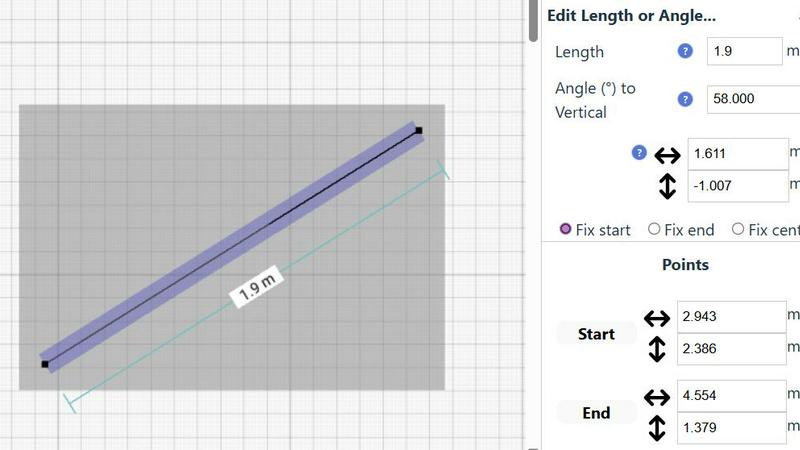
SimpleDraw is a free, browser based tool for creating precise scale drawings and floor plans.
Last updated: March 1, 2026

vaethat
Vaethat is an AI tool that enhances architectural renders with clarity and detail while preserving your original design.
Last updated: February 27, 2026
Visual Comparison
SimpleDraw
vaethat

Feature Comparison
SimpleDraw
Dedicated Floor Plan Mode
This specialized mode transforms SimpleDraw from a general drawing tool into a focused architectural assistant. Users can quickly draw walls to scale and populate their plans with pre-made, industry-standard symbols for doors, windows, and a comprehensive library of interior fixtures for kitchens, bathrooms, and living areas. Measurements update in real-time as elements are adjusted, ensuring that every cabinet, appliance, and piece of furniture is accurately placed. This feature eliminates the guesswork from space planning, allowing for precise visualization of traffic flow and layout feasibility before any physical work begins.
Smart Alignment & Snap System
The intelligent alignment system provides essential guidance for creating precise drawings. As users move their cursor, the tool automatically suggests snap points for endpoints, midpoints, and intersections, and aligns new lines parallel or perpendicular to existing geometry. Visual indicators clearly show what element is being targeted. For ultimate control, users can zoom in for finer precision or use keyboard shortcuts to lock lines to strictly horizontal or vertical axes. This feature is critical for maintaining the accuracy that defines professional technical drawings, as noted in principles of engineering design documentation.
Non-Destructive Editing & Complete Control
Every element in a SimpleDraw project remains fully editable at any stage. Users can freely move, resize, rotate, or modify any line, shape, or group of objects without starting over. This is supported by unlimited undo/redo functions and the ability to group elements for efficient copying and pasting. Furthermore, for numerical precision, any attribute—such as a line's length, an object's position, or an angle—can be input directly via keyboard. This level of control supports an iterative design process, allowing users to experiment with multiple layout options seamlessly.
Comprehensive Measurement System
SimpleDraw offers a robust and flexible measurement framework essential for scale-accurate work. Users can toggle dynamic measurements that appear contextually as they draw, and choose to display permanent dimension lines on their final plan. The system supports both metric (millimeters, meters) and US standard units (feet and inches), catering to a global audience. Fine-grained controls allow users to decide which measurements are visible, ensuring drawings remain clear and uncluttered while containing all necessary technical information for execution.
vaethat
AI Render Upscaling
Vaethat's AI render upscaling feature allows users to increase the resolution and sharpness of their 3D architectural renders while maintaining the integrity of geometry. This ensures that even the most intricate details remain clear and consistent, vital for high-quality architectural presentations.
Detail Refinement
The detail refinement feature enhances fine textures, edges, and small architectural elements, delivering a crisper, more polished look. This capability is essential for showcasing the intricacies of design, ensuring that every aspect of the visual representation is presented with clarity and precision.
Material and Lighting Enhancement
This feature improves perceived realism by enhancing material definitions, contrast, and lighting balance within architectural renders. By optimizing these elements, Vaethat helps create a more lifelike representation of the intended design, making it easier for stakeholders to visualize the final product.
Noise and Artifact Cleanup
Vaethat effectively reduces noise and common rendering artifacts, resulting in cleaner, presentation-ready images. This cleanup process is crucial for professional presentations, as it removes distractions and enhances the overall quality of the visual output, ensuring a more impactful viewer experience.
Use Cases
SimpleDraw
Home Renovation & Remodeling Planning
Homeowners and contractors can use SimpleDraw to plan and visualize renovation projects with precision. Creating a scale-accurate floor plan allows for experimenting with wall removals, kitchen cabinet configurations, or bathroom fixture placements. By visualizing the new layout in advance, users can make informed decisions about material quantities, identify potential spatial conflicts, and communicate their vision clearly to contractors, ultimately saving time and reducing costly mid-project changes.
Interior Design & Furniture Arrangement
Interior designers and residents can plan room layouts before purchasing or moving furniture. By inputting room dimensions and adding scaled representations of sofas, beds, tables, and storage units, users can optimize space utilization, ensure proper clearance for walkways, and create balanced, functional arrangements. This practical application helps avoid the common and frustrating issue of furniture not fitting through doors or overwhelming a space.
Real Estate & Rental Listing Visualization
Real estate agents and landlords can create clear, accurate floor plans for property listings. A well-drawn plan provides potential buyers or tenants with a superior understanding of a property's flow and proportions compared to photos alone. These plans can illustrate room sizes, the location of windows and doors, and overall layout, helping to qualify interest and attract serious inquiries more effectively.
DIY Project & Workshop Design
Hobbyists, woodworkers, and makers can draft plans for custom furniture, garden sheds, or workshop layouts. SimpleDraw's measurement tools enable the creation of detailed technical illustrations for cutting lists and assembly steps. Planning in scale helps in optimizing material use, verifying structural feasibility, and serving as a clear guide during the building process, leading to more successful project outcomes.
vaethat
Enhancing Portfolio Presentations
Architectural professionals can use Vaethat to enhance their portfolio presentations, ensuring that each render showcases their work in the best possible light. With improved clarity and detail, these enhanced images can make a significant impact during client meetings or job applications.
Preparing Marketing Materials
Vaethat is ideal for preparing marketing materials for architectural firms. By enhancing renders used in brochures, websites, and social media, firms can attract potential clients with visually striking images that effectively communicate their design expertise.
Streamlining Approval Processes
When submitting designs for approvals, Vaethat helps architects and visualizers present their projects with enhanced clarity and realism. This can facilitate faster decision-making and approvals from clients or stakeholders, ultimately expediting project timelines.
Improving Collaboration with Clients
Using Vaethat, architects can produce enhanced visualizations that improve communication with clients. Clear and compelling images enable clients to better understand design concepts, leading to more informed feedback and collaborative discussions throughout the project lifecycle.
Overview
About SimpleDraw
SimpleDraw is a sophisticated, browser-based scale drawing and floor plan creation tool engineered to democratize technical design. It bridges the gap between complex, expensive CAD software and overly simplistic drawing applications, offering professional-grade precision within an intuitive, accessible interface. The platform is designed for a wide user base, including homeowners planning renovations, DIY enthusiasts, interior designers, real estate agents, and students, requiring no prior CAD experience or software installation. Its core value proposition is delivering powerful, measurement-accurate drawing capabilities completely free of charge and without mandatory user registration, significantly lowering the barrier to entry for creating professional visualizations. Research indicates that visual planning tools can reduce project errors and improve spatial understanding, a principle central to SimpleDraw's design (Source: Journal of Environmental Psychology, studies on spatial cognition). By combining features like a dedicated Floor Plan Mode, a dynamic smart alignment system, and non-destructive editing, SimpleDraw empowers users to create detailed layouts for rooms, entire apartments, furniture arrangements, and technical illustrations with confidence and efficiency, directly in their web browser.
About vaethat
Vaethat is an innovative AI-powered tool specifically designed for architectural visualization professionals. It focuses on enhancing and upscaling 3D renders to improve clarity, sharpness, and realism, making it an essential asset for architects, visualizers, and designers alike. By leveraging specialized AI technology, Vaethat streamlines the process of enhancing architectural images, allowing users to focus on creativity and design rather than tedious post-production work. This tool is engineered to preserve the original design intent while significantly improving the overall quality of visual presentations. With a simple upload-and-export workflow, Vaethat provides a user-friendly experience that eliminates the complexities often associated with general AI enhancers. As a result, professionals can produce stunning, presentation-ready images that effectively communicate their vision and design concepts.
Frequently Asked Questions
SimpleDraw FAQ
Is SimpleDraw really free to use with no hidden costs?
Yes, SimpleDraw is completely free to use. There is no requirement for user registration, subscription fees, or software downloads. All core features, including the Floor Plan Mode, smart alignment tools, and measurement systems, are available at no cost directly within a supported web browser. The company's model is based on accessibility and community-driven development.
Do I need any prior experience with CAD or design software?
No prior experience is necessary. SimpleDraw is specifically designed with an intuitive interface that allows beginners to start creating drawings immediately. Contextual tooltips, the smart alignment guide, and straightforward controls make the learning curve gentle. The platform is built to provide advanced capabilities without the complexity associated with professional CAD suites.
Can I use SimpleDraw on a tablet or mobile device?
SimpleDraw is a web-based application optimized for use in desktop and laptop browsers. For the best experience with precise cursor control and full access to keyboard shortcuts, using a computer is recommended. While the interface may function on tablets, the precision required for detailed scale drawing is typically better achieved with a mouse or trackpad.
How do I save or export my drawings from SimpleDraw?
Drawings created in SimpleDraw are automatically saved in your browser's local storage, allowing you to return to your project later on the same device and browser. For sharing or archiving, you can export your plans. The tool provides options to export your drawing as a high-resolution image file (like PNG) or a vector file (like SVG), suitable for printing, embedding in documents, or further editing in other software.
vaethat FAQ
How does the AI render enhancer calculate credits?
Vaethat calculates credits based on the number of enhanced images processed. Each enhancement may consume a specific number of credits, ensuring users are only charged for what they utilize.
Can I use the archviz AI upscaler with V-Ray, Lumion, Enscape, 3ds Max, and SketchUp?
Yes, Vaethat is compatible with major architectural visualization software, including V-Ray, Lumion, Enscape, 3ds Max, and SketchUp, making it a versatile tool for professionals in the field.
What makes this AI post-production tool different from manual editing?
Unlike manual editing that requires extensive time and skill, Vaethat automates the enhancement process using advanced AI algorithms, providing faster results while maintaining high quality and consistency across multiple images.
Can I upgrade or downgrade my AI enhancement plan anytime?
Yes, Vaethat offers flexible subscription plans that allow users to upgrade or downgrade their AI enhancement plan according to their changing needs, ensuring they only pay for the services they require.
Alternatives
SimpleDraw Alternatives
SimpleDraw is a free, web-based design tool specializing in creating precise scale drawings and detailed floor plans. It falls into the category of online diagramming and technical illustration software, offering an accessible entry point for users who need to visualize spaces and projects without complex CAD software. Users often seek alternatives to any software tool for a variety of reasons. Common motivations include the need for more advanced or specialized features, such as 3D modeling or extensive object libraries, which may be beyond the scope of a focused tool like SimpleDraw. Other factors include platform requirements, such as needing a dedicated desktop application for offline work, or organizational needs like team collaboration features and cloud storage integration that are not part of its core free offering. When evaluating an alternative, key considerations should align with your specific project requirements. Prioritize the tool's core functionality—whether it excels at technical 2D drafting, 3D visualization, or collaborative planning. Assess the learning curve against the complexity of your tasks, and carefully review the pricing model, as many professional-grade tools operate on a subscription basis. The ideal alternative effectively balances capability, usability, and cost for your unique use case.
vaethat Alternatives
Vaethat is an AI-powered tool designed specifically for professionals in the architectural visualization (archviz) field. It focuses on enhancing 3D renders, improving clarity, sharpness, and overall realism while maintaining the integrity of the original design. As a part of the design tools category, it addresses the unique needs of architects and designers aiming to present their work with maximum impact. Users often seek alternatives to Vaethat for various reasons, including budget constraints, specific feature requirements, or compatibility with different platforms. When selecting an alternative, it is crucial to consider factors such as the range of features offered, ease of use, the quality of output, and customer support. Users should also evaluate whether the alternative maintains the original design intent while providing the necessary enhancements to their architectural renders.