Proofapp vs SimpleDraw
Side-by-side comparison to help you choose the right product.

Proofapp
Proofapp eliminates email feedback loops with visual comments pinned directly to your website.
Last updated: March 4, 2026

SimpleDraw
SimpleDraw is a free, browser based tool for creating precise scale drawings and floor plans.
Last updated: March 1, 2026
Visual Comparison
Proofapp

SimpleDraw
Feature Comparison
Proofapp
Visual Commenting
This foundational feature allows reviewers to click on any element within an automatically captured website screenshot to leave a pinned comment. This eliminates the ambiguity of textual descriptions like "top left, under the navigation" by providing exact visual context. Each comment initiates a thread where team members can discuss, attach relevant files, and ultimately resolve the feedback, creating a clear audit trail. This precision is critical, as non-visual feedback can result in three times more revision rounds according to platform data.
Multi-Breakpoint Testing
Proofapp automatically captures and presents synchronized screenshots of any submitted URL at both desktop and mobile viewports. This ensures feedback accounts for responsive design behavior across devices without requiring manual screenshot generation from multiple tools or browsers. Teams can toggle between views to ensure UI elements, layouts, and interactions are consistently reviewed, preventing post-launch issues related to device-specific oversights and streamlining the quality assurance process.
Secure, Account-Free Client Sharing
Project owners can generate expirable, secure links to share proofing sessions with clients or external stakeholders. Crucially, reviewers do not need to create a Proofapp account to participate, drastically reducing friction in the feedback collection process. This controlled access method maintains project security while facilitating easy collaboration with non-technical users, a common bottleneck in agency and freelance workflows that Proofapp effectively removes.
Real-Time Collaboration & Notification
All project activity is synchronized in real-time. When a team member or client leaves a comment, others in the project are notified immediately, fostering a dynamic collaborative environment. This live updating eliminates the need for manual refresh cycles and email "ping-pong," allowing for rapid discussion and decision-making. Integrated notifications ensure stakeholders are alerted to new feedback or replies, keeping projects moving forward without delay.
SimpleDraw
Dedicated Floor Plan Mode
This specialized mode transforms SimpleDraw from a general drawing tool into a focused architectural assistant. Users can quickly draw walls to scale and populate their plans with pre-made, industry-standard symbols for doors, windows, and a comprehensive library of interior fixtures for kitchens, bathrooms, and living areas. Measurements update in real-time as elements are adjusted, ensuring that every cabinet, appliance, and piece of furniture is accurately placed. This feature eliminates the guesswork from space planning, allowing for precise visualization of traffic flow and layout feasibility before any physical work begins.
Smart Alignment & Snap System
The intelligent alignment system provides essential guidance for creating precise drawings. As users move their cursor, the tool automatically suggests snap points for endpoints, midpoints, and intersections, and aligns new lines parallel or perpendicular to existing geometry. Visual indicators clearly show what element is being targeted. For ultimate control, users can zoom in for finer precision or use keyboard shortcuts to lock lines to strictly horizontal or vertical axes. This feature is critical for maintaining the accuracy that defines professional technical drawings, as noted in principles of engineering design documentation.
Non-Destructive Editing & Complete Control
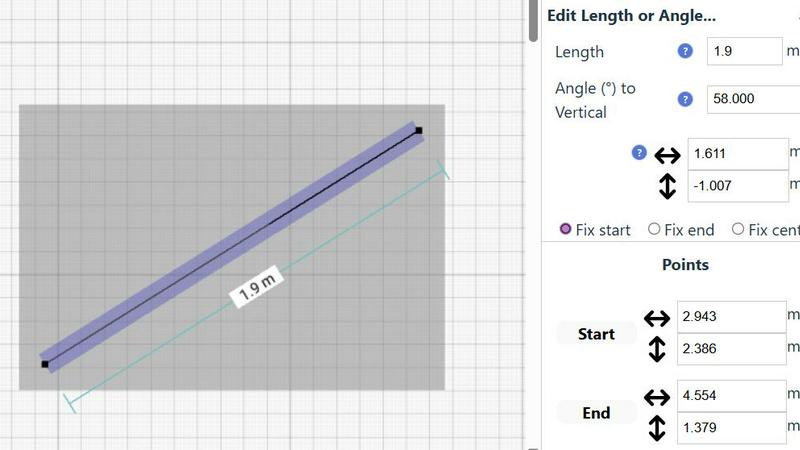
Every element in a SimpleDraw project remains fully editable at any stage. Users can freely move, resize, rotate, or modify any line, shape, or group of objects without starting over. This is supported by unlimited undo/redo functions and the ability to group elements for efficient copying and pasting. Furthermore, for numerical precision, any attribute—such as a line's length, an object's position, or an angle—can be input directly via keyboard. This level of control supports an iterative design process, allowing users to experiment with multiple layout options seamlessly.
Comprehensive Measurement System
SimpleDraw offers a robust and flexible measurement framework essential for scale-accurate work. Users can toggle dynamic measurements that appear contextually as they draw, and choose to display permanent dimension lines on their final plan. The system supports both metric (millimeters, meters) and US standard units (feet and inches), catering to a global audience. Fine-grained controls allow users to decide which measurements are visible, ensuring drawings remain clear and uncluttered while containing all necessary technical information for execution.
Use Cases
Proofapp
Freelancer-Client Website Approvals
Freelancers can use Proofapp to present website drafts to clients professionally. Instead of exchanging fragmented emails with attached, annotated images, they share a single secure link. Clients click directly on the live design to leave clear, contextual feedback, which the freelancer can then address and mark as resolved. This streamlines the approval process, reduces miscommunication, and projects a high level of organization, saving hours per project.
In-House Design & Development Team Sprints
During agile sprints, in-house teams require fast, precise feedback on new features or UI changes. Proofapp allows developers to push a staging URL and instantly gather visual feedback from product managers and designers. Comments are pinned to specific code elements or design components, making bug reports and change requests unambiguous and directly actionable, thereby accelerating iteration cycles and reducing the cognitive load of parsing textual feedback.
Marketing Campaign Landing Page Reviews
Marketing teams often need collective input on copy, imagery, and call-to-action placement on campaign landing pages. Proofapp enables the entire team—from copywriters to brand managers—to review the page simultaneously. They can attach brand guidelines, suggest copy edits directly on text blocks, and ensure mobile responsiveness, consolidating all feedback in one visual dashboard to ensure a cohesive and effective final asset.
Agency Managing Multiple Client Projects
Digital agencies juggling multiple client websites benefit from Proofapp's project organization and client-friendly interface. It replaces chaotic email threads and disparate communication tools with a unified platform. Each client project is siloed, with all historical feedback and resolved comments maintained for reference. This centralized system improves accountability, client satisfaction, and operational efficiency at a scale where traditional methods break down.
SimpleDraw
Home Renovation & Remodeling Planning
Homeowners and contractors can use SimpleDraw to plan and visualize renovation projects with precision. Creating a scale-accurate floor plan allows for experimenting with wall removals, kitchen cabinet configurations, or bathroom fixture placements. By visualizing the new layout in advance, users can make informed decisions about material quantities, identify potential spatial conflicts, and communicate their vision clearly to contractors, ultimately saving time and reducing costly mid-project changes.
Interior Design & Furniture Arrangement
Interior designers and residents can plan room layouts before purchasing or moving furniture. By inputting room dimensions and adding scaled representations of sofas, beds, tables, and storage units, users can optimize space utilization, ensure proper clearance for walkways, and create balanced, functional arrangements. This practical application helps avoid the common and frustrating issue of furniture not fitting through doors or overwhelming a space.
Real Estate & Rental Listing Visualization
Real estate agents and landlords can create clear, accurate floor plans for property listings. A well-drawn plan provides potential buyers or tenants with a superior understanding of a property's flow and proportions compared to photos alone. These plans can illustrate room sizes, the location of windows and doors, and overall layout, helping to qualify interest and attract serious inquiries more effectively.
DIY Project & Workshop Design
Hobbyists, woodworkers, and makers can draft plans for custom furniture, garden sheds, or workshop layouts. SimpleDraw's measurement tools enable the creation of detailed technical illustrations for cutting lists and assembly steps. Planning in scale helps in optimizing material use, verifying structural feasibility, and serving as a clear guide during the building process, leading to more successful project outcomes.
Pricing Comparison
Proofapp
Proofapp offers a transparent pricing model with a generous free tier and a competitively priced premium plan. Notably, it promotes itself as being approximately 600% more cost-effective than some competitors like Markup.io. A prominent "Solo" plan is advertised at an early-bird rate of $9.50 per month (discounted from $19), which is locked in forever for the first 1,000 users. This plan is targeted at freelancers and small projects. The platform also emphasizes a full-access 60-day free trial that requires no credit card information to start, allowing teams to thoroughly evaluate the tool's fit for their workflow before any financial commitment.
SimpleDraw
SimpleDraw is currently offered as a completely free online tool. There are no paid plans, tiers, or subscription costs. All features described, including the Floor Plan Mode, advanced measurement tools, and non-destructive editing, are available to all users without any financial commitment. The project is supported by its development community, and future monetization strategies, if any, have not been announced, ensuring full access to its powerful drawing capabilities at no charge.
Overview
About Proofapp
Proofapp is a specialized visual feedback and website review platform engineered to eliminate the inefficiencies and miscommunication inherent in traditional design and development feedback loops. It serves designers, developers, freelancers, and marketing teams by providing a centralized, visual workspace for collaboration. The core value proposition is replacing scattered email chains and vague textual notes with precise, contextual feedback pinned directly onto live website screenshots. Research indicates that 73% of design revisions are miscommunicated via email, leading to significant productivity losses (Proofapp, 2024). Proofapp directly addresses this by automating screenshot capture at multiple device breakpoints and enabling stakeholders to click and comment directly on the visual interface. This method reduces revision cycles by up to 60% and can save teams over five hours per week previously wasted on clarification and screenshot management. With features like secure shareable links, real-time notifications, and file attachments, Proofapp transforms subjective feedback into organized, actionable tasks, ensuring projects move from URL to shipped with clarity and speed.
About SimpleDraw
SimpleDraw is a sophisticated, browser-based scale drawing and floor plan creation tool engineered to democratize technical design. It bridges the gap between complex, expensive CAD software and overly simplistic drawing applications, offering professional-grade precision within an intuitive, accessible interface. The platform is designed for a wide user base, including homeowners planning renovations, DIY enthusiasts, interior designers, real estate agents, and students, requiring no prior CAD experience or software installation. Its core value proposition is delivering powerful, measurement-accurate drawing capabilities completely free of charge and without mandatory user registration, significantly lowering the barrier to entry for creating professional visualizations. Research indicates that visual planning tools can reduce project errors and improve spatial understanding, a principle central to SimpleDraw's design (Source: Journal of Environmental Psychology, studies on spatial cognition). By combining features like a dedicated Floor Plan Mode, a dynamic smart alignment system, and non-destructive editing, SimpleDraw empowers users to create detailed layouts for rooms, entire apartments, furniture arrangements, and technical illustrations with confidence and efficiency, directly in their web browser.
Frequently Asked Questions
Proofapp FAQ
How does Proofapp capture website screenshots?
Proofapp's system automatically navigates to the provided URL and programmatically captures full-page screenshots at pre-defined desktop and mobile breakpoints. This process happens instantly upon project creation or update, ensuring the visual proof always reflects the most current state of the website without any manual intervention required from the user.
Do my clients or reviewers need an account to give feedback?
No, one of Proofapp's core advantages is that reviewers do not need to create an account. Project owners simply generate a secure, shareable link. Anyone with this link can view the captured screenshots and leave visual feedback immediately, significantly lowering the barrier to entry and speeding up the feedback collection process from external stakeholders.
Is Proofapp secure for confidential client projects?
Yes, Proofapp is built with enterprise-grade security considerations for professional use. It offers secure, expirable share links, role-based permissions for team members, and maintains audit logs of all activity. Data is handled with secure protocols, providing peace of mind when collaborating on sensitive or pre-launch website projects.
Can I use Proofapp for applications behind a login or on localhost?
Proofapp is primarily designed for publicly accessible URLs. For reviewing sites behind authentication or on local development environments, users typically need to deploy the site to a publicly accessible staging server or use tunneling services. The platform does not currently have a direct method to bypass login walls for private applications.
SimpleDraw FAQ
Is SimpleDraw really free to use with no hidden costs?
Yes, SimpleDraw is completely free to use. There is no requirement for user registration, subscription fees, or software downloads. All core features, including the Floor Plan Mode, smart alignment tools, and measurement systems, are available at no cost directly within a supported web browser. The company's model is based on accessibility and community-driven development.
Do I need any prior experience with CAD or design software?
No prior experience is necessary. SimpleDraw is specifically designed with an intuitive interface that allows beginners to start creating drawings immediately. Contextual tooltips, the smart alignment guide, and straightforward controls make the learning curve gentle. The platform is built to provide advanced capabilities without the complexity associated with professional CAD suites.
Can I use SimpleDraw on a tablet or mobile device?
SimpleDraw is a web-based application optimized for use in desktop and laptop browsers. For the best experience with precise cursor control and full access to keyboard shortcuts, using a computer is recommended. While the interface may function on tablets, the precision required for detailed scale drawing is typically better achieved with a mouse or trackpad.
How do I save or export my drawings from SimpleDraw?
Drawings created in SimpleDraw are automatically saved in your browser's local storage, allowing you to return to your project later on the same device and browser. For sharing or archiving, you can export your plans. The tool provides options to export your drawing as a high-resolution image file (like PNG) or a vector file (like SVG), suitable for printing, embedding in documents, or further editing in other software.
Alternatives
Proofapp Alternatives
Proofapp is a specialized visual feedback and website review platform within the design tools category. It streamlines collaboration by allowing teams and clients to pin comments directly on automatically captured screenshots, centralizing feedback to replace scattered emails and vague notes. Users explore alternatives for various reasons, including budget constraints, specific feature requirements like advanced video review or native app prototyping, integration needs with existing project management stacks, or differing team size and workflow structures. The search for a better fit is a common step in optimizing a team's operational toolkit. When evaluating alternatives, key considerations should include the core functionality for visual annotation, the ease of use for both internal teams and external clients, integration capabilities, security and permission settings, and the overall value proposition of the pricing tiers relative to your project volume and team size.
SimpleDraw Alternatives
SimpleDraw is a free, web-based design tool specializing in creating precise scale drawings and detailed floor plans. It falls into the category of online diagramming and technical illustration software, offering an accessible entry point for users who need to visualize spaces and projects without complex CAD software. Users often seek alternatives to any software tool for a variety of reasons. Common motivations include the need for more advanced or specialized features, such as 3D modeling or extensive object libraries, which may be beyond the scope of a focused tool like SimpleDraw. Other factors include platform requirements, such as needing a dedicated desktop application for offline work, or organizational needs like team collaboration features and cloud storage integration that are not part of its core free offering. When evaluating an alternative, key considerations should align with your specific project requirements. Prioritize the tool's core functionality—whether it excels at technical 2D drafting, 3D visualization, or collaborative planning. Assess the learning curve against the complexity of your tasks, and carefully review the pricing model, as many professional-grade tools operate on a subscription basis. The ideal alternative effectively balances capability, usability, and cost for your unique use case.