Shrinkpad vs Skene
Side-by-side comparison to help you choose the right product.

Shrinkpad
Effortlessly batch compress images and videos on Mac, optimizing quality while saving time and disk space.
Last updated: February 28, 2026

Skene is a code-native growth engine that automates product-led growth directly within your codebase.
Last updated: February 28, 2026
Visual Comparison
Shrinkpad
Skene

Feature Comparison
Shrinkpad
Batch Compression
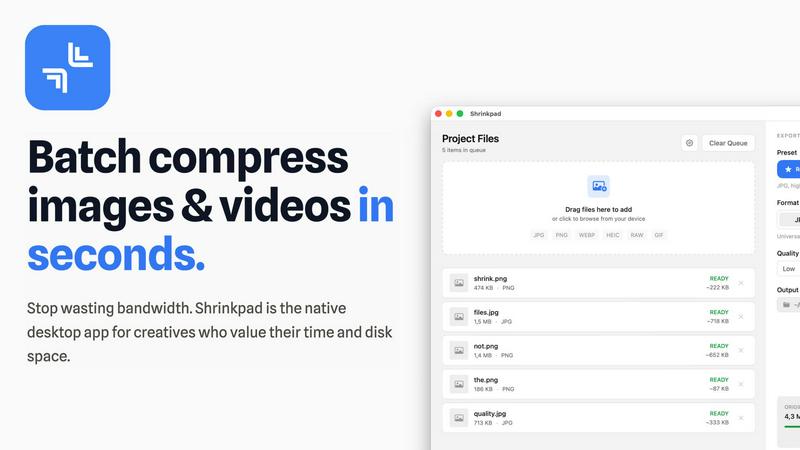
Shrinkpad allows users to batch compress images and videos in seconds. It automatically analyzes visual complexity, applying the perfect compression ratio without introducing artifacts, resulting in significant file size reductions and improved performance.
One-Drop Import
With the one-drop import feature, users can simply drag any folder onto Shrinkpad. The software automatically identifies and adds all supported images and videos to the batch list, eliminating the need for manual file selection and saving valuable time.
Mixed Media Batches
Shrinkpad excels at processing mixed media batches, enabling users to compress photos and videos together in the same batch. It intelligently applies optimal compression settings for each file type, ensuring the highest quality output across different media formats.
Privacy First
Prioritizing user privacy, Shrinkpad processes all files locally on the user's machine, ensuring no cloud uploads occur. This feature guarantees that sensitive assets remain secure, providing peace of mind for creatives handling confidential projects.
Skene
Codebase-Integrated Signal Detection
Skene derives growth signals directly from your application's source code, creating a context layer for AI-driven optimization. By analyzing the repository structure, it automatically identifies key user flows, components, and potential friction points without requiring manual tagging or external scripts. This deep integration ensures that growth instrumentation is version-controlled, performant, and never becomes a "black box" that breaks with deployments, providing a single source of truth for both your product and growth logic.
Autonomous Growth Loop Orchestration
The platform acts as a self-learning engine that autonomously observes user behavior, identifies bottlenecks in journeys like onboarding, and implements data-driven optimizations. Skene can automatically generate, A/B test, and deploy improved versions of user flows, creating a continuous feedback loop for metrics such as activation and retention. This removes the manual burden of hypothesis testing and implementation, allowing the system to systematically improve conversion paths without constant developer intervention.
Prompt-Driven Growth Implementation
Growth workflows are managed through natural language prompts within your existing development environment, such as Cursor or a terminal. Developers can instruct Skene to analyze code, generate growth manifests, or implement specific optimizations using simple commands like uvx skene-growth analyze .. This shifts growth work from managing disparate SaaS dashboards to a programmable, code-first workflow that integrates seamlessly with modern development practices.
Owned Infrastructure & Performance
Skene replaces legacy stacks of third-party snippets and widgets with owned code that you control, version, and deploy. By eliminating external JavaScript bloat and siloed data pipelines, it preserves your application's core performance and security posture. This architecture ensures that growth tooling enhances rather than hinders site speed and user experience, while keeping all data and logic within your ecosystem.
Use Cases
Shrinkpad
Optimizing Web Assets
Web developers and designers can utilize Shrinkpad to compress images and videos for websites, resulting in faster load times and improved user experiences. By reducing file sizes significantly, they can enhance overall site performance and SEO rankings.
Streamlining Design Workflows
Photographers and graphic designers often export large volumes of assets from applications like Figma or Photoshop. Shrinkpad simplifies this process by allowing them to export everything at 2x or 4x resolutions and handle optimization in bulk, saving hours of busywork.
Enhancing Video Production
Video editors can leverage Shrinkpad to compress large video files without sacrificing quality. This is particularly beneficial for projects requiring fast turnaround times, as it allows editors to share high-quality footage quickly and efficiently.
Managing Digital Archives
Content creators frequently accumulate vast libraries of images and videos. Shrinkpad aids in managing these digital archives by compressing files for better storage management while maintaining the quality necessary for future projects.
Skene
Automated Onboarding Flow Optimization
For product teams aiming to improve user activation, Skene automatically analyzes the onboarding journey within the code, identifies where users drop off, and deploys tailored improvements. It can test different guidance strategies, UI tweaks, or feature introductions to maximize the rate at which new users reach the "aha!" moment, all without engineering writing new code for each experiment.
Continuous Retention & Lifecycle Automation
Skene enables the creation of self-optimizing lifecycle campaigns based on actual user behavior derived from the product. It can detect signs of churn risk or feature underutilization and automatically trigger in-app messages, email sequences, or feature prompts to re-engage users, turning the product itself into the primary driver of customer retention and expansion.
Product-Led Customer Success
Customer success teams can leverage Skene's deep product integration to move beyond reactive support. The platform identifies users struggling with specific features or workflows and can proactively deliver contextual, in-app guidance or resources. This transforms the product into a scalable success tool, ensuring users derive value independently and reducing support ticket volume.
Data-Driven Feature Adoption Campaigns
For launching new features or increasing adoption of existing ones, Skene analyzes which user segments are not utilizing key functionality. It then automatically designs and targets in-product campaigns or tutorials to specific user cohorts, measuring impact on usage metrics and iterating on the messaging and placement to drive organic feature discovery and usage.
Overview
About Shrinkpad
Shrinkpad is a powerful batch image and video compression tool specifically crafted for macOS users, designed for a wide array of creatives, including photographers, designers, and content creators. This innovative software enables users to efficiently compress hundreds of media files in mere seconds without compromising visual quality. By simply dragging and dropping entire folders containing images and videos, Shrinkpad processes them locally on the device, ensuring complete privacy and security. Utilizing native macOS frameworks, it can minimize file sizes by up to 90%, which significantly enhances storage management and optimizes performance for applications and websites. Supporting over 50 file formats, such as JPG, PNG, HEIC, MP4, and MOV, Shrinkpad's user-friendly interface and customizable settings make it an ideal solution for anyone looking to streamline their media optimization workflow while maintaining high-quality output.
About Skene
Skene is an AI-powered, fully automated Product-Led Growth (PLG) infrastructure that fundamentally reimagines growth tooling by integrating directly with a product's codebase. It functions as a self-learning growth engine, eliminating the need for external scripts, siloed dashboards, and manual optimization. The platform operates by first analyzing a user's code to understand the product's structure and user flows. It then automatically observes user behavior to detect friction points and drop-offs in critical journeys like onboarding and activation. Using this intelligence, Skene autonomously creates, A/B tests, and deploys improved versions of these flows, continuously optimizing for key metrics like activation and retention without human intervention. Its core value proposition is turning growth into a programmable, owned layer of infrastructure rather than a collection of brittle third-party services. Primarily built for indie developers, early-stage startups, and established PLG companies, Skene serves as a "growth team in a box." It enables technical teams to scale their product's growth loops efficiently without adding headcount or sacrificing the technical control, performance, and data ownership intrinsic to their core product.
Frequently Asked Questions
Shrinkpad FAQ
Can I use Shrinkpad for free?
Yes, Shrinkpad offers a Free Starter plan, which includes essential tools for casual use, allowing users to batch process up to 10 files at a time in common formats.
What file formats does Shrinkpad support?
Shrinkpad supports over 50 file formats, including popular image formats like JPG, PNG, WEBP, and AVIF, as well as video formats such as MP4 and MOV, ensuring compatibility with various media types.
Does Shrinkpad support video compression?
Absolutely. Shrinkpad is designed to handle video compression alongside image compression, allowing users to process mixed media files in one batch efficiently.
How many files can I process at once?
The Free Starter plan limits users to 10 files per batch, while the Personal plan allows unlimited batch processing, enabling creators to handle thousands of files without crashing the application.
Skene FAQ
What is PLG software?
PLG (Product-Led Growth) software is designed to help users discover value in a product without manual intervention from sales or customer success teams. It automates the user journey, guiding users to activation, driving feature adoption, and strengthening retention through the product experience itself. According to industry frameworks, effective PLG turns the product into the primary acquisition, conversion, and expansion channel.
How is Skene different from traditional customer experience software?
Traditional tools like walkthrough builders require manual tour creation, constant maintenance, and rely on brittle UI selectors that break with every code deploy. Skene is fundamentally different; it reads your codebase to understand your product's structure and automatically generates and maintains onboarding, analytics, and automation. When you push new code, Skene's understanding and implementations update themselves, eliminating maintenance overhead and selector fragility.
How long does it take to set up Skene?
Setup is designed to take less than 60 seconds. You simply connect your GitHub or GitLab repository with read-only access. Skene then automatically analyzes your codebase to generate an initial set of PLG flows and signals. No initial code changes, API modifications, or snippet installations are required to begin receiving insights and automation.
Is my source code secure with Skene?
Absolutely. Security is a core tenet of Skene's architecture. The platform only requires read-only access to your repository. All code analysis occurs in a secure, isolated environment. Your code is not used for training models, and the infrastructure is designed to ensure that your proprietary logic and data remain within your controlled ecosystem, aligning with enterprise security standards.
Alternatives
Shrinkpad Alternatives
Shrinkpad is a powerful batch image and video compression tool designed specifically for macOS users. It allows creatives, including photographers and content creators, to efficiently compress large volumes of media files while maintaining high visual quality. As users explore their options, they often seek alternatives for various reasons such as pricing, feature sets, and compatibility with different platforms. When selecting an alternative to Shrinkpad, users should consider key factors such as the software's ease of use, the range of supported file formats, the quality of compression, and whether it processes files locally or relies on cloud-based solutions. Additionally, features like batch processing capabilities and customization options can significantly impact user experience.
Skene Alternatives
Skene is a code-native growth engine, representing a new category of fully automated Product-Led Growth (PLG) infrastructure. It integrates directly into an application's codebase to automate the analysis, testing, and optimization of user journeys like onboarding and activation, functioning as a self-learning system. Users may explore alternatives for several reasons. These include budget constraints, a need for more traditional marketing tools, or a preference for platforms with a visual, no-code interface rather than a code-native approach. The specific stage of a company, its technical resources, and its desired level of control over growth experiments are also key decision factors. When evaluating alternatives, consider the core methodology: code-native versus API-based or pixel-tracking solutions. Assess the depth of automation, from basic analytics to automated A/B testing and deployment. Security posture, integration requirements, and the ability to scale with your product's technical complexity are also critical dimensions for comparison.