
Seedream 4.5 vs Shrinkpad
Side-by-side comparison to help you choose the right product.

Seedream 4.5
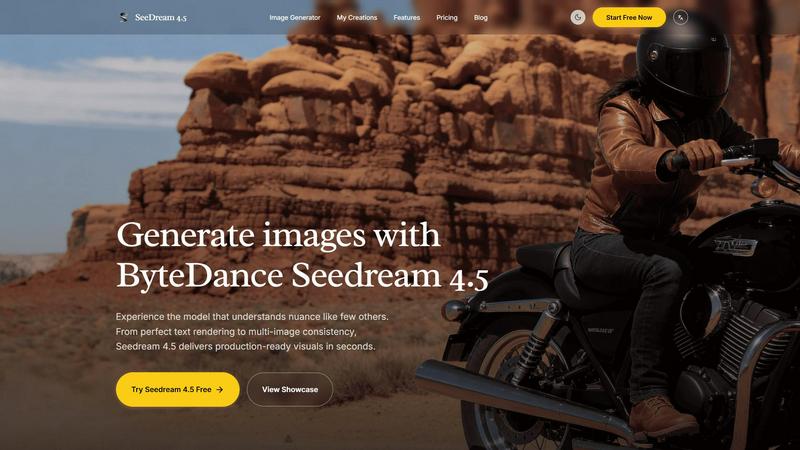
Seedream 4.5 generates production-ready, consistent images from text with superior nuance and fidelity.
Last updated: February 28, 2026

Shrinkpad
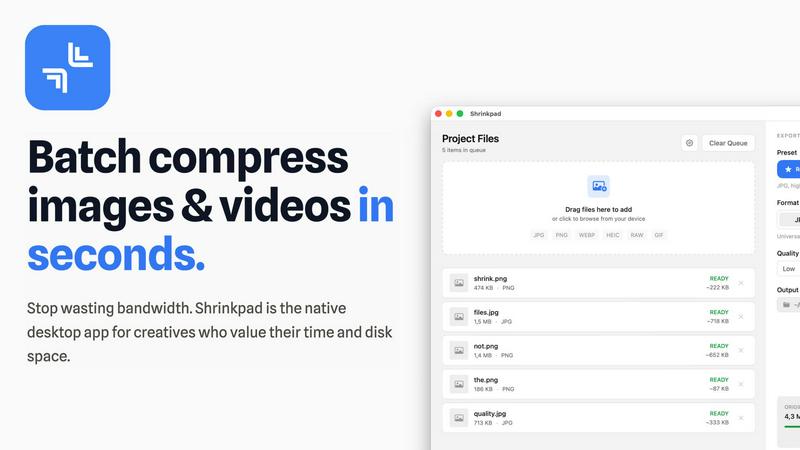
Effortlessly batch compress images and videos on Mac, optimizing quality while saving time and disk space.
Last updated: February 28, 2026
Visual Comparison
Seedream 4.5
Shrinkpad
Feature Comparison
Seedream 4.5
Superior Text Rendering and Instruction Adherence
Seedream 4.5 excels at interpreting and rendering textual elements within an image, a common challenge for many AI image generators. It demonstrates a high degree of prompt fidelity, accurately translating detailed scene descriptions, specific object placements, and stylistic commands into the final visual output. This precise instruction adherence, as noted in analyses of leading AI models, is critical for professional use where creative vision must be executed without ambiguity, ensuring that generated graphics align perfectly with project briefs and brand guidelines.
Multi-Image Character and Style Consistency
A standout technical capability of Seedream 4.5 is its ability to maintain strict consistency across a series of generated images. This feature allows users to create visual narratives, product variations, or character-focused content where the subject's appearance, clothing, and style remain coherent from one image to the next. Research into AI model training indicates that achieving this level of consistency requires advanced architectural techniques, making it a premium feature for creating professional storyboards, advertising campaigns, and serialized content.
Advanced Reference-Based Editing (Up to 14 Images)
The model supports the use of multiple reference images—reportedly up to 14—enabling powerful and precise image editing. Users can upload existing visuals to guide the generation process, allowing for "surgical" edits that modify specific components like an object's color, texture, or setting without altering the overall composition or style. This reference-guided generation is a form of controlled synthesis that, according to technical papers, provides a level of creative control previously difficult to achieve in AI image generation, bridging the gap between initial concepts and final assets.
Native 4K Resolution & Commercial-Grade Output
Seedream 4.5 is built for commercial production, offering native support for 4K resolution image generation. This ensures that outputs are of sufficient quality and detail for high-stakes applications such as print media, large-format displays, and premium digital content. The move towards native high-resolution support in models like Seedream 4.5 reflects an industry trend where the demand for AI-generated assets that meet professional broadcast and publication standards is rapidly increasing.
Shrinkpad
Batch Compression
Shrinkpad allows users to batch compress images and videos in seconds. It automatically analyzes visual complexity, applying the perfect compression ratio without introducing artifacts, resulting in significant file size reductions and improved performance.
One-Drop Import
With the one-drop import feature, users can simply drag any folder onto Shrinkpad. The software automatically identifies and adds all supported images and videos to the batch list, eliminating the need for manual file selection and saving valuable time.
Mixed Media Batches
Shrinkpad excels at processing mixed media batches, enabling users to compress photos and videos together in the same batch. It intelligently applies optimal compression settings for each file type, ensuring the highest quality output across different media formats.
Privacy First
Prioritizing user privacy, Shrinkpad processes all files locally on the user's machine, ensuring no cloud uploads occur. This feature guarantees that sensitive assets remain secure, providing peace of mind for creatives handling confidential projects.
Use Cases
Seedream 4.5
Marketing and Advertising Asset Creation
Marketing teams can leverage Seedream 4.5 to rapidly prototype and produce high-quality visuals for campaigns, social media posts, and advertisements. Its ability to render text, maintain brand consistency across multiple images, and produce 4K assets allows for the quick iteration of concepts and final production of materials that resonate with target audiences, significantly accelerating the creative workflow.
Concept Art and Storyboarding for Media
Concept artists and filmmakers can use the model to visualize scenes, characters, and environments during pre-production. The multi-image consistency feature is particularly valuable for developing a cohesive look for a character across different scenes or angles, while the detailed prompt adherence helps bring complex, imaginative worlds to life for pitches and storyboards.
Product Visualization and Design Mock-ups
Designers and e-commerce professionals can generate photorealistic mock-ups of products in various settings or with different stylistic features. Using reference images for surgical edits allows for quick visualization of product variations—such as different colors or materials—facilitating design decisions and creating compelling visual content for online stores without the need for costly photoshoots.
Content Creation for Digital Platforms
Bloggers, social media influencers, and content creators can use Seedream 4.5 to generate unique, engaging visuals that complement their written content. The tool's speed and quality enable the creation of custom illustrations, featured images, and thematic graphics that enhance audience engagement and establish a distinct visual identity across platforms like YouTube, Instagram, and blogs.
Shrinkpad
Optimizing Web Assets
Web developers and designers can utilize Shrinkpad to compress images and videos for websites, resulting in faster load times and improved user experiences. By reducing file sizes significantly, they can enhance overall site performance and SEO rankings.
Streamlining Design Workflows
Photographers and graphic designers often export large volumes of assets from applications like Figma or Photoshop. Shrinkpad simplifies this process by allowing them to export everything at 2x or 4x resolutions and handle optimization in bulk, saving hours of busywork.
Enhancing Video Production
Video editors can leverage Shrinkpad to compress large video files without sacrificing quality. This is particularly beneficial for projects requiring fast turnaround times, as it allows editors to share high-quality footage quickly and efficiently.
Managing Digital Archives
Content creators frequently accumulate vast libraries of images and videos. Shrinkpad aids in managing these digital archives by compressing files for better storage management while maintaining the quality necessary for future projects.
Overview
About Seedream 4.5
Seedream 4.5 is a state-of-the-art image generation model developed by ByteDance, representing a significant leap forward in the field of generative AI for visual content. It is engineered to transform textual descriptions into high-fidelity, production-ready images within seconds, distinguishing itself through an exceptional understanding of nuanced prompts and complex instructions. The model is specifically optimized for professional applications where speed, quality, and creative control are non-negotiable. Its core value proposition lies in delivering unparalleled visual coherence and precision, making it an indispensable tool for marketers, graphic designers, content creators, and product developers. According to industry benchmarks, models like Seedream 4.5 that prioritize instruction adherence and multi-image consistency are becoming the standard for commercial creative workflows, as they reduce revision cycles and increase output reliability. By supporting native 4K resolution and offering "surgical" editing capabilities via reference images, Seedream 4.5 provides a robust platform for generating everything from marketing assets to conceptual art with commercial-grade quality and efficiency.
About Shrinkpad
Shrinkpad is a powerful batch image and video compression tool specifically crafted for macOS users, designed for a wide array of creatives, including photographers, designers, and content creators. This innovative software enables users to efficiently compress hundreds of media files in mere seconds without compromising visual quality. By simply dragging and dropping entire folders containing images and videos, Shrinkpad processes them locally on the device, ensuring complete privacy and security. Utilizing native macOS frameworks, it can minimize file sizes by up to 90%, which significantly enhances storage management and optimizes performance for applications and websites. Supporting over 50 file formats, such as JPG, PNG, HEIC, MP4, and MOV, Shrinkpad's user-friendly interface and customizable settings make it an ideal solution for anyone looking to streamline their media optimization workflow while maintaining high-quality output.
Frequently Asked Questions
Seedream 4.5 FAQ
What makes Seedream 4.5 different from other AI image generators?
Seedream 4.5 differentiates itself through its industry-leading performance in specific technical areas: precise text rendering within images and robust multi-image consistency. These capabilities, often benchmarked in AI research, address common pain points in professional workflows. Furthermore, its support for up to 14 reference images for guided editing provides a level of control that is essential for iterative design and precise visual modifications.
How many reference images can I use with Seedream 4.5?
Seedream 4.5 supports the use of multiple reference images, with documentation indicating a capacity for up to 14 images. This allows users to provide extensive visual context to guide the generation process, enabling complex edits and ensuring the output aligns closely with a desired style, composition, or character design drawn from the provided references.
Is Seedream 4.5 suitable for creating commercial artwork?
Yes, Seedream 4.5 is explicitly optimized for commercial applications. Its native 4K output resolution meets the quality standards required for professional print and digital media. The model's high fidelity to prompts and consistency features ensure that generated assets are reliable and can be integrated directly into commercial projects, from advertising to product packaging, though users should always review the specific terms of service regarding usage rights.
What kind of prompts work best with Seedream 4.5?
For optimal results, users should provide detailed, descriptive prompts that specify the subject, setting, style, composition, and mood. The model is designed to understand nuance, so including adjectives, references to artistic styles (e.g., "photorealistic," "35mm film"), and specific details about lighting, camera angles, and textures will yield the most accurate and high-quality images, as demonstrated in the example prompts provided in its showcase.
Shrinkpad FAQ
Can I use Shrinkpad for free?
Yes, Shrinkpad offers a Free Starter plan, which includes essential tools for casual use, allowing users to batch process up to 10 files at a time in common formats.
What file formats does Shrinkpad support?
Shrinkpad supports over 50 file formats, including popular image formats like JPG, PNG, WEBP, and AVIF, as well as video formats such as MP4 and MOV, ensuring compatibility with various media types.
Does Shrinkpad support video compression?
Absolutely. Shrinkpad is designed to handle video compression alongside image compression, allowing users to process mixed media files in one batch efficiently.
How many files can I process at once?
The Free Starter plan limits users to 10 files per batch, while the Personal plan allows unlimited batch processing, enabling creators to handle thousands of files without crashing the application.
Alternatives
Seedream 4.5 Alternatives
Seedream 4.5 is a premium AI image generation tool within the broader category of text-to-image models. It is engineered to deliver production-ready, high-fidelity visuals with exceptional consistency and advanced editing capabilities, making it a powerful asset for professional creative workflows. Users often explore alternatives to a leading tool like Seedream 4.5 for various practical reasons. These can include budget constraints, as premium features often come with a corresponding cost. Others may seek different feature specializations, such as alternative artistic styles, specific integration needs with other software, or a platform that aligns better with their existing tech stack and operational requirements. When evaluating an alternative, key considerations should include the core output quality and consistency, the specificity of features like in-image text rendering or object editing, and the overall value proposition regarding pricing and licensing. The ideal choice balances raw generative power with the practical needs of your projects and team.
Shrinkpad Alternatives
Shrinkpad is a powerful batch image and video compression tool designed specifically for macOS users. It allows creatives, including photographers and content creators, to efficiently compress large volumes of media files while maintaining high visual quality. As users explore their options, they often seek alternatives for various reasons such as pricing, feature sets, and compatibility with different platforms. When selecting an alternative to Shrinkpad, users should consider key factors such as the software's ease of use, the range of supported file formats, the quality of compression, and whether it processes files locally or relies on cloud-based solutions. Additionally, features like batch processing capabilities and customization options can significantly impact user experience.