
OC Maker vs Shrinkpad
Side-by-side comparison to help you choose the right product.

OC Maker
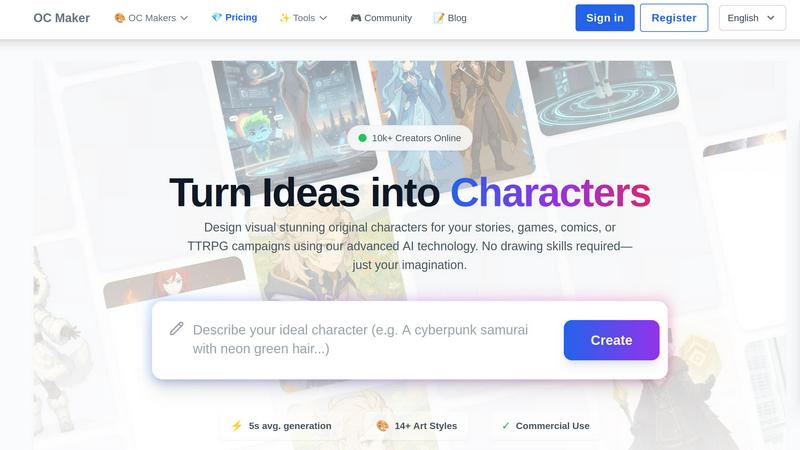
OC Maker is an AI platform that creates and customizes unique characters for stories and games without requiring.
Last updated: March 1, 2026

Shrinkpad
Effortlessly batch compress images and videos on Mac, optimizing quality while saving time and disk space.
Last updated: February 28, 2026
Visual Comparison
OC Maker
Shrinkpad
Feature Comparison
OC Maker
Diverse Art Style Library
OC Maker provides access to a curated library of over 14 specialized art styles, allowing for precise aesthetic alignment with a user's vision. This includes mainstream styles like Anime and Photorealistic, as well as fandom-specific models trained on universes such as Sonic the Hedgehog, Genshin Impact, Cuphead, and Jujutsu Kaisen. This feature ensures that generated characters can seamlessly fit into existing narratives, game worlds, or artistic projects, offering a level of stylistic authenticity that generic AI image generators often lack.
Full-Body Character Generation from Prompts
Unlike simple avatar assemblers, OC Maker's AI engines generate complete, original characters from scratch based on detailed user-written prompts. Users can describe physical appearance, clothing, fantasy elements, color schemes, and personality traits. The system interprets these text inputs to create coherent, full-body character visuals, providing a powerful tool for visualizing complex character concepts without any manual asset placement or drawing.
Integrated Creative Power Tools Suite
The platform extends its functionality with a suite of professional-grade AI tools for post-processing and enhancement. This includes an AI Video generator for creating cinematic clips from text and images, an AI Headshot generator for professional portraits, a Face Swap tool for photos and videos, and an Image to Prompt tool that reverse-engineers images into detailed prompts for other AI platforms like Midjourney. This integrated ecosystem supports end-to-end character development and content creation.
Character Consistency and Themed Universes
OC Maker addresses a key challenge in AI character creation—maintaining consistency. The platform offers tools and specialized models that help in generating multiple images of the same character across different poses or scenarios while preserving core features. Furthermore, its "Themed Universes" section provides generators fine-tuned for specific fandoms, ensuring outputs perfectly understand and replicate niche art styles, from "Murder Drones" to "Ever After High."
Shrinkpad
Batch Compression
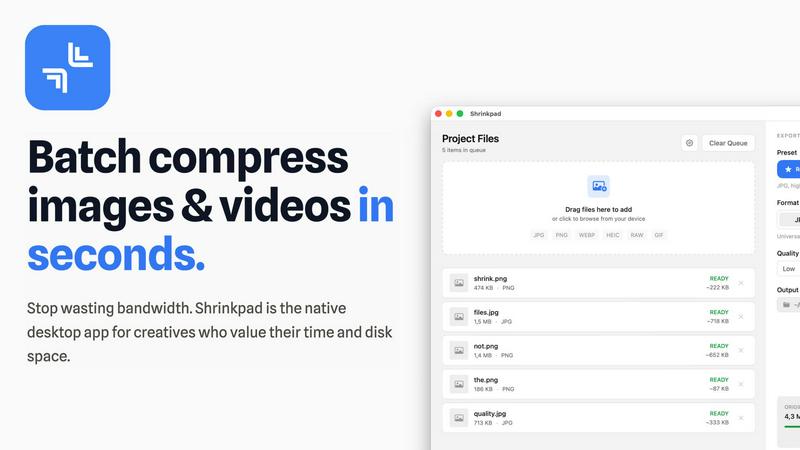
Shrinkpad allows users to batch compress images and videos in seconds. It automatically analyzes visual complexity, applying the perfect compression ratio without introducing artifacts, resulting in significant file size reductions and improved performance.
One-Drop Import
With the one-drop import feature, users can simply drag any folder onto Shrinkpad. The software automatically identifies and adds all supported images and videos to the batch list, eliminating the need for manual file selection and saving valuable time.
Mixed Media Batches
Shrinkpad excels at processing mixed media batches, enabling users to compress photos and videos together in the same batch. It intelligently applies optimal compression settings for each file type, ensuring the highest quality output across different media formats.
Privacy First
Prioritizing user privacy, Shrinkpad processes all files locally on the user's machine, ensuring no cloud uploads occur. This feature guarantees that sensitive assets remain secure, providing peace of mind for creatives handling confidential projects.
Use Cases
OC Maker
Narrative and Worldbuilding for Writers
Authors and storytellers can use OC Maker to visualize characters for novels, scripts, or comic books. By generating accurate representations of protagonists, antagonists, and supporting casts, writers can enhance their descriptive consistency, create reference material for illustrators, and share visual concepts with collaborators or their audience, thereby enriching the storytelling and worldbuilding process.
Character Design for Game Development
Independent game developers and designers can rapidly prototype character concepts for video games or TTRPG campaigns. The ability to generate characters in specific styles (e.g., anime for a JRPG, photorealistic for a simulation) allows for efficient iteration during pre-production. These assets can serve as concept art, inspiration for 3D modelers, or even placeholder visuals during early development stages.
Content Creation for Digital Artists and Social Media
Digital artists and social media content creators can leverage OC Maker to produce unique character art for projects, commissions, or personal brand content. The AI Headshot and Face Swap tools are particularly useful for creating engaging profile pictures, promotional material, or entertaining video content, streamlining the production of high-quality visual media without a full studio setup.
Fandom-Specific Art and Role-Playing
Fans and role-players within specific communities (e.g., Sonic, My Little Pony, Demon Slayer) can use the dedicated themed generators to create original characters that exist authentically within those universes. This is ideal for fan fiction, role-playing games, forum signatures, or creating personalized avatars that resonate with the established visual language of the chosen fandom.
Shrinkpad
Optimizing Web Assets
Web developers and designers can utilize Shrinkpad to compress images and videos for websites, resulting in faster load times and improved user experiences. By reducing file sizes significantly, they can enhance overall site performance and SEO rankings.
Streamlining Design Workflows
Photographers and graphic designers often export large volumes of assets from applications like Figma or Photoshop. Shrinkpad simplifies this process by allowing them to export everything at 2x or 4x resolutions and handle optimization in bulk, saving hours of busywork.
Enhancing Video Production
Video editors can leverage Shrinkpad to compress large video files without sacrificing quality. This is particularly beneficial for projects requiring fast turnaround times, as it allows editors to share high-quality footage quickly and efficiently.
Managing Digital Archives
Content creators frequently accumulate vast libraries of images and videos. Shrinkpad aids in managing these digital archives by compressing files for better storage management while maintaining the quality necessary for future projects.
Overview
About OC Maker
OC Maker is an advanced, AI-powered creative platform specifically engineered for the generation of unique Original Characters (OCs). It serves as a comprehensive digital tool that bridges the gap between conceptual imagination and visual representation, eliminating the traditional barrier of requiring advanced artistic or drawing skills. The platform is designed for a diverse demographic, including writers, artists, game developers, tabletop role-playing game (TTRPG) enthusiasts, and content creators across various media. According to its operational model, OC Maker leverages sophisticated generative AI to produce characters from textual descriptions, supporting over 14 distinct and popular art styles such as Anime, Photorealistic, Sonic, Genshin Impact, and many more. Its core value proposition lies in its speed, accessibility, and stylistic versatility, enabling users to transform a detailed prompt into a fully realized character visual in an average of five seconds. The platform further extends its utility beyond static character generation by offering a suite of ancillary AI tools for editing, animating, and refining creations, positioning itself not just as a character generator but as a holistic creative studio for digital character design.
About Shrinkpad
Shrinkpad is a powerful batch image and video compression tool specifically crafted for macOS users, designed for a wide array of creatives, including photographers, designers, and content creators. This innovative software enables users to efficiently compress hundreds of media files in mere seconds without compromising visual quality. By simply dragging and dropping entire folders containing images and videos, Shrinkpad processes them locally on the device, ensuring complete privacy and security. Utilizing native macOS frameworks, it can minimize file sizes by up to 90%, which significantly enhances storage management and optimizes performance for applications and websites. Supporting over 50 file formats, such as JPG, PNG, HEIC, MP4, and MOV, Shrinkpad's user-friendly interface and customizable settings make it an ideal solution for anyone looking to streamline their media optimization workflow while maintaining high-quality output.
Frequently Asked Questions
OC Maker FAQ
What is OC Maker and who is it for?
OC Maker is an AI-powered platform designed to generate unique Original Characters from text prompts. It is built for a wide range of users including writers, artists, game developers, tabletop RPG players, and content creators who need to visualize character concepts quickly and without requiring traditional drawing skills. Its tools cater to both professional project development and personal creative exploration.
Do I own the characters I create with OC Maker?
According to the platform's provided information, characters generated come with commercial use rights (indicated by a checkmark next to "Commercial Use"). This typically means users can utilize the created character images for commercial projects, such as in games, books, or merchandise. However, users should always review the specific Terms of Service for the most current and detailed licensing information.
How does the OC Maker prompt system work?
The prompt system requires users to provide a detailed textual description of their desired character. Effective prompts include details on appearance (hair, eyes, build), clothing, accessories, artistic style, color palette, and even implied personality or mood. The more descriptive the prompt, the more accurate and tailored the AI-generated result will be. The platform also offers an "Image to Prompt" tool to help users learn effective prompting by analyzing existing images.
Can I create consistent versions of the same character?
Yes, OC Maker offers features aimed at character consistency. By using detailed prompts and potentially leveraging specific style generators, users can generate multiple images of the same core character. The platform's specialized models and tools are designed to help maintain key features across different generations, which is essential for creating character sheets or visualizing a single character in various scenes or outfits.
Shrinkpad FAQ
Can I use Shrinkpad for free?
Yes, Shrinkpad offers a Free Starter plan, which includes essential tools for casual use, allowing users to batch process up to 10 files at a time in common formats.
What file formats does Shrinkpad support?
Shrinkpad supports over 50 file formats, including popular image formats like JPG, PNG, WEBP, and AVIF, as well as video formats such as MP4 and MOV, ensuring compatibility with various media types.
Does Shrinkpad support video compression?
Absolutely. Shrinkpad is designed to handle video compression alongside image compression, allowing users to process mixed media files in one batch efficiently.
How many files can I process at once?
The Free Starter plan limits users to 10 files per batch, while the Personal plan allows unlimited batch processing, enabling creators to handle thousands of files without crashing the application.
Alternatives
OC Maker Alternatives
OC Maker is an AI-powered creative platform in the image generation category, specifically designed for creating and customizing unique characters. It enables writers, artists, and game developers to visualize original characters (OCs) without needing artistic skills, supporting over 14 distinct art styles from Anime to Photorealistic. Users often seek alternatives to OC Maker for various reasons. Common factors include budget constraints, as pricing models can be a primary consideration. Others may require different feature sets, such as specific export formats, integration with other creative software, or a platform that operates on a different device or operating system. The need for a particular artistic style not covered or a different user interface approach also drives exploration. When evaluating an alternative, key criteria should align with your project's needs. Prioritize the range and quality of supported art styles, the clarity of the licensing and commercial use policy, and the overall speed and reliability of the AI generation. The tool's ability to fit into your specific creative workflow, whether for storytelling, game design, or commercial art, is ultimately the most critical factor for selection.
Shrinkpad Alternatives
Shrinkpad is a powerful batch image and video compression tool designed specifically for macOS users. It allows creatives, including photographers and content creators, to efficiently compress large volumes of media files while maintaining high visual quality. As users explore their options, they often seek alternatives for various reasons such as pricing, feature sets, and compatibility with different platforms. When selecting an alternative to Shrinkpad, users should consider key factors such as the software's ease of use, the range of supported file formats, the quality of compression, and whether it processes files locally or relies on cloud-based solutions. Additionally, features like batch processing capabilities and customization options can significantly impact user experience.