MyImageUpscaler vs Shrinkpad
Side-by-side comparison to help you choose the right product.

MyImageUpscaler
MyImageUpscaler enhances images to 4K quality in seconds while preserving sharp details and text clarity.
Last updated: February 27, 2026

Shrinkpad
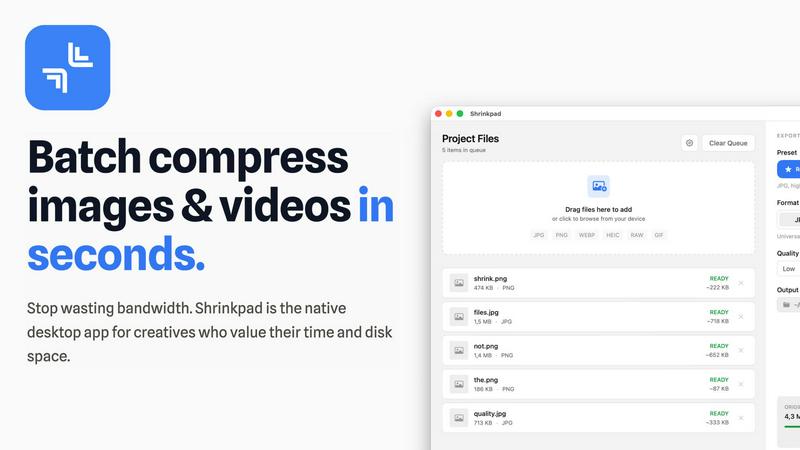
Effortlessly batch compress images and videos on Mac, optimizing quality while saving time and disk space.
Last updated: February 28, 2026
Visual Comparison
MyImageUpscaler

Shrinkpad
Feature Comparison
MyImageUpscaler
Advanced Detail Preservation
MyImageUpscaler employs sophisticated algorithms that preserve intricate details in images, ensuring that the final output remains crisp and high-quality. This feature is crucial for maintaining the integrity of product images and marketing materials, where clarity is paramount.
Rapid Processing Speed
Users can process images in under 10 seconds, significantly enhancing productivity. This swift processing capability allows businesses and content creators to manage large volumes of images efficiently, saving valuable time in their workflows.
Flexibility in Upscaling Options
The platform offers 2x and 4x upscaling options, allowing users to choose the level of enhancement that best suits their needs. Whether for online display or high-quality print, users can upscale images with precision without any loss of detail.
Batch Processing Capabilities
MyImageUpscaler allows users to process up to 500 images in a single batch. This feature is ideal for large projects, enabling users to streamline their editing processes and handle multiple images simultaneously, which is particularly beneficial for photographers and e-commerce sellers.
Shrinkpad
Batch Compression
Shrinkpad allows users to batch compress images and videos in seconds. It automatically analyzes visual complexity, applying the perfect compression ratio without introducing artifacts, resulting in significant file size reductions and improved performance.
One-Drop Import
With the one-drop import feature, users can simply drag any folder onto Shrinkpad. The software automatically identifies and adds all supported images and videos to the batch list, eliminating the need for manual file selection and saving valuable time.
Mixed Media Batches
Shrinkpad excels at processing mixed media batches, enabling users to compress photos and videos together in the same batch. It intelligently applies optimal compression settings for each file type, ensuring the highest quality output across different media formats.
Privacy First
Prioritizing user privacy, Shrinkpad processes all files locally on the user's machine, ensuring no cloud uploads occur. This feature guarantees that sensitive assets remain secure, providing peace of mind for creatives handling confidential projects.
Use Cases
MyImageUpscaler
E-commerce Product Listings
Online sellers can utilize MyImageUpscaler to improve product images, ensuring they meet high-quality standards required for competitive marketplaces. Enhanced images attract more customers and can lead to increased sales.
Social Media Content Creation
Content creators can resize and enhance images for various social media platforms like Instagram, YouTube, and TikTok. With platform-ready presets, they can ensure that their visuals stand out and maintain high quality across different formats.
Real Estate MLS Listings
Real estate agents can prepare stunning images for MLS listings using MyImageUpscaler. High-resolution images help in showcasing properties attractively, improving the chances of attracting potential buyers.
Photography and Archiving
Photographers can use the platform to process large batches of images, restoring sharpness and enhancing detail in their work. Additionally, it provides a means to revive old photographs, ensuring that precious memories are preserved with clarity.
Shrinkpad
Optimizing Web Assets
Web developers and designers can utilize Shrinkpad to compress images and videos for websites, resulting in faster load times and improved user experiences. By reducing file sizes significantly, they can enhance overall site performance and SEO rankings.
Streamlining Design Workflows
Photographers and graphic designers often export large volumes of assets from applications like Figma or Photoshop. Shrinkpad simplifies this process by allowing them to export everything at 2x or 4x resolutions and handle optimization in bulk, saving hours of busywork.
Enhancing Video Production
Video editors can leverage Shrinkpad to compress large video files without sacrificing quality. This is particularly beneficial for projects requiring fast turnaround times, as it allows editors to share high-quality footage quickly and efficiently.
Managing Digital Archives
Content creators frequently accumulate vast libraries of images and videos. Shrinkpad aids in managing these digital archives by compressing files for better storage management while maintaining the quality necessary for future projects.
Overview
About MyImageUpscaler
MyImageUpscaler is an advanced AI-powered image enhancement and upscaling platform designed explicitly for businesses and content creators. With cutting-edge technology, it allows users to upscale images by 2x to 4x while ensuring that sharpness is preserved and fine details are enhanced. The platform is tailored for diverse use cases, including e-commerce, social media content creation, real estate, and photography. Professionals can quickly enhance product images, marketing materials, and branded content, all without compromising quality. MyImageUpscaler stands out by offering a free tier that provides users with 10 credits and no credit card requirements, making it accessible for those just starting. With paid plans beginning at just $9 per month, the platform delivers exceptional value, streamlining the process of image enhancement while ensuring remarkable results in seconds.
About Shrinkpad
Shrinkpad is a powerful batch image and video compression tool specifically crafted for macOS users, designed for a wide array of creatives, including photographers, designers, and content creators. This innovative software enables users to efficiently compress hundreds of media files in mere seconds without compromising visual quality. By simply dragging and dropping entire folders containing images and videos, Shrinkpad processes them locally on the device, ensuring complete privacy and security. Utilizing native macOS frameworks, it can minimize file sizes by up to 90%, which significantly enhances storage management and optimizes performance for applications and websites. Supporting over 50 file formats, such as JPG, PNG, HEIC, MP4, and MOV, Shrinkpad's user-friendly interface and customizable settings make it an ideal solution for anyone looking to streamline their media optimization workflow while maintaining high-quality output.
Frequently Asked Questions
MyImageUpscaler FAQ
How does MyImageUpscaler preserve image quality?
MyImageUpscaler utilizes advanced AI algorithms that focus on detail preservation, ensuring that images remain sharp and free from blur or artifacts during the upscaling process.
Can I use MyImageUpscaler for free?
Yes, MyImageUpscaler offers a free tier that includes 10 credits, allowing users to enhance images without any credit card requirement. This is a great way to try out the service before committing to a paid plan.
What formats does MyImageUpscaler support?
The platform supports various image formats, making it versatile for different user needs. Whether you are working with JPEG, PNG, or others, MyImageUpscaler can enhance your images effectively.
How long are processed images stored?
Depending on the plan you choose, processed images are auto-deleted after 7 to 30 days. This feature ensures that users can manage their storage effectively while keeping their images secure.
Shrinkpad FAQ
Can I use Shrinkpad for free?
Yes, Shrinkpad offers a Free Starter plan, which includes essential tools for casual use, allowing users to batch process up to 10 files at a time in common formats.
What file formats does Shrinkpad support?
Shrinkpad supports over 50 file formats, including popular image formats like JPG, PNG, WEBP, and AVIF, as well as video formats such as MP4 and MOV, ensuring compatibility with various media types.
Does Shrinkpad support video compression?
Absolutely. Shrinkpad is designed to handle video compression alongside image compression, allowing users to process mixed media files in one batch efficiently.
How many files can I process at once?
The Free Starter plan limits users to 10 files per batch, while the Personal plan allows unlimited batch processing, enabling creators to handle thousands of files without crashing the application.
Alternatives
MyImageUpscaler Alternatives
MyImageUpscaler is an AI-powered image enhancement and upscaling platform designed for businesses and content creators. It belongs to the productivity and management category, focusing on improving the quality of images for various applications, including e-commerce, social media, and real estate. Users often seek alternatives to MyImageUpscaler due to factors such as pricing, specific feature sets, or compatibility with different platforms. When choosing an alternative, it is important to consider aspects like processing speed, image quality, batch processing capabilities, and whether the solution meets the unique needs of your projects, ensuring that it aligns with your workflow and budget.
Shrinkpad Alternatives
Shrinkpad is a powerful batch image and video compression tool designed specifically for macOS users. It allows creatives, including photographers and content creators, to efficiently compress large volumes of media files while maintaining high visual quality. As users explore their options, they often seek alternatives for various reasons such as pricing, feature sets, and compatibility with different platforms. When selecting an alternative to Shrinkpad, users should consider key factors such as the software's ease of use, the range of supported file formats, the quality of compression, and whether it processes files locally or relies on cloud-based solutions. Additionally, features like batch processing capabilities and customization options can significantly impact user experience.