Seedance 2 AI Video Generator vs VideoAny
Side-by-side comparison to help you choose the right product.

Seedance 2 AI Video Generator
Seedance 2.0 instantly creates cinematic videos from text, images, or clips with consistent quality and easy control.
Last updated: March 1, 2026

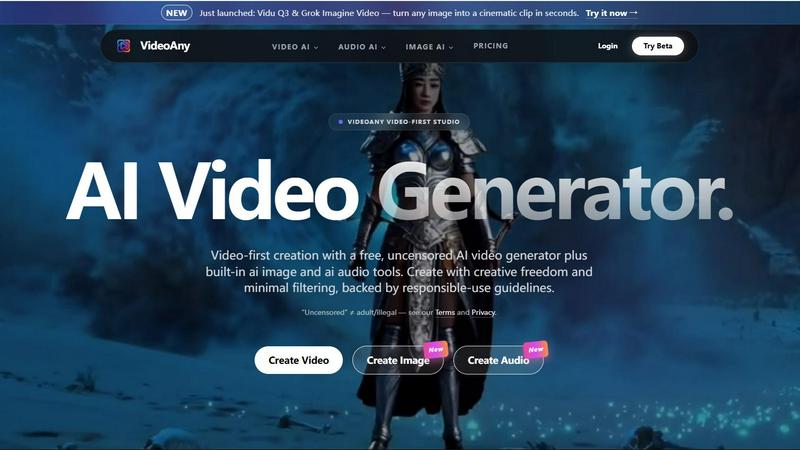
VideoAny is a comprehensive AI studio that consolidates video, image, and audio generation into one powerful, video-first platform for creators.
Last updated: April 13, 2026
Visual Comparison
Seedance 2 AI Video Generator

VideoAny
Feature Comparison
Seedance 2 AI Video Generator
Multimodal Input Flexibility
Seedance 2.0 supports three distinct generation modes: Text-to-Video, Image-to-Video, and Video-to-Video. This flexibility allows users to choose the optimal starting point for any project, whether conceptualizing from a written idea, extending a specific visual style from a reference image, or restyling and enhancing existing source footage. This multimodal approach, as highlighted in platform comparisons, provides maximum creative control and workflow adaptability that many competing models lack (AI Video Generator Comparison, 2024).
Reference-First Generation Workflow
A defining feature of Seedance 2.0 is its emphasis on using visual references to guide the AI. Instead of relying solely on the nuances of prompt wording, users can upload an image or video clip to anchor character design, artistic style, color palette, and cinematic feel. This results in significantly higher output consistency and reduces the iterative trial-and-error often required in AI video generation, making it a more predictable and efficient tool for professional workflows.
Integrated Audio-Video Synthesis
Unlike many competitors that generate silent video, Seedance 2.0 Pro model includes joint audio generation in a single pass. This synchronized synthesis can produce sound effects (SFX), background music, and even voiceovers with lip-sync accuracy across 10+ languages, including English, Chinese, Japanese, and Korean. This all-in-one capability streamlines production, creating a more cohesive and finished video asset without requiring separate audio editing software.
Advanced Motion and Consistency Control
The platform is engineered for "steadier motion and more coherent scenes," addressing common AI video pitfalls like temporal flickering or unstable subjects. Technical specifications note a cinema-standard frame rate of up to 24fps, and showcases demonstrate its strength in maintaining character consistency and realistic physics across frames. This makes it particularly suitable for narratives, product demonstrations, and any use case where smooth, believable motion is critical.
VideoAny
Unified AI Video, Image, and Audio Studio
VideoAny consolidates three critical creative modalities into one seamless interface. Users can generate AI videos from text prompts or existing images, create high-fidelity AI images with upscaling and style control, and produce custom audio tracks including text-to-music and sound effects. This integrated approach, as highlighted on the platform, is designed to "replace your entire creative stack," significantly reducing the need to switch between multiple specialized applications and streamlining the content production pipeline from conception to final asset.
Access to Cutting-Edge AI Models
The platform provides direct access to a curated selection of top-tier generative AI models, acting as a centralized hub. This includes newly launched models like Kling 3 for bringing images to life with motion, Vidu Q3 and Grok Imagine Video for cinematic clip generation, and Seedance 2.0. By aggregating these models, VideoAny ensures creators can leverage the latest technological advancements and choose the best tool for their specific creative vision without managing separate subscriptions or interfaces for each model.
Extensive Library of AI Video Effects
VideoAny offers a suite of over 60 one-click AI video effects designed to add dynamic motion and engagement to static content. These pre-built effects allow users to easily make subjects in photos dance, hug, kiss, or perform other actions, enabling rapid creation of engaging, shareable content without requiring advanced technical skills in animation or video editing. This feature lowers the barrier to creating professional-looking, animated social media content.
Uncensored Creation Mode with Guidelines
A defining feature of VideoAny is its support for an "uncensored" mode, which applies minimal content filtering to maximize creative freedom. The platform explicitly clarifies that this does not equate to permission for adult or illegal content, operating instead within a framework of responsible-use guidelines. This mode is specifically supported by the native VideoAny model, offering creators an alternative to platforms with stricter, more restrictive content policies, while third-party integrated models follow their own respective safety standards.
Use Cases
Seedance 2 AI Video Generator
Social Media and Marketing Content Creation
Marketing teams and social media managers can leverage Seedance 2.0 to rapidly produce a high volume of platform-optimized video ads, promotional clips, and engaging social posts. The fast iteration cycle and support for aspect ratios like 9:16 (for Stories/Reels) and 1:1 allow for quick adaptation of core creative concepts across multiple channels, significantly accelerating campaign rollout.
Concept Visualization and Storyboarding
Filmmakers, agencies, and creative directors can use the Text-to-Video and Image-to-Video modes to quickly visualize concepts, create dynamic mood boards, or generate preliminary storyboard sequences. This enables faster client presentations, internal alignment on creative direction, and early testing of narrative ideas before committing to full-scale production.
Product Demonstration and Explainer Videos
Businesses can create polished product demo videos or animated explainer content by using image references of their product or interface. The Video-to-Video mode can also be used to add stylistic flair or illustrative animations to existing screen recordings, creating more engaging and professional tutorials or sales materials without complex animation software.
Content Restyling and Localization
Content creators and media companies can repurpose existing video footage by using the Video-to-Video mode for controllable restyling—applying new artistic filters, adjusting settings, or changing environments. The integrated multilingual lip-sync feature also opens efficient pathways for localizing explainer or spokesperson videos for different international markets.
VideoAny
Social Media Content and Viral Marketing
Creators and marketing teams can use VideoAny to rapidly produce a high volume of engaging, platform-optimized video clips, images, and audio for campaigns. The ability to quickly turn text ideas or product images into professional videos with effects makes it ideal for creating trending TikTok/Reels content, promotional ads, and brand storytelling designed to capture attention and drive shares in fast-paced social media environments.
Prototyping and Storyboarding for Film & Media
Filmmakers, animators, and game developers can utilize VideoAny's text-to-video and image-to-video capabilities to visualize concepts, create dynamic storyboards, and prototype scenes. Generating quick cinematic clips from script excerpts or concept art allows for efficient pre-visualization, client presentations, and creative iteration before committing to expensive production shoots or complex 3D animation.
Personalized Audio-Visual Content Creation
Podcasters, educators, and influencers can leverage the integrated audio and video tools to create cohesive multimedia content. This includes generating custom background music or sound effects for videos, cloning voices for narration, and transforming blog posts or scripts into narrated video summaries with accompanying visuals, all within a single workflow to enhance production value and audience engagement.
E-commerce and Product Visualization
Online retailers and brands can employ VideoAny to create compelling product showcases. By uploading product images, they can generate videos that show items in use, apply engaging AI effects to highlight features, and create consistent branded imagery and audio for advertising. This transforms static catalog photos into dynamic, conversion-optimized content for websites, marketplaces, and social media ads.
Overview
About Seedance 2 AI Video Generator
Seedance 2.0 is a state-of-the-art AI video generation platform engineered to transform text prompts, reference images, or existing source footage into polished, cinematic-quality video clips. It represents a significant advancement in controllable AI video synthesis, moving beyond simple text-to-video conversion to offer a robust, multimodal workflow. The platform is specifically designed for creators, marketers, and agencies who require high-quality video output at speed, eliminating the traditional bottlenecks and heavy editing overhead associated with conventional video production (Seedance 2.0, 2024). Its core value proposition lies in a unique "reference-first" methodology, which allows users to anchor the AI's output to specific visual styles, characters, or camera feels, resulting in greater consistency and less guesswork compared to prompt-only systems. With support for resolutions up to 1080p, synchronized audio generation, and multilingual lip-sync capabilities, Seedance 2.0 is positioned as a production-ready tool for creating content for advertising, social media, product demos, and more, facilitating rapid iteration without compromising on motion quality or visual coherence.
About VideoAny
VideoAny is a comprehensive, video-first AI creative studio designed to consolidate the entire content creation workflow into a single, powerful platform. It integrates state-of-the-art AI video, image, and audio generation tools, offering creators a unified environment to produce high-quality, viral-ready content. The platform distinguishes itself by emphasizing creative freedom with "minimal filtering," operating under a framework of responsible-use guidelines that prohibit illegal content while allowing for a broader range of creative expression compared to heavily censored alternatives. VideoAny aggregates access to leading AI models like Kling 3.0, Vidu Q3, Grok Imagine, and Seedance 2.0, enabling users to generate fluid, high-definition videos from text or images, create detailed AI images, and produce custom audio including music and sound effects. It is built for a wide range of users, from social media creators and digital marketers to storytellers and advertisers, who seek an efficient, all-in-one solution to replace fragmented creative software stacks. According to its official documentation, the platform's core value proposition is providing "everything you need to go viral" by streamlining production and leveraging the latest advancements in generative AI technology.
Frequently Asked Questions
Seedance 2 AI Video Generator FAQ
What input methods does Seedance 2.0 support?
Seedance 2.0 supports three primary input methods for video generation: Text (via a 2500-character prompt field), Image (uploading a reference image to guide style and composition), and Video (uploading source footage for restyling or extension). This multimodal flexibility allows users to choose the most effective starting point for their specific project needs.
What is the maximum video length and quality I can generate?
According to its technical specifications, Seedance 2.0 can generate video clips with a duration of 5 to 10 seconds per generation, with capabilities for extension. The maximum output resolution is 1080p (Full HD) at a cinematic frame rate of up to 24 frames per second, ensuring professional-grade visual quality suitable for various platforms.
How does the audio generation and lip-sync feature work?
The Seedance 2.0 Pro model includes a joint audio-video synthesis engine. It can generate synchronized sound effects, music, and voiceovers directly from your video generation parameters. The advanced lip-sync functionality automatically animates character mouth movements to match generated or provided voice audio across 10+ supported languages.
How does Seedance 2.0 ensure consistency in characters and scenes?
Seedance 2.0 employs a reference-first architecture and advanced temporal modeling. By using a provided image or video as a visual anchor, the AI maintains consistent character appearance, style, and color palette across frames. This approach, combined with its optimized motion synthesis, results in smoother animation and more coherent scene continuity compared to models relying solely on text prompts.
VideoAny FAQ
What is VideoAny's "uncensored" mode?
VideoAny's "uncensored" mode refers to its native AI model operating with minimal content filtering to provide greater creative freedom, as defined in its responsible-use guidelines. It is crucial to note the platform explicitly states this "does not equal adult/illegal" content, which remains prohibited. Importantly, third-party models integrated into VideoAny, such as Kling or Vidu, follow their own platform policies and may apply additional safety filters or refuse certain prompts, independent of VideoAny's settings.
Is there a free version of VideoAny?
Yes, VideoAny offers a free tier that provides access to core features, allowing users to generate content with certain limitations. This enables experimentation and basic creation without financial commitment. For enhanced capabilities like higher resolution outputs, batch processing, and priority access to generation queues, users must subscribe to one of VideoAny's paid plans.
Can I use content generated on VideoAny for commercial purposes?
Commercial usage rights depend on the user's subscription plan. According to the platform's FAQ, paid subscribers typically receive broader licenses for commercial use of generated content. Users on the free tier are generally limited to personal and non-commercial projects. It is essential to review the specific Terms of Service associated with your active plan to understand the exact scope of permitted use.
How does VideoAny handle data privacy and security?
VideoAny states that user uploads are encrypted during transit to protect data. The platform's data handling practices are governed by its published Privacy Policy. Users retain control over their content, deciding what to publish or share. For specific details on data storage, processing, and retention, creators are directed to consult the official Privacy and Terms documents provided by VideoAny.
Alternatives
Seedance 2 AI Video Generator Alternatives
Seedance 2 AI Video Generator is a prominent tool in the AI video synthesis category, designed to transform text prompts, images, and existing clips into cinematic-quality videos. It emphasizes a fast, all-in-one workflow with features for maintaining visual consistency and providing easy prompt control, catering to creators seeking efficient video production. Users often explore alternatives to such platforms for various practical reasons. These can include budget constraints, as subscription costs may not align with all project scales. Others may seek different feature sets, such as more advanced editing controls, specific output formats, or integration with other software in their workflow. Platform compatibility, including operating system requirements or browser-based versus desktop application preferences, also drives the search for other options. When evaluating an alternative, key considerations should include the core AI capabilities for video generation and extension, the overall cost-effectiveness relative to your output volume, and the intuitiveness of the user interface. It is also prudent to assess the tool's performance in generating consistent characters and scenes, the flexibility of its input methods, and the quality of its customer support and learning resources, as noted in industry analyses of content creation software.
VideoAny Alternatives
VideoAny is a comprehensive AI video and image generation platform, categorized as an AI-powered creative studio. It integrates video, image, and audio synthesis tools, emphasizing creative freedom with minimal content filtering to support a wide range of creator visions. Users may seek alternatives for various reasons, including budget constraints, specific feature requirements like advanced editing controls or different AI model access, or a need for platforms with more robust moderation for brand-safe content. The search often stems from a mismatch between a tool's capabilities and a project's unique demands. When evaluating alternatives, key considerations include the quality and realism of AI-generated outputs, the range of supported media types (video, image, audio), pricing transparency and scalability, the specific AI models available, and the platform's content policies to ensure alignment with your intended use case and audience.