quickseo.ai vs RemoveTexts
Side-by-side comparison to help you choose the right product.

QuickSEO.ai tracks and improves your brand's visibility across both Google Search and leading AI chatbots like ChatGPT.
Last updated: March 11, 2026

RemoveTexts
RemoveTexts is an AI tool that effortlessly removes text from images in seconds, delivering professional results without any design skills required.
Last updated: March 11, 2026
Visual Comparison
quickseo.ai
RemoveTexts

Feature Comparison
quickseo.ai
Unified Search & AI Analytics Dashboard
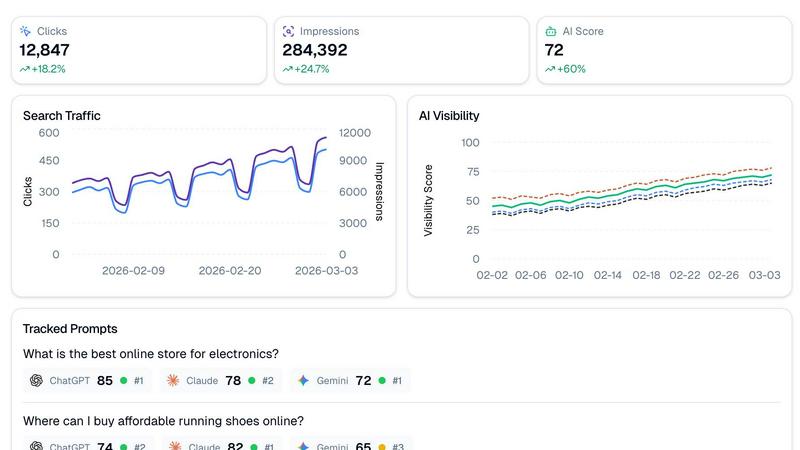
This foundational feature integrates data from Google Search Console with proprietary AI visibility tracking, presenting both datasets in a single, cohesive interface. Users can view classic SEO metrics like clicks, impressions, and click-through rates alongside daily AI visibility scores for ChatGPT, Claude, and Gemini. This side-by-side comparison allows for correlating trends and understanding the holistic performance of a brand's search presence, moving beyond siloed data to a comprehensive view of modern search behavior.
AI Visibility Scoring & Prompt Tracking
quickseo.ai enables users to define specific questions or "prompts" that their target customers are likely asking AI chatbots, such as "What is the best online store for electronics?". The platform then continuously monitors these prompts across the major AI platforms, reporting back not only your brand's ranking position (e.g., #1, #2) but also a proprietary visibility score out of 100. This provides a quantifiable, daily measure of your brand's authority and presence within AI-generated answers, a metric previously unavailable to most marketers.
Sentiment Analysis & Cited Page Monitoring
Beyond mere ranking, quickseo.ai analyzes the context in which your brand is mentioned by AI. The sentiment analysis feature categorizes mentions as positive, neutral, or negative, providing crucial insight into brand perception within AI ecosystems. Furthermore, it identifies which specific pages on your website (e.g., blog posts, product pages) are cited as sources by the AI chatbots. This reveals which content is most influential in securing AI visibility and driving authoritative citations.
Page Group Organization & Competitor Tracking
For efficient analysis, quickseo.ai allows users to group website pages by URL patterns (like /blog/, /products/) to see which site sections drive the most traffic and AI citations. Simultaneously, the competitor tracking feature automatically extracts and monitors which rival brands are appearing alongside yours in AI responses for your tracked prompts. This provides direct, actionable intelligence on your competitive landscape within the new AI search channel.
RemoveTexts
Paint to Remove
The Paint to Remove feature allows users to brush over specific areas of text they wish to eliminate with precision. This targeted approach ensures that only the selected text is removed, leaving the surrounding image intact. It is particularly useful for images with multiple text elements, allowing users to control the editing process effectively.
Auto Remove All
With the Auto Remove All feature, users benefit from the power of AI to automatically detect and remove every text element within an image. This feature is ideal for users looking for a quick solution to clean up images without the hassle of manual selection, saving valuable time and effort.
Edit & Replace Text
This feature enables users to not only remove existing text but also replace it with new text while matching the original style. This is particularly useful for marketers and designers who need to update promotional materials or graphics without starting from scratch, ensuring brand consistency.
Remove Objects
Beyond text removal, RemoveTexts offers the ability to erase unwanted objects or logos from images. This feature is essential for users who need to clean up product photos or personal images by eliminating distracting elements that may detract from the overall appearance.
Use Cases
quickseo.ai
Proactive AI Search Strategy Development
Marketing teams can transition from being reactive to proactive in AI search. By identifying key customer prompts and tracking visibility scores, teams can develop content and SEO strategies specifically designed to improve rankings in ChatGPT, Claude, and Gemini. This use case is critical for capturing early market share in AI-driven discovery, as studies show only 16% of brands currently track this visibility, leaving a significant opportunity gap.
Integrated Performance Reporting & Attribution
SEO managers and agency professionals can use quickseo.ai to create unified reports that demonstrate ROI across all search channels. Instead of reporting on Google Analytics and speculating about AI impact separately, they can present a complete picture showing how organic search efforts contribute to both traditional and AI visibility, justifying budget and strategy with hard, correlated data from a single platform.
Content Optimization for AI Authority
Content marketers and writers can leverage the cited page monitoring and sentiment analysis features to understand which pieces of content AI models deem most authoritative. This insight allows them to double down on successful topics and formats, optimize underperforming but important pages, and create new content designed to earn citations, thereby directly influencing brand visibility in AI-generated answers.
Competitive Intelligence and Market Analysis
Business strategists and competitive analysts can use the platform to monitor not just their own brand's AI visibility but also that of their main competitors. By tracking which prompts competitors rank for and analyzing the sentiment of mentions, companies can identify market gaps, anticipate competitive moves, and adjust their positioning to capitalize on weaknesses or opportunities in the AI search landscape.
RemoveTexts
Content Creation
Content creators across various platforms rely on RemoveTexts to enhance their visuals by removing distracting watermarks or text overlays. This enables them to present clean and professional images that engage their audience more effectively.
E-commerce Product Images
E-commerce sellers can use RemoveTexts to refine product images by eliminating watermarks and unwanted text, ensuring that their listings appear polished and attractive. Clean visuals can significantly impact sales conversions and customer trust.
Legal Document Redaction
Legal professionals can utilize RemoveTexts to redact sensitive information from documents, such as names or dates, ensuring compliance and privacy without compromising the document's overall integrity. The tool's efficiency allows for quick processing of necessary edits.
Social Media Management
Social media managers can leverage RemoveTexts to create visually appealing posts by removing text from images sourced online. This allows for the creation of unique and customized content that aligns with branding strategies and audience engagement goals.
Overview
About quickseo.ai
quickseo.ai is an advanced analytics platform that unifies traditional search engine optimization (SEO) data with pioneering AI search visibility tracking. It addresses a critical gap in modern digital marketing: the rise of AI-powered search. While tools like Google Search Console have been essential for understanding performance on traditional search engines, the rapid adoption of AI chatbots like ChatGPT, Claude, and Gemini has created a new, largely invisible search landscape. Research indicates that 44% of consumers now consider AI their primary search source, and a projected $750 billion in consumer spending will flow through AI search by 2028 (McKinsey). quickseo.ai provides the first integrated dashboard where marketers, SEO professionals, and business owners can track their brand's performance across both Google and major AI platforms. Its core value proposition is eliminating guesswork by offering a single source of truth for search visibility, enabling users to capture emerging AI-driven traffic opportunities before their competitors do. The platform is designed for anyone responsible for organic growth, from solo entrepreneurs to enterprise SEO teams, who understands that Google Search is only half the picture in today's rapidly evolving digital ecosystem.
About RemoveTexts
RemoveTexts is a cutting-edge AI-powered image editing tool designed to effortlessly remove unwanted text from images, making it accessible for users of all skill levels. With its intuitive interface, users can simply upload their images and utilize advanced AI technology to eliminate text elements like watermarks, captions, and date stamps in seconds. This tool is particularly beneficial for photographers, marketers, e-commerce sellers, and content creators who need pristine visuals without the distractions of unwanted text. RemoveTexts employs deep learning techniques, specifically inpainting methods similar to those developed by industry leaders such as NVIDIA and Adobe, to reconstruct the original background seamlessly. The main value proposition of RemoveTexts lies in its ability to provide professional-grade results quickly and efficiently, eliminating the need for complex software like Photoshop or any manual editing skills.
Frequently Asked Questions
quickseo.ai FAQ
How does quickseo.ai track rankings in AI chatbots?
quickseo.ai uses a combination of proprietary API integrations and advanced monitoring systems to simulate user queries and analyze the responses generated by AI platforms like ChatGPT, Claude, and Gemini. It tracks the specific prompts you define, identifies when and how your brand is mentioned, and assigns a ranking position and visibility score based on the prominence and context of the mention within the AI's answer.
What is the difference between AI visibility score and traditional search ranking?
A traditional search ranking is a positional placement (e.g., 1st, 5th) on a Search Engine Results Page (SERP). An AI visibility score is a composite metric (0-100) that factors in not just if you are mentioned, but also the ranking position, the frequency of mention across multiple AI platforms, and the perceived authority within the response. It is designed to quantify presence in a conversational, non-list-based environment.
Can I track competitors who aren't directly in my tracked prompts?
Yes. quickseo.ai's competitor tracking feature automatically extracts brand names that appear alongside yours in the AI responses to your tracked prompts. This allows you to discover emerging or indirect competitors you may not have initially considered, providing a more complete picture of your competitive set within AI search conversations.
How accurate is the sentiment analysis for AI mentions?
The sentiment analysis is powered by natural language processing models trained to identify positive, neutral, and negative language cues within the text of AI responses. While highly accurate for clear-cut language, the nuance of conversational AI can sometimes pose challenges. The feature is designed as a reliable indicator of overall brand perception trends rather than a perfect analysis of every single mention.
RemoveTexts FAQ
How does RemoveTexts work?
RemoveTexts utilizes advanced AI algorithms to analyze surrounding pixels and intelligently reconstruct the background after removing text. This process ensures that the edited area blends seamlessly with the rest of the image.
What types of images can I upload?
You can upload images in JPG, PNG, or WebP formats, with a maximum file size of 10 MB. This compatibility makes it easy to work with various types of images for your editing needs.
Is there a limit to the number of images I can process?
While there is no explicit limit mentioned, users can process multiple images as needed. RemoveTexts is designed to handle batch processing efficiently, making it suitable for high-volume editing tasks.
Do I need any special skills to use RemoveTexts?
No special skills or design experience is required to use RemoveTexts. The tool is designed for users of all levels, making it accessible and easy to use for anyone needing to remove text from images quickly.
Alternatives
quickseo.ai Alternatives
quickseo.ai is a specialized marketing platform that falls into the emerging category of AI search visibility and brand tracking tools. It uniquely combines traditional Google Search Console analytics with monitoring for how a brand appears within leading AI models like ChatGPT, Claude, and Gemini. This allows businesses to track their performance across both conventional and AI-powered search landscapes. Users may explore alternatives for several common reasons. Budget constraints or specific pricing models can drive the search for a different solution. Some may require integrations with a particular tech stack, while others might seek a tool with a different focus, such as deeper traditional SEO analytics or broader social media monitoring instead of AI-specific tracking. The need for a free plan or a different user interface can also prompt evaluation of other options. When selecting an alternative, key considerations should include the scope of AI platform coverage, the depth of analytics provided, and the tool's ability to deliver actionable insights. It's crucial to assess whether a platform offers the specific tracking features you need, such as sentiment analysis, competitor benchmarking, or geographic performance data, and to ensure it aligns with your team's technical requirements and strategic goals for capturing AI-driven organic traffic.
RemoveTexts Alternatives
RemoveTexts is an AI-powered tool designed for the rapid removal of text from images, making it an essential resource within the image editing category. Users often seek alternatives to RemoveTexts for a variety of reasons, such as pricing concerns, specific feature sets, or compatibility with different platforms. The need for flexibility in editing capabilities, user interface preferences, and additional functionalities can also drive the search for alternatives. When choosing an alternative to RemoveTexts, look for tools that offer similar AI-powered capabilities, ease of use, and high-quality output. Consider features like the ability to remove not just text but also other unwanted elements, as well as the range of languages supported. Additionally, assess the pricing structure and whether there are any free trials or demo versions available.