
Imgezy vs Shrinkpad
Side-by-side comparison to help you choose the right product.

Imgezy
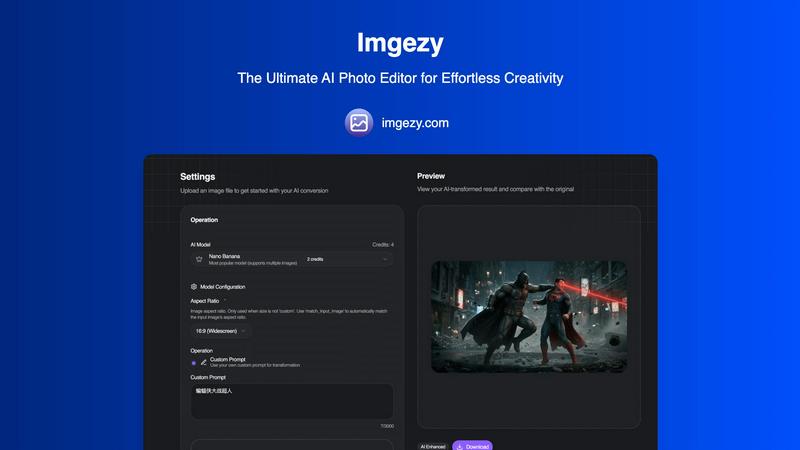
Imgezy is an AI photo editor that professionally removes objects and changes backgrounds instantly.
Last updated: February 28, 2026

Shrinkpad
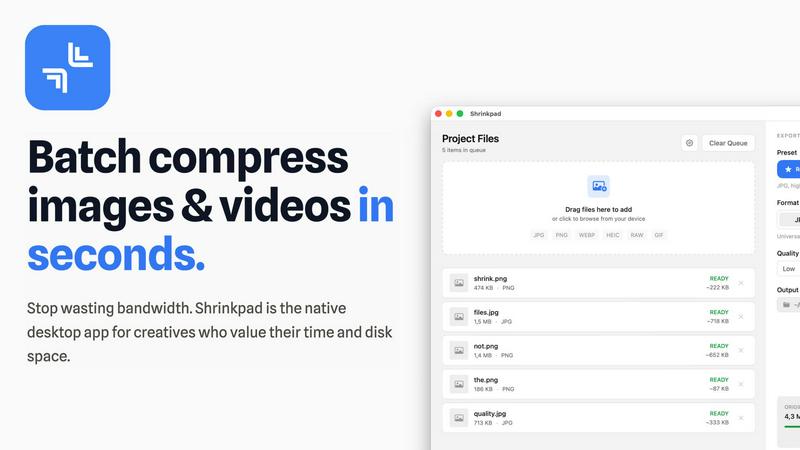
Effortlessly batch compress images and videos on Mac, optimizing quality while saving time and disk space.
Last updated: February 28, 2026
Visual Comparison
Imgezy
Shrinkpad
Feature Comparison
Imgezy
AI-Powered Object Removal
This feature utilizes sophisticated inpainting algorithms to identify and seamlessly remove unwanted elements from photographs. Whether it's a photobomber, a distracting street sign, or imperfections, the AI analyzes the surrounding pixels to reconstruct the background with photorealistic accuracy. This process, which once required meticulous manual cloning and healing in professional software, is now accomplished automatically, preserving the image's original texture and lighting without a trace of the removed object.
Instant Background Replacement
Imgezy allows users to alter a photo's context entirely by replacing its background through a simple text prompt. The AI accurately segments the main subject from the foreground—a complex task known as image matting—and places it onto a new backdrop. Users can specify environments like "sunny beach," "modern office," or "solid color," enabling limitless creative possibilities for portrait photography, product shots, and social media content without the need for green screens or complex selection tools.
Intelligent Photo Enhancement
Beyond structural edits, Imgezy's AI performs automatic quality optimization. It can enhance a photo's attributes by adjusting exposure, correcting color balance, increasing sharpness, and reducing noise. This is powered by machine learning models trained on vast datasets of professional photography, allowing the tool to apply nuanced improvements that elevate an image's overall aesthetic appeal and professional finish with a single click.
Batch Processing Capability
For professionals and users handling large volumes of images, Imgezy offers batch processing. This feature enables the application of the same edit or enhancement preset across multiple photos simultaneously, dramatically improving workflow efficiency. This is particularly valuable for e-commerce businesses needing consistent product image backgrounds or photographers editing a series from a single event, ensuring uniformity and saving considerable manual effort.
Shrinkpad
Batch Compression
Shrinkpad allows users to batch compress images and videos in seconds. It automatically analyzes visual complexity, applying the perfect compression ratio without introducing artifacts, resulting in significant file size reductions and improved performance.
One-Drop Import
With the one-drop import feature, users can simply drag any folder onto Shrinkpad. The software automatically identifies and adds all supported images and videos to the batch list, eliminating the need for manual file selection and saving valuable time.
Mixed Media Batches
Shrinkpad excels at processing mixed media batches, enabling users to compress photos and videos together in the same batch. It intelligently applies optimal compression settings for each file type, ensuring the highest quality output across different media formats.
Privacy First
Prioritizing user privacy, Shrinkpad processes all files locally on the user's machine, ensuring no cloud uploads occur. This feature guarantees that sensitive assets remain secure, providing peace of mind for creatives handling confidential projects.
Use Cases
Imgezy
Real Estate Photography Enhancement
Real estate agents and photographers can use Imgezy to instantly declutter and stage property photos. The AI can remove personal items, trash bins, or power lines from exterior shots, and replace outdated furniture or bland skies with more appealing alternatives. This enhances listing appeal, potentially increasing perceived property value and engagement, as high-quality visuals are critical in digital marketplaces.
E-commerce Product Image Optimization
Online retailers can streamline their catalog management by using Imgezy to create uniform, professional product images. The tool can remove distracting backgrounds and place products on clean, white backdrops or branded environments. It can also erase mannequin stands or supporting wires, resulting in polished images that meet platform standards and improve conversion rates, all without costly photo shoots for every variant.
Personal Photo Restoration and Refinement
Individuals can revive old or imperfect personal photographs. Imgezy can repair scratches and tears from scanned old photos, remove unwanted ex-partners or strangers from group shots, and enhance faded colors. It can also creatively alter vacation photos by replacing gloomy skies with sunny ones or removing tourist crowds, allowing users to perfect their personal memories effortlessly.
Social Media Content Creation
Content creators, influencers, and marketers can rapidly produce eye-catching visuals for platforms like Instagram, TikTok, and Facebook. By quickly removing distractions, swapping backgrounds to match a theme or trend, and enhancing image quality, users can maintain a consistent and high-quality feed. This speeds up content production cycles, enabling more frequent posting of professional-looking material.
Shrinkpad
Optimizing Web Assets
Web developers and designers can utilize Shrinkpad to compress images and videos for websites, resulting in faster load times and improved user experiences. By reducing file sizes significantly, they can enhance overall site performance and SEO rankings.
Streamlining Design Workflows
Photographers and graphic designers often export large volumes of assets from applications like Figma or Photoshop. Shrinkpad simplifies this process by allowing them to export everything at 2x or 4x resolutions and handle optimization in bulk, saving hours of busywork.
Enhancing Video Production
Video editors can leverage Shrinkpad to compress large video files without sacrificing quality. This is particularly beneficial for projects requiring fast turnaround times, as it allows editors to share high-quality footage quickly and efficiently.
Managing Digital Archives
Content creators frequently accumulate vast libraries of images and videos. Shrinkpad aids in managing these digital archives by compressing files for better storage management while maintaining the quality necessary for future projects.
Overview
About Imgezy
Imgezy is a state-of-the-art, AI-powered photo editing platform that fundamentally democratizes professional-grade image manipulation. It leverages advanced artificial intelligence to enable users to perform complex edits through simple text-based instructions, eliminating the steep learning curve traditionally associated with software like Photoshop. This paradigm shift, as noted in research on human-computer interaction, lowers barriers to creative expression by prioritizing intent over technical skill (Shneiderman, B., et al. "Designing the User Interface: Strategies for Effective Human-Computer Interaction"). Trusted by over 200,000 creators, Imgezy serves a broad spectrum of users, from casual photographers looking to enhance personal memories to marketing professionals and social media managers who require rapid, high-quality visual content. Its core value proposition lies in delivering precision-editing capabilities—such as object removal, background replacement, and quality enhancement—within seconds, allowing users to focus purely on their creative vision rather than the intricacies of manual editing tools.
About Shrinkpad
Shrinkpad is a powerful batch image and video compression tool specifically crafted for macOS users, designed for a wide array of creatives, including photographers, designers, and content creators. This innovative software enables users to efficiently compress hundreds of media files in mere seconds without compromising visual quality. By simply dragging and dropping entire folders containing images and videos, Shrinkpad processes them locally on the device, ensuring complete privacy and security. Utilizing native macOS frameworks, it can minimize file sizes by up to 90%, which significantly enhances storage management and optimizes performance for applications and websites. Supporting over 50 file formats, such as JPG, PNG, HEIC, MP4, and MOV, Shrinkpad's user-friendly interface and customizable settings make it an ideal solution for anyone looking to streamline their media optimization workflow while maintaining high-quality output.
Frequently Asked Questions
Imgezy FAQ
How does Imgezy's AI understand my text prompts?
Imgezy integrates advanced natural language processing (NLP) models with computer vision systems. When you input a prompt like "remove the red car," the NLP component interprets your intent, and the vision AI locates the relevant object within the image's pixel data. This synergy allows for intuitive, instruction-based editing, a significant advancement in accessible design tools as highlighted in studies on multimodal AI interfaces.
Is there a limit to the complexity of objects I can remove?
While Imgezy is highly effective, the success rate can depend on the object's size, complexity, and how integrated it is with the background. Simple objects on contrasting backgrounds are removed flawlessly. For very complex scenes, the AI may require more detailed prompts. The technology is continuously learning, with its efficacy supported by the platform's milestone of over 1 million objects successfully removed.
Can I use images edited with Imgezy for commercial purposes?
Yes, commercial usage rights are included with specific subscription plans. The Pro plan explicitly includes a commercial license, granting users the right to use the edited images in client work, marketing materials, and for sale. Users should review the terms of service for their specific plan to ensure compliance, as the Basic plan may have limitations on commercial use.
What image formats does Imgezy support for upload and download?
Imgezy supports all major image formats for upload, including JPG, PNG, and WebP. Edited images are available for download in high-resolution formats without quality loss, ensuring the output is suitable for both digital use and high-quality printing. The system is designed to maintain the integrity and resolution of your original file throughout the AI editing process.
Shrinkpad FAQ
Can I use Shrinkpad for free?
Yes, Shrinkpad offers a Free Starter plan, which includes essential tools for casual use, allowing users to batch process up to 10 files at a time in common formats.
What file formats does Shrinkpad support?
Shrinkpad supports over 50 file formats, including popular image formats like JPG, PNG, WEBP, and AVIF, as well as video formats such as MP4 and MOV, ensuring compatibility with various media types.
Does Shrinkpad support video compression?
Absolutely. Shrinkpad is designed to handle video compression alongside image compression, allowing users to process mixed media files in one batch efficiently.
How many files can I process at once?
The Free Starter plan limits users to 10 files per batch, while the Personal plan allows unlimited batch processing, enabling creators to handle thousands of files without crashing the application.
Alternatives
Imgezy Alternatives
Imgezy is a prominent AI-powered photo editing tool within the image enhancement and manipulation category. It specializes in using natural language instructions to perform complex edits like object removal and background replacement, making professional-grade editing accessible to a broad audience. Users often explore alternatives to Imgezy for various reasons. Common factors include budget constraints and subscription pricing models, the need for specific advanced features beyond core object removal, or compatibility requirements with different operating systems and workflows. The search for a tool with a different user interface or integration capabilities also drives this evaluation. When selecting an alternative, key considerations should align with your primary needs. Evaluate the accuracy and quality of the AI's output, especially for intricate edits. Assess the overall cost against the feature set and usage limits. Furthermore, consider the platform's ease of use, processing speed, and how well it integrates into your existing creative or professional pipeline.
Shrinkpad Alternatives
Shrinkpad is a powerful batch image and video compression tool designed specifically for macOS users. It allows creatives, including photographers and content creators, to efficiently compress large volumes of media files while maintaining high visual quality. As users explore their options, they often seek alternatives for various reasons such as pricing, feature sets, and compatibility with different platforms. When selecting an alternative to Shrinkpad, users should consider key factors such as the software's ease of use, the range of supported file formats, the quality of compression, and whether it processes files locally or relies on cloud-based solutions. Additionally, features like batch processing capabilities and customization options can significantly impact user experience.