
ImaginePro vs Shrinkpad
Side-by-side comparison to help you choose the right product.

ImaginePro
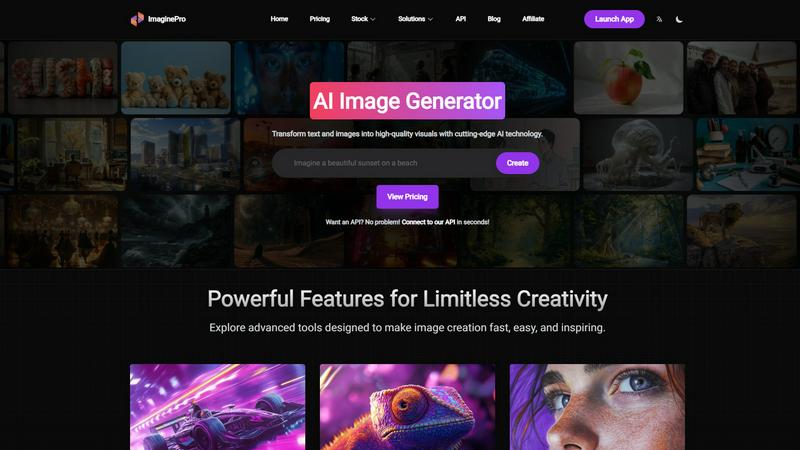
ImaginePro generates professional AI images and removes backgrounds with research-backed speed and quality.
Last updated: March 1, 2026

Shrinkpad
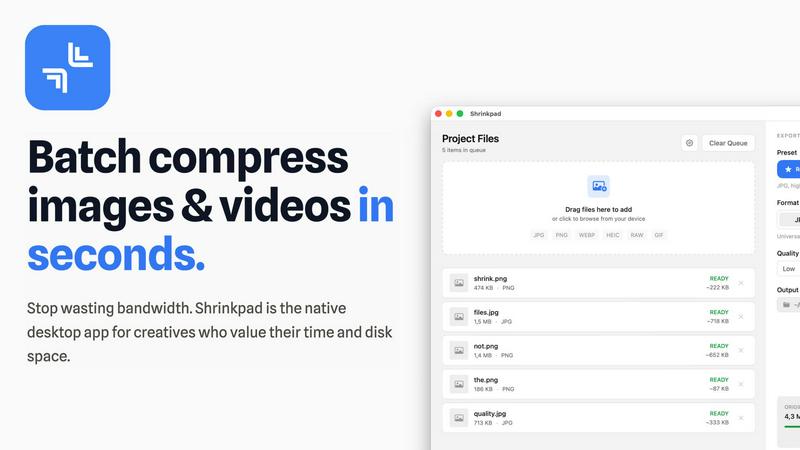
Effortlessly batch compress images and videos on Mac, optimizing quality while saving time and disk space.
Last updated: February 28, 2026
Visual Comparison
ImaginePro
Shrinkpad
Feature Comparison
ImaginePro
AI Image Generator
This core feature leverages top-tier generative AI models to convert text prompts into high-resolution, lifelike images in seconds. The system is designed for both speed and quality, producing visuals with realistic detail and composition that are ready for immediate commercial use. Users can fine-tune results with style references, color palettes, and lighting adjustments, offering a balance between automated generation and creative control without requiring external editing software.
Background Removal
ImaginePro includes a dedicated, AI-powered tool for instantly and accurately removing backgrounds from any image. This feature is critical for streamlining workflows in e-commerce, portrait photography, and graphic design, allowing users to isolate subjects cleanly. It eliminates the need for complex manual selection in software like Photoshop, enabling rapid creation of product cutouts, professional headshots, and compositing-ready assets directly within the platform.
Text Behind Image Effect
This advanced post-production feature allows users to create dynamic magazine-cover-style graphics by placing text behind foreground objects. The AI intelligently detects subjects within an image, enabling text to be seamlessly integrated into the background for a professional, layered effect. Users have extensive customization options, including multiple font choices, styles, and positioning controls, to enhance visual impact and convey specific brand messaging or artistic inspiration.
AI Agent & Skill Integration
For developers and automated workflows, ImaginePro offers a powerful API and a zero-dependency Python skill. This allows AI coding agents like Claude Code or Codex to generate and manipulate images programmatically. The skill provides access to multiple AI models, upscaling, background removal, and prompt enhancement, outputting results in JSON format for easy consumption by chatbots, automated content pipelines, and other agentic systems.
Shrinkpad
Batch Compression
Shrinkpad allows users to batch compress images and videos in seconds. It automatically analyzes visual complexity, applying the perfect compression ratio without introducing artifacts, resulting in significant file size reductions and improved performance.
One-Drop Import
With the one-drop import feature, users can simply drag any folder onto Shrinkpad. The software automatically identifies and adds all supported images and videos to the batch list, eliminating the need for manual file selection and saving valuable time.
Mixed Media Batches
Shrinkpad excels at processing mixed media batches, enabling users to compress photos and videos together in the same batch. It intelligently applies optimal compression settings for each file type, ensuring the highest quality output across different media formats.
Privacy First
Prioritizing user privacy, Shrinkpad processes all files locally on the user's machine, ensuring no cloud uploads occur. This feature guarantees that sensitive assets remain secure, providing peace of mind for creatives handling confidential projects.
Use Cases
ImaginePro
Marketing & Social Media Content Creation
Marketing teams can rapidly generate a high volume of unique, on-brand visuals for campaigns, social media posts, and advertisements. The platform's ability to quickly produce variations and apply effects like text overlay enables the creation of engaging content calendars without constant reliance on design departments or stock photo subscriptions, aligning with the need for agile content marketing strategies.
E-commerce Product Visualization
Online retailers can use ImaginePro to create professional product images, generate lifestyle shots of products in different settings, and cleanly remove backgrounds for catalog listings. This reduces photoshoot costs and accelerates time-to-market for new products. The high-quality, consistent output helps improve conversion rates by providing customers with clear, appealing visual information.
Creative Design & Artistic Augmentation
Graphic designers and digital artists can employ ImaginePro as a brainstorming and prototyping tool to overcome creative blocks and explore visual concepts. The platform can generate base imagery, textures, or stylistic elements that professionals can then refine and integrate into their final compositions, effectively augmenting traditional design workflows with AI-powered inspiration.
Automated Content Pipelines
Businesses and developers can integrate the ImaginePro API into automated systems to generate images for dynamic web content, personalized marketing emails, report illustrations, or chatbot interactions. This use case is essential for scaling personalized visual content where manual creation is impractical, leveraging the platform's programmatic access for efficiency.
Shrinkpad
Optimizing Web Assets
Web developers and designers can utilize Shrinkpad to compress images and videos for websites, resulting in faster load times and improved user experiences. By reducing file sizes significantly, they can enhance overall site performance and SEO rankings.
Streamlining Design Workflows
Photographers and graphic designers often export large volumes of assets from applications like Figma or Photoshop. Shrinkpad simplifies this process by allowing them to export everything at 2x or 4x resolutions and handle optimization in bulk, saving hours of busywork.
Enhancing Video Production
Video editors can leverage Shrinkpad to compress large video files without sacrificing quality. This is particularly beneficial for projects requiring fast turnaround times, as it allows editors to share high-quality footage quickly and efficiently.
Managing Digital Archives
Content creators frequently accumulate vast libraries of images and videos. Shrinkpad aids in managing these digital archives by compressing files for better storage management while maintaining the quality necessary for future projects.
Overview
About ImaginePro
ImaginePro is a comprehensive, AI-powered visual content creation platform engineered to democratize professional-grade graphic design. It functions as an all-in-one solution that transforms textual descriptions and existing images into high-quality, commercial-ready visuals using cutting-edge generative AI models. The platform's core value proposition lies in its synthesis of powerful generation capabilities with practical, integrated post-production tools, all accessible through an intuitive interface. This significantly reduces the time, cost, and technical skill traditionally required for visual asset production. ImaginePro serves a broad user base, from marketing professionals and e-commerce managers needing rapid social media graphics or product photos, to designers and content creators seeking to augment their creative workflow with AI-driven inspiration and execution. Backed by a robust API for enterprise integration and automation, ImaginePro positions itself as a scalable solution for businesses and individuals aiming to produce polished visual content efficiently, supporting the growing demand for high-volume, personalized media as noted in industry analyses of digital marketing trends.
About Shrinkpad
Shrinkpad is a powerful batch image and video compression tool specifically crafted for macOS users, designed for a wide array of creatives, including photographers, designers, and content creators. This innovative software enables users to efficiently compress hundreds of media files in mere seconds without compromising visual quality. By simply dragging and dropping entire folders containing images and videos, Shrinkpad processes them locally on the device, ensuring complete privacy and security. Utilizing native macOS frameworks, it can minimize file sizes by up to 90%, which significantly enhances storage management and optimizes performance for applications and websites. Supporting over 50 file formats, such as JPG, PNG, HEIC, MP4, and MOV, Shrinkpad's user-friendly interface and customizable settings make it an ideal solution for anyone looking to streamline their media optimization workflow while maintaining high-quality output.
Frequently Asked Questions
ImaginePro FAQ
What kind of images can I create with ImaginePro?
ImaginePro is capable of generating a wide array of high-quality, commercial-ready visuals. This includes realistic product shots, artistic illustrations, social media graphics, concept art, and portraits. The AI models are trained to handle diverse styles and subjects, from photorealistic scenes to stylized artwork, based on the detail and specificity of your text prompt.
Do I own the images I generate on ImaginePro?
Yes, users typically retain full ownership and commercial rights to the images they create using ImaginePro's platform. This is standard for major AI image generation services, allowing you to use the generated visuals in marketing materials, products, and publications without requiring additional licenses or attributions. Always review the platform's specific Terms of Service for the most current policy details.
How does the Background Removal feature work?
The Background Removal tool uses a specialized AI model trained for image segmentation. It automatically identifies and separates the primary subject (like a person, product, or animal) from its background. The process is nearly instantaneous and requires no manual outlining, producing a clean cutout with a transparent background that can be used for compositing or placed onto new backdrops.
Can I use ImaginePro via an API for my applications?
Absolutely. ImaginePro offers a robust API designed for enterprise integration and automation. Developers can connect to the API to programmatically access core features like image generation, background removal, and upscaling. This enables the embedding of ImaginePro's capabilities into custom applications, automated content workflows, chatbots, and other software solutions.
Shrinkpad FAQ
Can I use Shrinkpad for free?
Yes, Shrinkpad offers a Free Starter plan, which includes essential tools for casual use, allowing users to batch process up to 10 files at a time in common formats.
What file formats does Shrinkpad support?
Shrinkpad supports over 50 file formats, including popular image formats like JPG, PNG, WEBP, and AVIF, as well as video formats such as MP4 and MOV, ensuring compatibility with various media types.
Does Shrinkpad support video compression?
Absolutely. Shrinkpad is designed to handle video compression alongside image compression, allowing users to process mixed media files in one batch efficiently.
How many files can I process at once?
The Free Starter plan limits users to 10 files per batch, while the Personal plan allows unlimited batch processing, enabling creators to handle thousands of files without crashing the application.
Alternatives
ImaginePro Alternatives
ImaginePro is a comprehensive AI-powered visual content creation platform within the image and photo category. It specializes in generating high-quality visuals from text and refining existing images with tools like background removal, positioning itself as an all-in-one solution for professional-grade visual production. Users may explore alternatives for various reasons, including budget constraints, specific feature requirements not covered by the platform, or a need for integration with different software ecosystems. The search often stems from a desire to find a tool that aligns precisely with individual workflow demands or project scales. When evaluating alternatives, key considerations should include the core AI model's output quality and speed, the breadth of post-production tools available, the platform's ease of use for non-experts, and the robustness of its API for automation. Research into the underlying technology, such as the use of advanced diffusion models for generation, can also indicate a tool's capability and reliability.
Shrinkpad Alternatives
Shrinkpad is a powerful batch image and video compression tool designed specifically for macOS users. It allows creatives, including photographers and content creators, to efficiently compress large volumes of media files while maintaining high visual quality. As users explore their options, they often seek alternatives for various reasons such as pricing, feature sets, and compatibility with different platforms. When selecting an alternative to Shrinkpad, users should consider key factors such as the software's ease of use, the range of supported file formats, the quality of compression, and whether it processes files locally or relies on cloud-based solutions. Additionally, features like batch processing capabilities and customization options can significantly impact user experience.