Hush Touch | Voice-to-Text for MacOS vs VideoAny
Side-by-side comparison to help you choose the right product.

Hush Touch | Voice-to-Text for MacOS
Hush Touch is an offline voice-to-text app for macOS that learns your vocabulary and improves accuracy every use.
Last updated: February 27, 2026

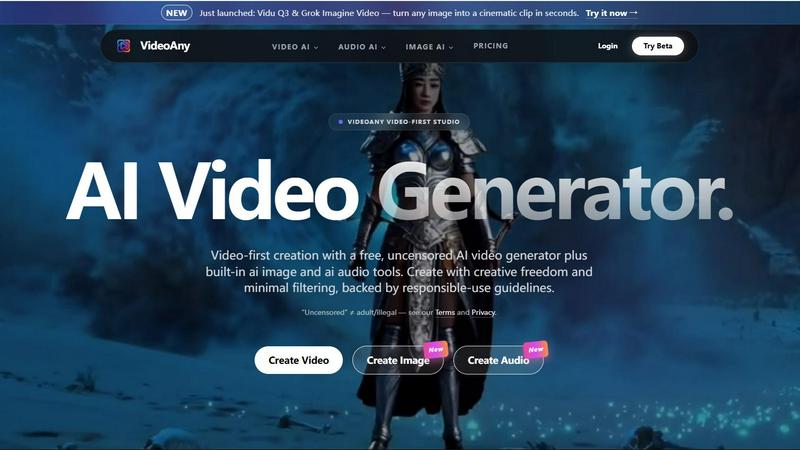
VideoAny is a comprehensive AI studio that consolidates video, image, and audio generation into one powerful, video-first platform for creators.
Last updated: April 13, 2026
Visual Comparison
Hush Touch | Voice-to-Text for MacOS

VideoAny
Feature Comparison
Hush Touch | Voice-to-Text for MacOS
Dual-Engine Recognition
Hush Touch employs a dual-engine approach that combines the DictationTranscriber for natural flow and punctuation with the SFSpeechRecognizer for custom vocabulary enhancement. This synergy ensures accurate transcriptions that cater to specific user needs, adapting to the unique language used within various professions.
Custom Vocabulary
With the capability to learn and store up to 500 specific terms, Hush Touch enhances dictation accuracy by recognizing technical jargon, brand names, and medical terminology. The app's auto-learn feature allows it to adapt to corrections made by users, ensuring that it evolves with their vocabulary.
Smart Text Processing
The app's smart text processing features include filler word removal, auto-correction for common errors, and voice snippets for frequently used phrases. All these functionalities operate locally and in real-time, allowing for seamless and efficient dictation without delays or interruptions.
Context Modes & Hands-Free Functionality
Hush Touch offers various context modes—General, Email, Code, and Notes—to optimize the dictation experience based on the type of content being created. Users can initiate hands-free dictation by saying "Hey Siri, start touch," with automatic text insertion following a brief pause, making it an ideal tool for multitasking.
VideoAny
Unified AI Video, Image, and Audio Studio
VideoAny consolidates three critical creative modalities into one seamless interface. Users can generate AI videos from text prompts or existing images, create high-fidelity AI images with upscaling and style control, and produce custom audio tracks including text-to-music and sound effects. This integrated approach, as highlighted on the platform, is designed to "replace your entire creative stack," significantly reducing the need to switch between multiple specialized applications and streamlining the content production pipeline from conception to final asset.
Access to Cutting-Edge AI Models
The platform provides direct access to a curated selection of top-tier generative AI models, acting as a centralized hub. This includes newly launched models like Kling 3 for bringing images to life with motion, Vidu Q3 and Grok Imagine Video for cinematic clip generation, and Seedance 2.0. By aggregating these models, VideoAny ensures creators can leverage the latest technological advancements and choose the best tool for their specific creative vision without managing separate subscriptions or interfaces for each model.
Extensive Library of AI Video Effects
VideoAny offers a suite of over 60 one-click AI video effects designed to add dynamic motion and engagement to static content. These pre-built effects allow users to easily make subjects in photos dance, hug, kiss, or perform other actions, enabling rapid creation of engaging, shareable content without requiring advanced technical skills in animation or video editing. This feature lowers the barrier to creating professional-looking, animated social media content.
Uncensored Creation Mode with Guidelines
A defining feature of VideoAny is its support for an "uncensored" mode, which applies minimal content filtering to maximize creative freedom. The platform explicitly clarifies that this does not equate to permission for adult or illegal content, operating instead within a framework of responsible-use guidelines. This mode is specifically supported by the native VideoAny model, offering creators an alternative to platforms with stricter, more restrictive content policies, while third-party integrated models follow their own respective safety standards.
Use Cases
Hush Touch | Voice-to-Text for MacOS
Professional Correspondence
Hush Touch is an excellent tool for professionals who need to draft emails and messages quickly. By using voice dictation, users can compose lengthy correspondence without the hassle of typing, enabling them to focus on content rather than format.
Medical Documentation
Healthcare professionals can utilize Hush Touch to document patient notes and medical records hands-free. The app's ability to recognize medical terminology and maintain accuracy ensures that critical information is captured correctly and efficiently.
Creative Writing
Writers can leverage Hush Touch to brainstorm ideas and draft creative pieces seamlessly. The app allows for a natural flow of thought, enabling authors to express their ideas without interruption while benefiting from real-time transcription.
Coding and Technical Documentation
For software engineers and technical writers, Hush Touch simplifies the process of documenting code and technical specifications. Its dual-engine recognition supports specific programming language syntax and terminology, making it a valuable asset for anyone in the tech industry.
VideoAny
Social Media Content and Viral Marketing
Creators and marketing teams can use VideoAny to rapidly produce a high volume of engaging, platform-optimized video clips, images, and audio for campaigns. The ability to quickly turn text ideas or product images into professional videos with effects makes it ideal for creating trending TikTok/Reels content, promotional ads, and brand storytelling designed to capture attention and drive shares in fast-paced social media environments.
Prototyping and Storyboarding for Film & Media
Filmmakers, animators, and game developers can utilize VideoAny's text-to-video and image-to-video capabilities to visualize concepts, create dynamic storyboards, and prototype scenes. Generating quick cinematic clips from script excerpts or concept art allows for efficient pre-visualization, client presentations, and creative iteration before committing to expensive production shoots or complex 3D animation.
Personalized Audio-Visual Content Creation
Podcasters, educators, and influencers can leverage the integrated audio and video tools to create cohesive multimedia content. This includes generating custom background music or sound effects for videos, cloning voices for narration, and transforming blog posts or scripts into narrated video summaries with accompanying visuals, all within a single workflow to enhance production value and audience engagement.
E-commerce and Product Visualization
Online retailers and brands can employ VideoAny to create compelling product showcases. By uploading product images, they can generate videos that show items in use, apply engaging AI effects to highlight features, and create consistent branded imagery and audio for advertising. This transforms static catalog photos into dynamic, conversion-optimized content for websites, marketplaces, and social media ads.
Overview
About Hush Touch | Voice-to-Text for MacOS
Hush Touch is an innovative voice-to-text application designed specifically for macOS users seeking a fast, natural, and privacy-focused dictation experience. Unlike many dictation tools that rely on cloud processing, Hush Touch operates entirely on-device, ensuring user data remains private and secure. By integrating two advanced Apple transcription engines with an Apple Intelligence final pass, the app delivers highly accurate text conversions that continuously improve over time. With Hush Touch, users can effortlessly draft emails, messages, notes, and documents hands-free, initiating dictation through a customizable hotkey or Siri. The app excels in recognizing specialized vocabulary, removing unnecessary filler words, and maintaining clear punctuation—all while being lightweight (only 5.5 MB) and requiring minimal setup. Hush Touch is perfect for professionals in various fields, such as writers, doctors, and engineers, who demand a reliable dictation solution without the hassle of ongoing subscriptions.
About VideoAny
VideoAny is a comprehensive, video-first AI creative studio designed to consolidate the entire content creation workflow into a single, powerful platform. It integrates state-of-the-art AI video, image, and audio generation tools, offering creators a unified environment to produce high-quality, viral-ready content. The platform distinguishes itself by emphasizing creative freedom with "minimal filtering," operating under a framework of responsible-use guidelines that prohibit illegal content while allowing for a broader range of creative expression compared to heavily censored alternatives. VideoAny aggregates access to leading AI models like Kling 3.0, Vidu Q3, Grok Imagine, and Seedance 2.0, enabling users to generate fluid, high-definition videos from text or images, create detailed AI images, and produce custom audio including music and sound effects. It is built for a wide range of users, from social media creators and digital marketers to storytellers and advertisers, who seek an efficient, all-in-one solution to replace fragmented creative software stacks. According to its official documentation, the platform's core value proposition is providing "everything you need to go viral" by streamlining production and leveraging the latest advancements in generative AI technology.
Frequently Asked Questions
Hush Touch | Voice-to-Text for MacOS FAQ
How does Hush Touch maintain privacy?
Hush Touch processes all voice data on-device, eliminating reliance on cloud storage and ensuring that users' information remains private and secure throughout the dictation process.
Can I customize the vocabulary in Hush Touch?
Yes, Hush Touch allows users to input up to 500 custom terms, which the app can learn over time. This feature enhances dictation accuracy, particularly for specialized jargon and technical language.
Is there a trial available for Hush Touch?
Yes, Hush Touch offers a 7-day free trial with no credit card required. Users can experience its features and capabilities before committing to a purchase.
What is the pricing structure for Hush Touch?
Hush Touch is available for a one-time fee of $20, providing users with a lifetime license without any subscription costs, ensuring long-term access to the app without ongoing expenses.
VideoAny FAQ
What is VideoAny's "uncensored" mode?
VideoAny's "uncensored" mode refers to its native AI model operating with minimal content filtering to provide greater creative freedom, as defined in its responsible-use guidelines. It is crucial to note the platform explicitly states this "does not equal adult/illegal" content, which remains prohibited. Importantly, third-party models integrated into VideoAny, such as Kling or Vidu, follow their own platform policies and may apply additional safety filters or refuse certain prompts, independent of VideoAny's settings.
Is there a free version of VideoAny?
Yes, VideoAny offers a free tier that provides access to core features, allowing users to generate content with certain limitations. This enables experimentation and basic creation without financial commitment. For enhanced capabilities like higher resolution outputs, batch processing, and priority access to generation queues, users must subscribe to one of VideoAny's paid plans.
Can I use content generated on VideoAny for commercial purposes?
Commercial usage rights depend on the user's subscription plan. According to the platform's FAQ, paid subscribers typically receive broader licenses for commercial use of generated content. Users on the free tier are generally limited to personal and non-commercial projects. It is essential to review the specific Terms of Service associated with your active plan to understand the exact scope of permitted use.
How does VideoAny handle data privacy and security?
VideoAny states that user uploads are encrypted during transit to protect data. The platform's data handling practices are governed by its published Privacy Policy. Users retain control over their content, deciding what to publish or share. For specific details on data storage, processing, and retention, creators are directed to consult the official Privacy and Terms documents provided by VideoAny.
Alternatives
Hush Touch | Voice-to-Text for MacOS Alternatives
Hush Touch | Voice-to-Text for MacOS is an innovative voice-to-text application designed specifically for macOS users. It belongs to the AI Assistants category and offers a unique offline dictation experience, utilizing advanced Apple transcription engines to ensure accuracy and privacy. Users often seek alternatives for various reasons, including pricing, feature sets, and compatibility with other platforms. The desire for enhanced functionality, broader language support, or different user interfaces can also drive users to explore other options. When choosing an alternative to Hush Touch, it is essential to consider factors such as the application’s transcription accuracy, ease of use, and whether it operates offline. Users should also evaluate the pricing model, as some alternatives may require ongoing subscriptions, while others offer one-time purchases. Furthermore, looking for features like customizable commands, seamless integration with existing workflows, and privacy assurances can significantly impact user satisfaction.
VideoAny Alternatives
VideoAny is a comprehensive AI video and image generation platform, categorized as an AI-powered creative studio. It integrates video, image, and audio synthesis tools, emphasizing creative freedom with minimal content filtering to support a wide range of creator visions. Users may seek alternatives for various reasons, including budget constraints, specific feature requirements like advanced editing controls or different AI model access, or a need for platforms with more robust moderation for brand-safe content. The search often stems from a mismatch between a tool's capabilities and a project's unique demands. When evaluating alternatives, key considerations include the quality and realism of AI-generated outputs, the range of supported media types (video, image, audio), pricing transparency and scalability, the specific AI models available, and the platform's content policies to ensure alignment with your intended use case and audience.