AIPhotoTalk vs Grok Imagine
Side-by-side comparison to help you choose the right product.

AI PhotoTalk transforms photos into realistic talking videos with perfect lip sync, multi-language support, and 4K quality in just 30 seconds.
Last updated: March 11, 2026

Grok Imagine
Grok Imagine transforms text and images into stunning AI videos with synced audio in seconds, sparking your creativity.
Last updated: February 28, 2026
Visual Comparison
AIPhotoTalk
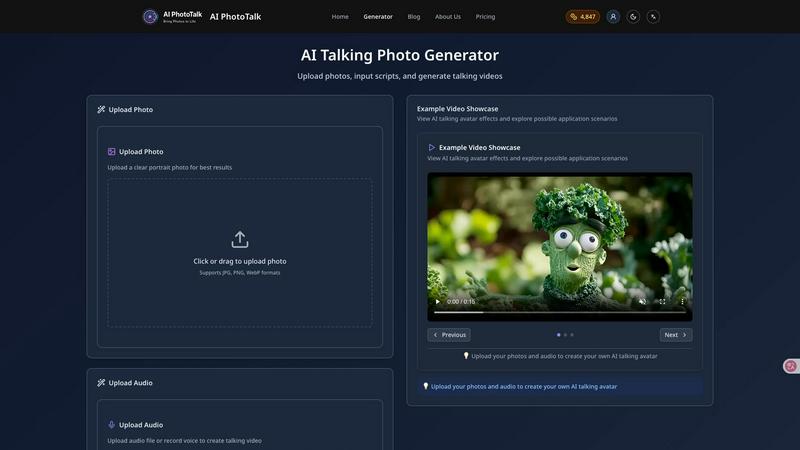
Grok Imagine

Feature Comparison
AIPhotoTalk
Professional Lip Sync Technology
AIPhotoTalk utilizes advanced algorithms powered by deep learning to ensure perfect lip synchronization. This feature allows for the creation of realistic photo animations that mimic natural facial expressions, making the final video appear lifelike and engaging.
Multi-language Voice Synthesis
The platform supports voice synthesis in over 30 languages, catering to a global audience. This feature enables users to create content that resonates with diverse demographics, making AIPhotoTalk an invaluable tool for international marketing and education.
4K Professional Video Output
AIPhotoTalk guarantees high-quality video production with its advanced rendering technology that produces professional-grade 4K videos. This feature is particularly beneficial for businesses and educators seeking to deliver polished presentations and marketing materials.
30-Second Generation Speed
The AI processing capabilities of AIPhotoTalk allow it to generate talking videos in under 30 seconds. This rapid production time is optimized for professional workflows, enabling users to create and share content quickly without sacrificing quality.
Grok Imagine
Fast Generation
Grok Imagine excels in delivering rapid media outputs, generating 6-second videos with audio in just seconds. This feature significantly streamlines the content creation process, allowing users to focus more on creativity rather than waiting for lengthy render times.
Synced Audio
In addition to high-quality visuals, Grok Imagine automatically generates background music and sound effects that are perfectly synchronized with the video content. This integration enhances the overall production quality, making videos more engaging and professional.
Image to Video
Grok Imagine allows users to convert static images into dynamic videos seamlessly. This feature supports all creative modes, enabling users to breathe life into their existing images and transform them into captivating visual narratives.
Three Modes
Grok Imagine offers three distinct creative modes—Normal, Fun, and Spicy—allowing users to choose the style that best suits their project needs. Each mode provides a different approach to visuals, catering to various audiences and content types.
Use Cases
AIPhotoTalk
Talking Social Media Videos
AIPhotoTalk is perfect for creating engaging social media content. Users can transform their personal photos into captivating talking videos that attract attention and drive engagement on platforms like TikTok and Instagram.
AI Spokesperson Clips
Businesses can utilize AIPhotoTalk to create AI-generated spokesperson videos that deliver messages effectively. This use case is particularly useful for marketing campaigns where a human-like presence can enhance brand communication.
Educational Explainer Videos
Educators can leverage AIPhotoTalk to create dynamic explainer videos. By animating historical figures or educational content, teachers can make learning more interactive and appealing to students.
Animated Historical Characters
AIPhotoTalk allows for the creation of animated historical characters, making it an excellent tool for museums, educational institutions, and content creators interested in bringing history to life in an engaging format.
Grok Imagine
Social Media Marketing
Marketing professionals can leverage Grok Imagine for creating captivating social media posts that stand out in crowded feeds. By generating videos quickly with engaging content, they can enhance brand visibility and audience interaction effectively.
Digital Art Creation
Digital artists can utilize Grok Imagine to explore new creative avenues by animating their artwork. The ability to transform static images into videos provides artists with innovative ways to present their creations and connect with audiences.
E-commerce Promotion
E-commerce businesses can create dynamic product videos that showcase their items in an appealing way. By using Grok Imagine, they can produce engaging promotional content that highlights features and benefits, driving customer interest and sales.
Educational Content
Educators and trainers can use Grok Imagine to develop visually stimulating educational videos that enhance learning experiences. With the platform's quick generation of content, educators can create resources that are both informative and visually appealing.
Overview
About AIPhotoTalk
AIPhotoTalk is an innovative AI-powered platform designed to transform static photos into realistic talking videos within seconds. By leveraging advanced artificial intelligence technology, users can upload portrait photos, type in scripts, and generate lip-synced videos effortlessly. The platform is ideal for a diverse range of users including creators, marketers, educators, and businesses looking to enhance their visual content. With its user-friendly interface and no requirement for video editing skills, AIPhotoTalk democratizes access to high-quality video production. Whether you are looking to engage your audience on social media, create compelling educational materials, or produce professional marketing videos, AIPhotoTalk offers a swift and effective solution. Its support for 30+ languages and 4K video output further solidifies its position as a leading tool in the realm of digital content creation.
About Grok Imagine
Grok Imagine is a cutting-edge AI media generation platform created by xAI, designed to revolutionize the way users produce visual content. This innovative tool allows artists, marketers, and social media creators to transform their creative concepts into stunning videos and images with remarkable ease. Utilizing intuitive text prompts or the ability to animate existing static images, Grok Imagine stands out for its rapid generation capabilities, producing complete 6-second video clips that come with synchronized background music and sound effects in mere seconds. The platform is powered by xAI's proprietary Aurora engine, which ensures photorealistic rendering and cinematic quality across various aspect ratios, catering to diverse project requirements. With unique generation modes—Normal, Fun, and Spicy—creators can finely tune the stylistic elements of their output, effectively lowering the technical barriers typically associated with high-end video production. Grok Imagine democratizes creative expression, enabling users to prototype ideas swiftly, craft engaging content, and delve into the realm of AI-assisted storytelling.
Frequently Asked Questions
AIPhotoTalk FAQ
How does AIPhotoTalk ensure realistic lip synchronization?
AIPhotoTalk employs advanced AI algorithms that utilize deep learning techniques to analyze facial movements and synchronize them with the spoken script, resulting in highly realistic animations.
Can I use AIPhotoTalk for commercial purposes?
Yes, AIPhotoTalk offers a commercial use license that allows businesses to utilize the platform for professional content production and marketing campaigns without restrictions.
What types of photos work best with AIPhotoTalk?
For optimal results, it is recommended to upload clear, high-quality portrait photos. The better the quality of the input image, the more realistic the generated video will be.
Is AIPhotoTalk accessible for beginners?
Absolutely. AIPhotoTalk features a beginner-friendly interface that simplifies the process of creating talking videos. No prior video editing experience is required, allowing anyone to produce professional-quality content easily.
Grok Imagine FAQ
What types of media can I create with Grok Imagine?
Grok Imagine allows users to create both videos and images, including text-to-video, image-to-video, and text-to-image generation, offering a versatile range of media output for various applications.
How does the audio synchronization feature work?
The audio synchronization feature in Grok Imagine automatically generates background music and sound effects that align perfectly with the visual content, enhancing the viewing experience and making it more immersive.
Can I customize the output ratios for my videos and images?
Yes, Grok Imagine supports multiple aspect ratios for both images and videos, including 1:1, 2:3, 3:2, 9:16, and 16:9, ensuring that your content fits perfectly on any platform or project requirement.
What are the different creative modes available in Grok Imagine?
Grok Imagine offers three creative modes: Normal, which provides clear and balanced outputs; Fun, which adds playful styles; and Spicy, which employs bold colors and expressive visuals, allowing for a tailored creative approach.
Alternatives
AIPhotoTalk Alternatives
AIPhotoTalk is an innovative tool designed to transform static photos into dynamic talking videos through the power of artificial intelligence. This platform falls within the realm of video creation tools, enabling users to produce engaging content quickly and easily. However, users often seek alternatives to AIPhotoTalk for various reasons, including pricing structures, specific feature requirements, or compatibility with different platforms. When searching for an alternative, it is essential to consider factors such as user interface design, rendering speed, the complexity of features offered, and the level of customer support. Additionally, understanding whether the tool caters to your specific needs—whether for marketing, education, or social media content—can significantly enhance your content creation process.
Grok Imagine Alternatives
Grok Imagine is an advanced AI media generation platform that specializes in creating high-quality videos and images from text or static images. It serves a wide range of users, including social media creators, marketing professionals, and digital artists, by streamlining the video production process through its innovative features. Despite its impressive capabilities, users often seek alternatives due to factors such as pricing, specific feature sets, or compatibility with different platforms. When searching for alternatives, it is essential to consider the unique features that cater to your creative needs, the pricing structure to ensure it fits your budget, and the ease of use within your preferred workflow. Additionally, evaluating the quality of output, the level of customization available, and the support for various media formats can significantly impact your overall experience and satisfaction with the alternative solution.