
AssiPilot vs Image to 3D AI
Side-by-side comparison to help you choose the right product.

AssiPilot is an all-in-one AI platform that transforms your ideas into images, videos, music, and voiceovers through simple conversation.
Last updated: March 11, 2026

Image to 3D AI
ImgTo3D.ai instantly converts any 2D image into a detailed 3D model for free, as noted by its 20,000 monthly users.
Last updated: March 1, 2026
Visual Comparison
AssiPilot
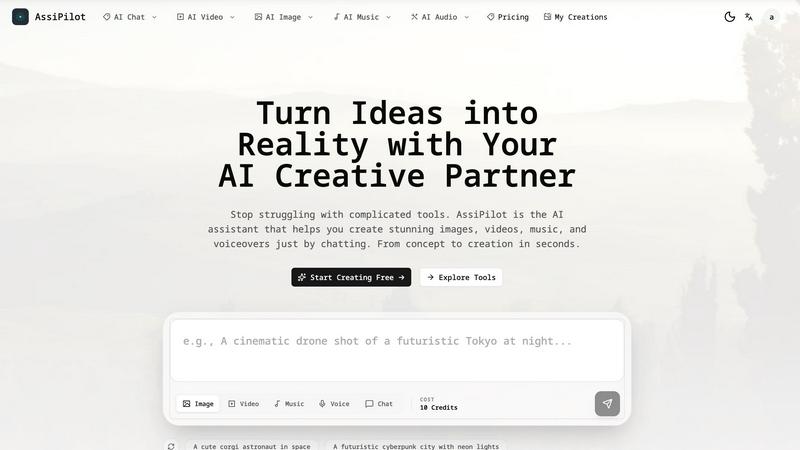
Image to 3D AI

Feature Comparison
AssiPilot
Unified Multi-Modal AI Studio
AssiPilot integrates over 50 state-of-the-art AI models into one browser-based interface, eliminating the need for multiple subscriptions. The platform intelligently routes user requests to specialized engines like Flux for images, Kling for video, and ElevenLabs for voice, ensuring users always have access to the best-in-class technology for each creative modality without needing to manage separate accounts or workflows.
Conversational Prompt Interface
The platform features a built-in AI chat assistant that guides the creative process. Users can describe their vision in simple, conversational language (e.g., "I need a video for my travel vlog"), and AssiPilot helps refine the idea and translate it into detailed, effective prompts. This smart prompting system lowers the barrier to entry, making professional-grade results accessible to non-experts.
Seamless Asset Integration & Iteration
Created assets are not siloed. Users can seamlessly move outputs between tools, such as using a generated image as an input for a video or adding a synthesized voiceover to a music track. The platform also supports rapid, conversational refinement—users can simply ask for changes like "make it brighter" or "slower pace" to iterate towards the perfect final asset.
Commercial Rights & High-Definition Export
AssiPilot grants users 100% commercial ownership of all generated content, enabling use in client work, monetized YouTube channels, and advertising campaigns. All assets can be exported in professional-quality formats, including 1080p/4K video and high-resolution images suitable for both digital and print media, with automatic cloud storage for all creations.
About Image to 3D AI
AI-Powered Textured Image-to-3D Conversion
This core feature utilizes advanced deep learning algorithms to instantly transform any uploaded 2D image into a detailed 3D model complete with projected textures. The AI interprets depth, geometry, and surface details from a single static image, a complex task that traditionally requires photogrammetry with multiple photos or manual modeling. Users can select from different generation modes like "Turbo" and "Ultra" to balance speed and detail, making professional-grade 3D asset creation accessible in seconds without any manual sculpting.
Adaptive Polygon Density Control
The platform provides users with critical control over the final model's complexity by allowing adjustment of the face count, with options ranging from 5K to 40K polygons. This adaptive mesh optimization ensures an optimal balance between visual fidelity and performance. For instance, a game developer can create a low-poly model for real-time rendering, while a 3D printing enthusiast can generate a high-detail model, all from the same source image, preserving critical details through intelligent algorithmic processing.
Multi-Format Export for Professional Workflows
Image to 3D AI supports exporting the generated models in industry-standard formats, including OBJ, GLB, and STL. This versatility ensures seamless integration into downstream professional pipelines. OBJ and GLB files are perfect for game engines, AR/VR applications, and animation software, while the STL format is optimized for direct use in 3D printing, making the platform a unified solution for both digital and physical 3D creation.
Zero-Barrier Free Tier with Instant Access
A foundational feature is the permanently free AI 3D model generator that requires no software installation, user sign-up, or credit card. This eliminates all initial barriers to entry, allowing anyone to experiment and create. The free tier meets the needs of most casual users and serves as a full-featured proof of concept, embodying the platform's mission to democratize 3D technology, though it may involve processing queues during peak hours to manage service quality.
Use Cases
AssiPilot
Rapid Prototyping for Indie Products
Indie hackers and startup founders can use AssiPilot to quickly generate logo concepts, app interface mockups, and product demo videos. This allows for fast validation of ideas and the creation of compelling pitch materials without the need for expensive design agencies or lengthy production timelines, significantly reducing time-to-market.
Dynamic Content for Social Media Marketers
Digital marketers and social media managers can leverage the platform to produce a high volume of A/B testable ad creatives, engaging short-form videos, and branded graphics. The ability to quickly generate variations in style, tone, and format enables data-driven optimization of campaigns and consistent content output.
Production for Content Creators
Video bloggers, educators, and influencers can streamline their production pipeline by generating custom background music, creating B-roll or intro sequences from text prompts, and producing clear voiceovers in multiple languages. This consolidates post-production tasks into one tool, cutting down editing time and resource requirements.
Efficient Storyboarding & Pre-Visualization
Creative teams and agencies can use AssiPilot to rapidly visualize concepts and create detailed storyboards for client presentations or internal planning. Generating scene imagery, mood-setting audio, and narrative voiceovers on-demand facilitates clearer communication and alignment before committing to full-scale production.
Image to 3D AI
Rapid Prototyping in Game Development
Indie game studios and developers use the platform to rapidly generate characters, environmental props, and assets in minutes instead of days. The ability to control polygon density is crucial, allowing for the creation of optimized, game-ready models that integrate directly into engines like Unity or Unreal Engine. This accelerates iteration cycles, slashing pre-production time and enabling small teams to compete with larger studios by focusing resources on gameplay and design rather than asset modeling.
Accessible 3D Printing and Product Design
Hobbyists, educators, and startup founders leverage the tool to convert photographs or sketches into printable 3D models. Users can create custom figurines, replacement parts, or artistic sculptures. The export in STL format ensures compatibility with most slicing software and 3D printers. This use case is particularly valuable for fields like heritage preservation, where photographs of objects or monuments can be transformed into physical replicas without expensive 3D scanning equipment.
Efficient Asset Creation for XR/VR/AR
Producers of virtual reality, augmented reality, and metaverse experiences require a high volume of optimized 3D assets that perform well in resource-constrained environments. This platform allows for the quick population of virtual worlds with textured models. The generated assets maintain visual quality while adhering to strict polygon budgets, which is essential for maintaining high frame rates and a smooth, immersive user experience in real-time applications.
Enhanced Creative Portfolio Development
Artists, graphic designers, and architects use Image to 3D AI to rapidly visualize concepts and expand their creative portfolios. A hand-drawn sketch or a concept art piece can be turned into a presentable 3D model in seconds, allowing creatives to demonstrate their ideas in a more tangible and impressive format without needing to invest weeks in learning complex 3D modeling software, thereby showcasing their vision rather than their technical modeling skills.
Overview
About AssiPilot
AssiPilot is a comprehensive, all-in-one AI creative platform engineered to democratize high-quality content production. It consolidates multiple generative AI capabilities—including image, video, music, and voice synthesis—into a single, intuitive workflow powered by natural language prompts. This unified approach directly addresses the significant inefficiency and cost associated with managing disparate, specialized AI tools, a common pain point identified in creative workflows. The platform is strategically designed for agile creators and businesses, including indie hackers, SaaS founders, content creators, and digital marketers, who require rapid, cost-effective production of marketing visuals, demo videos, background scores, and voiceovers. Its core value proposition lies in drastically reducing the time, technical complexity, and financial investment needed to go from a conceptual idea to polished, commercially viable assets, thereby accelerating product launches and promotional campaigns.
About Image to 3D AI
Image to 3D AI, powered by ImgTo3D.ai, is a transformative artificial intelligence platform that automates the conversion of two-dimensional images into fully realized three-dimensional models. This technology addresses a significant bottleneck in digital content creation, where traditional 3D modeling requires extensive manual effort, specialized software expertise, and considerable time investment, often taking skilled artists hours or days per asset. By leveraging cutting-edge deep learning algorithms, the platform can process a single input—be it a photograph, digital artwork, or hand-drawn sketch—and generate a textured 3D model with geometry in a matter of seconds. This process democratizes 3D content creation, making it accessible to a broad audience beyond professional 3D artists. The primary value proposition lies in its unprecedented speed and accessibility, offering a zero-cost entry point with a free tier while enabling professional-grade output. According to platform statistics, this approach can reduce prototyping costs by up to 90% and accelerate asset creation workflows by 8x for independent studios. It is engineered for a diverse user base, including indie game developers, 3D printing enthusiasts, e-commerce managers, and XR/VR producers, serving as a strategic tool for rapid iteration and production in today's fast-paced digital economy.
Frequently Asked Questions
AssiPilot FAQ
What commercial rights do I have for content created with AssiPilot?
You retain full, 100% commercial ownership of all images, videos, music, and voiceovers you generate on the AssiPilot platform. This means you are free to use the assets for any purpose, including client projects, commercial advertising, YouTube monetization, and product branding, without owing royalties or requiring additional licenses.
How does AssiPilot ensure the quality of its AI-generated outputs?
AssiPilot aggregates and provides access to dozens of leading, cutting-edge AI models, such as Flux for images and ElevenLabs for voice. By continuously integrating top-tier technologies, the platform ensures users receive state-of-the-art results. Furthermore, the conversational prompt helper refines basic ideas into detailed instructions optimized for these models, enhancing output quality.
Can I edit or refine my creations after the initial generation?
Yes, iterative refinement is a core functionality. The chat-based interface allows for continuous editing through natural language commands. You can ask for specific adjustments like changing colors, altering the pacing of a video, adjusting the emotion of a voiceover, or generating new variations until the asset meets your exact specifications.
Is there a limit to how many assets I can create?
Asset generation operates on a credit-based system, which varies by subscription plan. Details on credit allowances, rollover policies, and the resolution of outputs are clearly outlined in the platform's pricing tiers. Users can monitor their credit usage within their account dashboard to manage their creative workflow effectively.
Image to 3D AI FAQ
What kind of images work best with the AI 3D Model Generator?
For optimal results, upload clear, well-lit images featuring a single object against a relatively uncluttered background. The AI algorithm is trained to interpret depth and form from visual cues, so high-contrast photos with distinct edges and good lighting yield the most accurate 3D geometry. Simple sketches with defined outlines also work effectively. Avoid overly busy backgrounds or images with multiple overlapping objects, as this can confuse the depth perception algorithm.
What are the main differences between the Free and Pro tiers?
The free tier offers full access to the core AI generation technology with polygon control and OBJ export, but users may experience processing queues during peak traffic. The Pro tier, or "Pro Access," provides priority processing with no queues, higher generation limits, and the ability to export in multiple formats including GLB and STL. Pro users also gain access to advanced features for textured models, making it suitable for professional, high-volume production workflows.
How does the polygon density (face count) setting affect my model?
The polygon density, or face count, directly determines the level of detail and the file size of your 3D model. A lower count (e.g., 5K faces) creates a lighter, more performance-optimized model ideal for real-time applications like video games or VR. A higher count (e.g., 40K faces) captures finer details and smoother curves, which is better for close-up renders, high-quality visuals, or 3D printing where detail is paramount. The AI adaptively optimizes the mesh to preserve critical details at any chosen setting.
Are the generated 3D models ready for commercial use?
Yes, models generated using Image to 3D AI are typically free for personal and commercial use. However, it is the user's responsibility to ensure they have the necessary rights or licenses to the original 2D image source they are uploading. The platform grants you the rights to the 3D model derived from your input, but you must own or have permission to use the underlying image, especially for commercial projects, to avoid copyright infringement.
Alternatives
AssiPilot Alternatives
AssiPilot is an all-in-one AI creative platform that allows users to generate images, videos, music, and voiceovers through natural language prompts. It belongs to the category of multimodal AI assistants, which aim to consolidate multiple creative workflows into a single, streamlined interface. This consolidation is its primary value proposition, designed to save time and reduce the complexity of managing separate specialized tools. Users may explore alternatives to AssiPilot for various reasons. Common considerations include specific budgetary constraints, the need for more advanced features in a particular creative domain like high-fidelity image generation or professional-grade audio editing, or a preference for a different user interface and workflow. Some may also seek tools that offer greater transparency in data usage or different subscription models. When evaluating an alternative, it's crucial to assess your core creative needs. Determine if you require a true all-in-one solution or if a collection of best-in-class, specialized tools would yield better results. Key factors to compare include output quality across different media types, the flexibility of pricing plans, integration capabilities with your existing software stack, and the overall user experience that aligns with your technical proficiency.
Image to 3D AI Alternatives
Image to 3D AI is a specialized AI assistant that automates the conversion of 2D images into textured 3D models. This category of software, often termed AI-powered 3D generation, uses deep learning to interpret depth and form from a single photograph or sketch, drastically reducing the time and skill required for traditional 3D modeling. Users may seek alternatives for various practical reasons. These include budget constraints beyond a free tier, specific feature requirements like different export formats or integration with other software, or the need for a platform that operates on a different device or operating system. The intended use case, such as game development versus 3D printing, also heavily influences the search for a more tailored solution. When evaluating alternatives, key considerations should include the core AI's accuracy and output quality, the level of user control over the generated mesh and textures, supported file formats for export, and the overall cost structure. It is also prudent to assess the tool's performance with your specific types of input images and its ability to integrate into your existing digital content pipeline.