
Ayn8n
Ayn8n offers 5,000+ AI-powered n8n automation templates to streamline your development workflows effortlessly.
Visit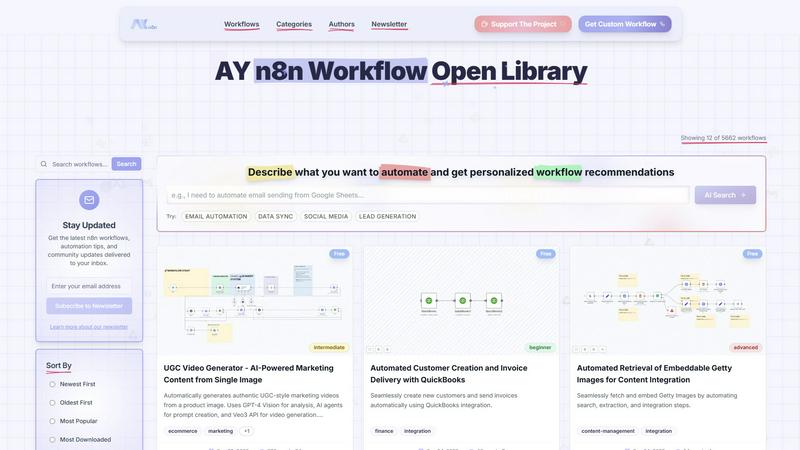
About Ayn8n
Ayn8n, officially known as the AY n8n Workflow Library by AY Automate LLC, stands as a pioneering open-source hub aimed at revolutionizing business process automation. This platform acts as a centralized repository that empowers users to discover, share, and customize a vast array of pre-built automation workflows developed on the powerful n8n.io framework. Acknowledging the prevalent challenges in automation, particularly the extensive time and technical expertise necessary for constructing intricate workflows from ground zero, Ayn8n addresses these issues head-on. It offers an impressive collection of over 6,150 ready-to-use workflows spanning diverse categories, such as Marketing, Sales & CRM, Data Processing, and Content Management. This allows users to implement complex automations in mere minutes rather than the traditional days. The platform is tailored to a broad audience, including "vibe coders," developers, and business professionals, enabling them to streamline operations without requiring advanced coding skills. The primary value proposition of Ayn8n lies in its ability to significantly lower the barriers to effective automation, fostering a collaborative community rich in shared knowledge and leveraging AI-powered tools for personalized workflow recommendations. This transformational approach redefines how organizations can implement and scale their automated processes.
Features of Ayn8n
Extensive Workflow Library
Ayn8n boasts an extensive library containing over 6,150 pre-built workflows across more than a dozen categories. This extensive selection allows users to find solutions tailored to their specific automation needs, whether in marketing, sales, or data processing.
AI-Powered Recommendations
The platform leverages AI technology to provide users with personalized workflow recommendations based on their specific automation requirements. This feature simplifies the process of discovering relevant workflows, enhancing user experience and efficiency.
User-Friendly Interface
Designed with usability in mind, Ayn8n features a user-friendly interface that allows both seasoned developers and novice users to easily navigate the platform. The intuitive design ensures that users can quickly find and implement workflows without a steep learning curve.
Community-Driven Collaboration
Ayn8n fosters a community-driven environment where users can share their own workflows and automation experiences. This collaborative aspect not only enriches the platform but also encourages knowledge sharing and innovation among users.
Use Cases of Ayn8n
Marketing Automation
Ayn8n can be utilized to streamline various marketing processes, such as automating social media posts, managing email campaigns, and generating marketing analytics. Users can save time and enhance engagement with minimal manual intervention.
Sales Process Optimization
Sales teams can leverage Ayn8n to automate lead generation, client follow-ups, and CRM updates. By reducing manual tasks, sales professionals can focus on building relationships and closing deals more effectively.
Data Processing and Integration
Organizations can utilize Ayn8n to automate data migration, transformation, and synchronization between different applications. This ensures that data is accurate and readily available without requiring extensive manual input.
Content Management Automation
Content creators and managers can benefit from workflows that automate the retrieval and integration of multimedia elements, such as images and videos, into their projects. This significantly speeds up the content creation process while maintaining quality.
Frequently Asked Questions
What types of workflows are available on Ayn8n?
Ayn8n offers a wide variety of workflows across categories such as Marketing, Sales & CRM, Data Processing, Content Management, and more. Users can explore over 6,150 pre-built options to suit their automation needs.
Is coding knowledge required to use Ayn8n?
No, Ayn8n is designed to be user-friendly and accessible to individuals without advanced coding skills. The platform provides pre-built workflows that can be easily implemented, making automation achievable for all users.
How does Ayn8n leverage AI in its functionalities?
Ayn8n incorporates AI technology to deliver personalized workflow recommendations tailored to user needs. This feature enhances the automation experience by simplifying the search for relevant workflows.
Can I contribute my own workflows to Ayn8n?
Yes, Ayn8n encourages community contributions. Users can share their own workflows and automation experiences, fostering a collaborative environment that enhances the overall platform.
Similar to Ayn8n

Free YouTube transcripts on the web, a Chrome extension, and an API + MCP server so AI assistants can read YouTube.

Moderation, routing, intent and scoring for any text over one Jev-compatible API, hosted in the EU.

MiroFish is an AI simulation chat for scenario prediction. Ask a question in plain language and it runs graph building, multi-agent simulation, and re


A directory of AI tools where every listing was opened and used by a person.

An AI tools directory that turns down money. 146 listings, 20 categories, no sponsored placement and no affiliate ordering.